1. Product Overview
The Sony 55-300mm DT f/4.5-5.6 SAM Telephoto Zoom Lens is designed for APS-C size DSLR cameras with a Sony A-mount. This compact and lightweight lens offers a versatile zoom range, making it suitable for capturing distant subjects and various events. It features ED Glass to minimize color distortion and benefits from the Super SteadyShot® image stabilization system built into compatible Sony Alpha system DSLRs.
Key Features:
- Ideal for use on APS-C size DSLR cameras.
- Minimum focus distance of 4.5 feet (1.4 meters).
- 7 aperture blades for smooth bokeh.
- Zoom range: 55-300mm (equivalent to 82.5-450mm on a 35mm format camera).
- Equipped with ED Glass for sharp imaging and reduced chromatic aberration.
- Compact and lightweight design for portability.
- Maximum magnification ratio of 0.27x.

Figure 1: Front view of the Sony 55-300mm DT f/4.5-5.6 SAM Telephoto Zoom A-Mount Lens.
2. Setup and Installation
2.1 Attaching the Lens
- Ensure your camera is turned off.
- Remove the rear lens cap from the lens and the body cap from the camera by twisting them counter-clockwise.
- Align the white index mark on the lens barrel with the white index mark on the camera body.
- Insert the lens into the camera mount and rotate it clockwise until it clicks into place. Do not force the lens.
- Remove the front lens cap.

Figure 2: The lens mounted on a compatible Sony A-mount camera body.
2.2 Attaching the Lens Hood (ALC-SH122)
The included lens hood helps to block unwanted light and protect the front element of the lens. Align the red dot on the lens hood with the red dot on the lens, then twist the hood clockwise until it locks into place.
3. Operating the Lens
3.1 Zooming
To adjust the focal length, rotate the zoom ring on the lens barrel. The lens offers a versatile range from 55mm for wider shots to 300mm for telephoto magnification. The zoom ring has markings for 55, 70, 100, 200, and 300mm to guide your selection.
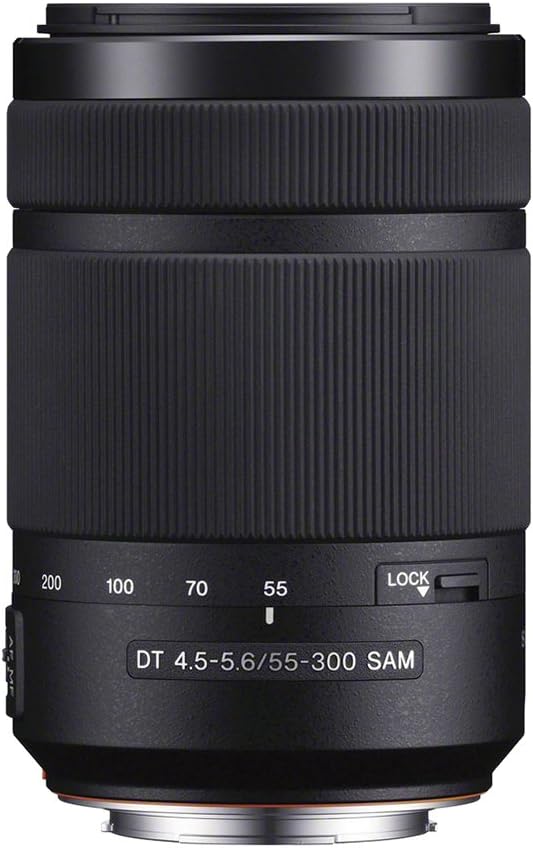
Figure 3: The zoom ring on the lens barrel, indicating focal length settings.
3.2 Focusing
This lens utilizes a Smooth Autofocus Motor (SAM) for quiet and responsive autofocus. Ensure your camera's focus mode is set to autofocus (AF). For manual focusing, switch your camera to manual focus (MF) mode and rotate the focus ring on the lens.
3.3 Image Stabilization (Super SteadyShot®)
The Sony Alpha system DSLRs feature built-in Super SteadyShot® image stabilization. This system compensates for camera shake, which is particularly beneficial when using telephoto lenses or shooting in low light conditions. Ensure this feature is enabled in your camera settings for optimal results.
3.4 Lens Lock Switch
The lens is equipped with a lock switch to prevent the lens barrel from extending unintentionally during transport. To lock the lens, set it to the 55mm position and slide the lock switch. To unlock, slide the switch back.

Figure 4: The lens lock switch, located near the mount, prevents accidental extension.
3.5 Video Demonstration: NEX Alpha Zoom Lens
Video 1: This video demonstrates the use of an A-mount zoom lens, highlighting its telephoto capabilities and the benefits of image stabilization for capturing distant subjects. It shows how the lens can be used to achieve detailed shots from a distance, compensating for minor movements.
4. Care and Maintenance
- Cleaning the Lens Surface: Use a lens blower to remove dust and debris. For smudges or fingerprints, use a soft, clean microfiber cloth specifically designed for optics, along with a lens cleaning solution if necessary. Wipe gently in a circular motion from the center outwards.
- Cleaning the Lens Body: Use a soft, dry cloth to wipe the exterior of the lens. Avoid using organic solvents like alcohol or thinner.
- Storage: When not in use, attach both the front and rear lens caps. Store the lens in a cool, dry place away from direct sunlight and extreme temperatures. Avoid storing in areas with high humidity to prevent mold growth.
- Handling: Avoid dropping or subjecting the lens to strong impacts. Do not touch the lens contacts with your bare hands.
5. Troubleshooting
| Problem | Possible Cause | Solution |
|---|---|---|
| Lens not attaching securely | Incorrect alignment or debris on the mount. | Ensure index marks are aligned and rotate until a click is heard. Check for and remove any debris. |
| Autofocus is slow or "hunts" | Low light conditions, low contrast subject, or incorrect focus area selection. | Try focusing on a higher contrast area. Increase ambient light if possible. Adjust camera's focus area settings. Ensure camera is in AF mode. |
| Images appear blurry or shaky | Camera shake, especially at longer focal lengths, or insufficient shutter speed. | Ensure Super SteadyShot® is enabled on your camera. Use a faster shutter speed. Consider using a tripod or monopod for stability. |
| Lens barrel extends unintentionally | Lens lock switch is disengaged. | Engage the lens lock switch when transporting the lens (at 55mm position). |
6. Specifications
| Feature | Detail |
|---|---|
| Brand | Sony |
| Model Name | SAL55300 |
| Focal Length | 55-300mm |
| Lens Type | Telephoto Zoom |
| Compatible Mountings | Sony/Minolta Alpha (A-mount) |
| Maximum Aperture | f/4.5 (at 55mm) |
| Minimum Aperture | f/5.6 (at 300mm) |
| Number of Diaphragm Blades | 7 |
| Minimum Focus Distance | 1.4 meters (4.5 feet) |
| Maximum Magnification Ratio | 0.27x |
| Focus Type | Micromotor (SAM) |
| Lens Coating Description | Extra-Low Dispersion (ED) glass |
| Photo Filter Size | 62 Millimeters |
| Item Weight | 460 Grams |
| Color | Black |
| Water Resistance Level | Not Water Resistant |
| UPC | 845251044713, 027242845596 |
What's in the Box:
- Lens
- Lens hood (ALC-SH122: round shape, bayonet type)
- Lens front cap
- Lens rear cap
7. Warranty and Support
This product is covered by a 90-day Limited Hardware Warranty. For detailed warranty information, please refer to the official Sony warranty document. For further support or inquiries, please visit the official Sony support website or contact their customer service.
Warranty Document: Sony 90-day Limited Hardware Warranty
For additional product information and support, visit the Sony Store on Amazon.


