1. Introduction
This manual provides essential information for the proper installation, operation, and maintenance of your EARTHQUAKE Sound EWS800 Edgeless Series 8-inch In-Wall Speakers. Please read this manual thoroughly before installation and retain it for future reference. The EWS800 speakers are designed to deliver high-fidelity audio with a discreet, frameless aesthetic, blending seamlessly into your living space.
2. Safety Information
Observe the following safety precautions to prevent damage to the speakers or injury to yourself:
- Ensure power to the amplifier or receiver is off before making any connections.
- Do not exceed the maximum power handling of 500 Watts to prevent speaker damage.
- Use appropriate gauge speaker wire for your installation.
- Consult a qualified installer if you are unsure about any part of the installation process.
- Keep speakers away from moisture and extreme temperatures. These speakers are not waterproof.
3. Package Contents
Verify that all items are present in your package:
- EARTHQUAKE Sound EWS800 Edgeless Series In-Wall Speaker (2 units)
- Paintable Grilles (2 units)
- Instruction Manual (this document)

Image: The retail packaging box for the EWS800 speakers, showing product details and features.
4. Product Features
The EARTHQUAKE Sound EWS800 speakers incorporate advanced design and technology for superior audio performance and seamless integration:
- Frameless Design: Minimizes visibility for a clean, integrated look.
- High-Performance Drivers: Features an 8-inch Kevlar cone woofer for deep bass and a 1-inch silk dome NEO swivel-action tweeter for clear highs.
- Sound Customization: Equipped with +/- 3dB adjustment switches for bass and treble to optimize sound for room acoustics and personal preference.
- Easy Installation: Utilizes a Turn-N-Lock mechanism for secure and efficient mounting.
- Paintable Grille: Magnetically attached grilles can be painted to match your wall color.
- Gold Plated Terminals: Spring-loaded terminals ensure a reliable connection.
5. Setup and Installation
Follow these steps for installing your EWS800 in-wall speakers:
5.1 Planning the Installation
- Choose a suitable location in your wall, ensuring no obstructions (e.g., studs, electrical wiring, plumbing).
- Ensure there is sufficient depth within the wall cavity for the speaker (refer to specifications).
- Run speaker wires from your amplifier/receiver to the chosen speaker locations.
5.2 Cutting the Opening
- Use the provided template (if included, or refer to cutout dimensions in specifications) to mark the opening on the wall.
- Carefully cut the opening using a drywall saw or similar tool.
5.3 Wiring the Speaker
- Strip approximately 1/2 inch of insulation from the ends of your speaker wire.
- Press down on the gold-plated spring-loaded terminals on the speaker and insert the corresponding positive (+) and negative (-) wires. Ensure correct polarity.

Image: The rear of the EWS800 speaker, displaying the internal components, crossover network, and spring-loaded wire terminals.
5.4 Mounting the Speaker
- Carefully insert the speaker into the wall opening.
- Tighten the Turn-N-Lock mounting screws located on the front baffle. This will rotate the mounting clamps behind the wall and secure the speaker. Do not overtighten.

Image: A side profile of the EWS800 speaker, illustrating the extended Turn-N-Lock clamps used for securing the speaker within the wall.

Image: A top-down view of the EWS800 speaker, highlighting the Turn-N-Lock mounting mechanism.
5.5 Attaching the Grille
- Align the magnetic grille with the speaker baffle. The magnets will hold it securely in place.
- The grille can be painted to match your wall color before attachment.

Image: The white, paintable magnetic grille designed to cover the EWS800 in-wall speaker, providing a flush finish.
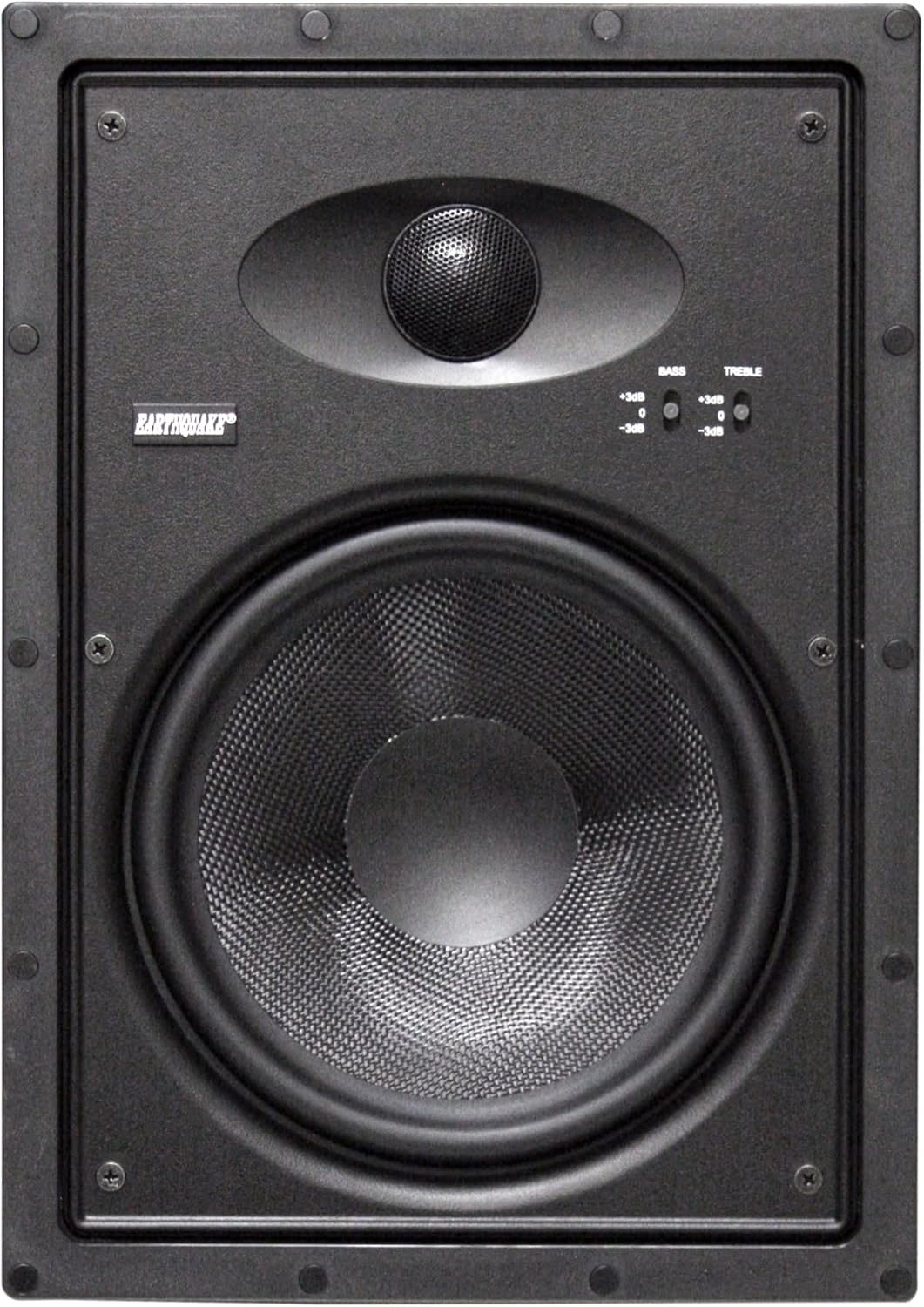
Image: The front of the EWS800 in-wall speaker, revealing the 8-inch woofer, 1-inch tweeter, and sound adjustment switches.
6. Operating Instructions
Once installed, the EWS800 speakers require minimal operation. The primary adjustments are made via the bass and treble switches located on the front baffle.
6.1 Sound Adjustment Switches
The EWS800 features two +/- 3dB adjustment switches for fine-tuning the audio output:
- Bass Adjustment: Adjusts the low-frequency output. Use +3dB for more pronounced bass, -3dB for reduced bass, or 0dB for a neutral response.
- Treble Adjustment: Adjusts the high-frequency output. Use +3dB for brighter highs, -3dB for softer highs, or 0dB for a neutral response.
Experiment with these settings to match your room's acoustics and personal listening preferences. These adjustments are typically made once after installation.
7. Maintenance
The EWS800 speakers are designed for long-term durability with minimal maintenance.
- Cleaning: Gently wipe the grilles and speaker surfaces with a soft, dry cloth. Do not use harsh chemicals or abrasive cleaners.
- Grille Removal: The magnetic grilles can be easily removed for cleaning or painting. Exercise care when removing to avoid bending.
- Environmental Conditions: Avoid exposing the speakers to excessive humidity or direct sunlight, which can degrade materials over time.
8. Troubleshooting
If you encounter issues with your EWS800 speakers, refer to the following common problems and solutions:
| Problem | Possible Cause | Solution |
|---|---|---|
| No Sound | Incorrect wiring, amplifier off, source issue. | Check speaker wire connections for correct polarity and secure fit. Ensure amplifier/receiver is powered on and input source is selected correctly. |
| Distorted Sound | Over-driving amplifier, loose connections, damaged speaker. | Reduce amplifier volume. Check all connections. If distortion persists at low volumes, the speaker may be damaged; contact support. |
| Weak Bass/Treble | Sound adjustment switches set incorrectly. | Adjust the +/- 3dB bass and treble switches on the speaker baffle to your preference. |
| Speaker Not Secure | Mounting clamps not fully engaged. | Gently tighten the Turn-N-Lock mounting screws until the speaker is firm in the wall opening. Do not overtighten. |
9. Specifications
Technical specifications for the EARTHQUAKE Sound EWS800 Edgeless Series In-Wall Speakers:
| Feature | Specification |
|---|---|
| Model | EWS800 |
| Speaker Type | 2-Way In-Wall Speaker |
| Woofer | 8-inch Kevlar Cone |
| Tweeter | 1-inch Silk Dome NEO Swivel-Action |
| Power Handling | 500 Watts Max |
| Impedance | 8 Ohm |
| Frequency Response | 30Hz - 20kHz |
| Sensitivity | 89dB @ 1W/1M |
| Adjustments | +/- 3dB Bass & Treble Switches |
| Product Dimensions (H x W x D) | 13.75" x 9.75" x 4.06" (349mm x 248mm x 103mm) |
| Cutout Dimensions (H x W) | 12.75" x 8.75" (324mm x 222mm) (Estimated based on product dimensions and typical bezel) |
| Mounting Depth | 4.06" (103mm) |
| Item Weight (per speaker) | 5.83 lbs (2.64 kg) (Total pair weight 11.66 lbs) |
| Grille | Magnetic, Paintable |
| Enclosure Material | Impact resistant ABS plastic |

Image: A diagram illustrating the physical dimensions of the EWS800 speaker, including height, width, and depth.
10. Warranty Information
The EARTHQUAKE Sound EWS800 Edgeless Series In-Wall Speakers come with a Limited Warranty. For specific terms, conditions, and duration of the warranty, please refer to the official EARTHQUAKE Sound website or contact their customer support directly. Retain your proof of purchase for warranty claims.
11. Support
For technical assistance, troubleshooting beyond this manual, or warranty inquiries, please contact EARTHQUAKE Sound customer support. You can find contact information and additional resources on the official EARTHQUAKE Sound website: www.earthquakesound.com


