
Introduction
Thank you for choosing the MIRAC Mirac-1500 Digital Azan Alarm Clock. This device is designed to provide accurate prayer times for 1500 cities worldwide, along with various useful features such as Qibla direction, temperature display, and dual calendar support. This manual will guide you through the setup, operation, and maintenance of your new alarm clock to ensure optimal performance.

Front view of the MIRAC Mirac-1500 Digital Azan Alarm Clock, showing its clear digital display with current time, date, city, temperature, and a list of prayer times.
Features
- 1500 Cities Azan Times: Provides accurate Azan times for 1500 cities globally.
- World Times: Displays current time for various locations.
- 7 Azan Accents: Includes Mecca, Medina, Egyptian, Al-Aqsa, Turkish, Indonesian, and Moroccan Azan accents.
- Doa (Ezan Prayers): Features pre-recorded Ezan prayers.
- 5 Prayer Times Display: Shows 5 prayer times on the screen with automatic Azan.
- Qibla Direction: Automatically indicates the Qibla direction.
- Dual Calendar: Simultaneous display of Hijri and Gregorian calendars.
- Temperature Display: Shows the current ambient temperature.
- Daily Alarm: Standard alarm function for daily use.
- DST Function: Supports Daylight Saving Time adjustments.
- Snooze Function: Allows for temporary silencing of the alarm.
- Volume Control: Adjustable volume for Azan and alarms.
- DC Power Input: For continuous power supply.
- Full Screen Backlight: Ensures readability in low light conditions.
Setup
Follow these steps to set up your MIRAC Mirac-1500 alarm clock for the first time.
- Power Connection: Connect the provided DC power adapter to the clock and plug it into a power outlet. The display should illuminate.
- Initial Time Setting: The clock may automatically set the time upon power-up. If not, use the 'SET' button to enter time setting mode and adjust hours and minutes using the 'UP' and 'DOWN' arrows. Confirm each setting with 'SET'.
- City Selection: Press the 'CITY' button to browse through available cities. Use the 'UP' and 'DOWN' arrows to select your current city. This is crucial for accurate Azan times. Confirm with 'SET'.
- Azan Accent Selection: Press the 'AZAN' button to cycle through the 7 available Azan accents. Choose your preferred accent.
- DST (Daylight Saving Time) Adjustment: If your region observes DST, press the 'DST' button to toggle it on or off as needed.

The MIRAC Mirac-1500 clock positioned next to a decorative book, highlighting its compact design and clear display.
Operating Instructions
Time and Date Display
The main display shows the current time, year, month, and date. It also displays the Hijri calendar date simultaneously.
Azan Times and Alerts
The clock automatically calculates and displays the 5 daily prayer times. When an Azan time is reached, the clock will play the selected Azan accent. You can adjust the volume using the 'VOLUME' switch, typically located on the side or back of the unit.
Daily Alarm
To set a daily alarm, press the 'DAILY ALM' button. Use the 'UP' and 'DOWN' arrows to set the desired alarm time. Press 'SET' to confirm. The alarm will sound daily at the set time.
Snooze Function
When an alarm or Azan sounds, press the 'SNOOZE' button (if available, often combined with another button) to temporarily silence it. The alarm will sound again after a short interval.
Qibla Direction
The clock features an automatic Qibla direction indicator. Ensure the clock is placed on a flat surface for accurate readings. The display will show an arrow or indicator pointing towards the Qibla.
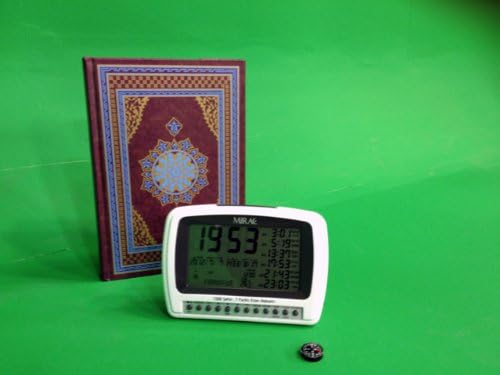
The MIRAC Mirac-1500 clock shown with a small compass, illustrating its Qibla direction feature.
Temperature Display
The current ambient temperature is displayed on the screen, usually in Celsius or Fahrenheit. There may be a button to switch between units if desired.
Full Screen Backlight
Press the 'LIGHT' or 'ON/OFF' button to activate the full-screen backlight for better visibility in dark environments.
Maintenance
To ensure the longevity and proper functioning of your MIRAC Mirac-1500 alarm clock, follow these simple maintenance guidelines:
- Cleaning: Use a soft, dry cloth to clean the exterior of the clock. Do not use abrasive cleaners, solvents, or chemical sprays, as these can damage the finish and electronic components.
- Placement: Place the clock on a stable, flat surface away from direct sunlight, extreme temperatures, and high humidity. Avoid placing it near strong magnetic fields, which could affect the Qibla direction accuracy.
- Power: Always use the original DC power adapter provided with the unit. If the clock uses backup batteries (not explicitly mentioned but common for alarm clocks), replace them periodically to prevent data loss during power outages.
- Storage: If storing the clock for an extended period, disconnect it from power and remove any backup batteries. Store it in a cool, dry place.
Troubleshooting
If you encounter any issues with your MIRAC Mirac-1500 alarm clock, refer to the following common problems and solutions:
| Problem | Possible Cause | Solution |
|---|---|---|
| Clock display is blank. | No power or power adapter issue. | Ensure the DC power adapter is securely connected to the clock and the power outlet. Check if the outlet is functional. |
| Incorrect time or date. | Time not set correctly or DST setting is wrong. | Re-enter time and date using the 'SET' button. Verify the DST setting is correct for your region. |
| Azan times are inaccurate. | Incorrect city selected. | Press the 'CITY' button and select the correct city for your location. |
| No Azan sound or low volume. | Volume is too low or muted. | Adjust the 'VOLUME' switch to increase the sound level. |
| Qibla direction seems incorrect. | Interference or improper placement. | Ensure the clock is on a flat, stable surface and away from strong magnetic fields or large metal objects. |
Specifications
- Brand: MIRAC
- Model Number: Mirac-1500
- Color: White
- Product Dimensions (L x W x H): 18 x 14 x 7 cm
- Item Weight: 340 g
- Material: Acrylonitrile Butadiene Styrene (ABS)
- Display Type: Digital
- Power Source: Electric Cable (DC input)
- Special Features: Temperature Display, Alarm, Azan Times, Qibla Direction, Dual Calendar
- Room Type: Bedroom (Indoor Use)
- Shape: Rectangular
Warranty and Support
Specific warranty information for the MIRAC Mirac-1500 Digital Azan Alarm Clock is not available in the provided product details. Please refer to the product packaging or contact your retailer for warranty terms and conditions.
For technical support or further assistance, please contact the MIRAC customer service department through the contact information provided with your purchase or on the manufacturer's official website.