
1. Introduction
Thank you for choosing the Yongnuo YN-467 II i-TTL Flash Speedlite. This advanced flash unit is designed to provide versatile lighting solutions for Canon DSLR cameras, offering improved features over its predecessor. This manual will guide you through the setup, operation, and maintenance of your YN-467 II to help you achieve optimal photographic results.
2. Safety Information
- Do not disassemble or attempt to repair the flash unit yourself. Refer to qualified service personnel.
- Keep the flash unit dry. Do not expose it to rain or moisture.
- Do not touch the flash tube immediately after firing, as it can be hot.
- Use only specified batteries (AA alkaline or Ni-MH). Incorrect battery types may cause damage or malfunction.
- Keep out of reach of children.
- Avoid direct eye exposure to the flash, especially at close range, as it can impair vision.
3. Package Contents
Please check that all the following items are included in your package:
- 1 x Yongnuo YN-467 II Flash Unit
- 1 x Protection Bag
- 1 x Mini Stand
- 1 x User Manual (English, Chinese)
4. Key Features
The Yongnuo YN-467 II offers several enhancements and core functionalities:
- Improved Mark II Version: Enhanced design and functionality compared to the classic YN-467.
- PC Port: Includes a PC synchronization port for wired flash triggering.
- Improved Button Design: Ergonomic control panel for easier operation.
- Multiple Flash Modes: Supports TTL (Through-The-Lens), Manual (M), S1, and S2 optic slave modes.
- Auto Zoom Head: Automatically adjusts flash coverage to match the lens focal length.
- AF LED: Assists with autofocus in low-light conditions.
- Superfast Recycle Time: Approximately 2 seconds at full power with AA alkaline batteries.
- Guide Number: GN33 (at ISO 100, 105mm).
- Power Control: 7 levels of light quantity output control in manual mode (1/1, 1/2, 1/4, 1/8, 1/16, 1/32, 1/64).
5. Setup
5.1 Battery Installation
The YN-467 II requires four (4) AA size batteries. Both alkaline and Ni-MH rechargeable batteries are suitable.
- Locate the battery compartment cover on the side of the flash unit.
- Slide the cover open in the direction indicated by the arrow.
- Insert four AA batteries, ensuring correct polarity (+/-) as marked inside the compartment.
- Close the battery compartment cover securely until it clicks into place.
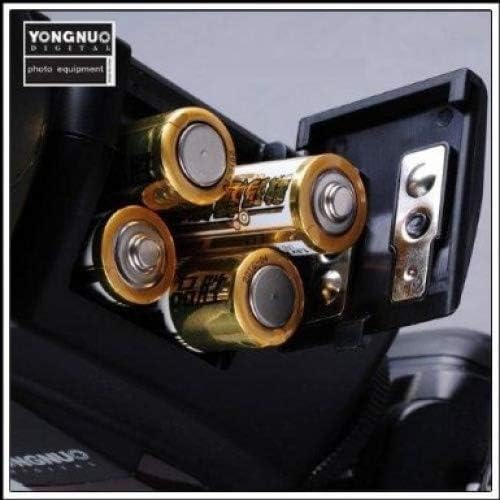
Figure 5.1: Battery compartment with four AA batteries correctly installed.
5.2 Mounting the Flash to Your Camera
The YN-467 II is designed to mount onto the hot shoe of Canon DSLR cameras.
- Ensure both the flash unit and your camera are powered off.
- Slide the flash's mounting foot into the camera's hot shoe until it stops.
- Tighten the locking wheel or lever on the flash unit to secure it firmly to the camera's hot shoe. Do not overtighten.
- Power on your camera, then power on the flash unit.
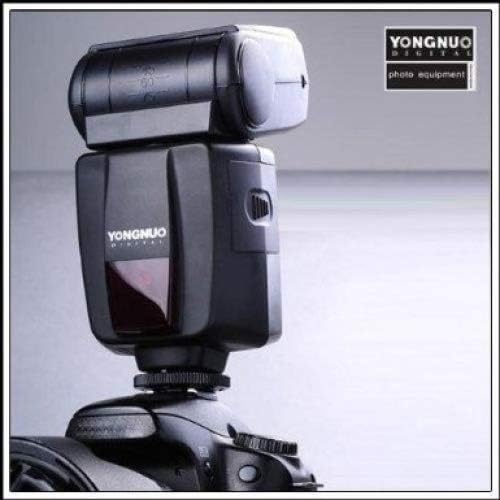
Figure 5.2: Yongnuo YN-467 II flash mounted on a Canon DSLR camera.
6. Operating Modes
The YN-467 II offers several flash modes to suit various shooting conditions. Use the mode button on the flash unit to cycle through the available modes.
6.1 TTL Mode (Through-The-Lens)
In TTL mode, the flash automatically determines the appropriate light output based on the camera's metering system. This is the most convenient mode for general photography.
- Mount the flash to your camera and power both on.
- Select TTL mode on the flash unit.
- The flash will communicate with your camera to provide automatic exposure.
6.2 Manual (M) Mode
Manual mode allows you to set the flash power output manually. This provides precise control over lighting for consistent results.
- Select M mode on the flash unit.
- Use the control buttons (usually '+' and '-') to adjust the flash power from 1/1 (full power) down to 1/64.
- Available power levels: 1/1, 1/2, 1/4, 1/8, 1/16, 1/32, 1/64.
6.3 Optic Slave Modes (S1 & S2)
These modes allow the YN-467 II to be triggered wirelessly by another flash unit.
- S1 Mode: The flash will fire in response to the first flash it detects. This is suitable for use with manual flashes or flashes that do not emit a pre-flash.
- S2 Mode: The flash will ignore the first pre-flash from a master flash (e.g., a camera's built-in flash or another TTL flash) and fire on the second flash. This is useful when using the YN-467 II as an off-camera slave with a TTL master flash.
7. Advanced Functions
7.1 Auto Zoom Head
The YN-467 II features an auto-zoom function that automatically adjusts the flash head's coverage to match the focal length of the lens attached to your camera. This ensures efficient light distribution.
7.2 AF Assist LED
In low-light conditions, the built-in AF assist LED will emit a pattern to help your camera's autofocus system lock onto subjects more easily. This function typically activates automatically when needed.
7.3 PC Synchronization Port
The PC port allows for a wired connection to trigger the flash, offering an alternative to hot shoe or optical triggering. This is useful for studio setups or when optical triggering is not feasible.
8. Maintenance
- Cleaning: Use a soft, dry cloth to clean the flash unit. For stubborn dirt, a slightly damp cloth can be used, followed by a dry cloth. Do not use solvents or abrasive cleaners.
- Storage: When not in use for extended periods, remove the batteries to prevent leakage and corrosion. Store the flash in its protection bag in a cool, dry place.
- Battery Care: Always use fresh batteries. If using rechargeable batteries, ensure they are fully charged before use.
9. Troubleshooting
If you encounter issues with your YN-467 II flash, please refer to the following common problems and solutions:
- Flash does not fire:
- Check if the flash unit is powered on.
- Ensure batteries are correctly inserted and have sufficient charge.
- Verify the flash is securely mounted to the camera's hot shoe.
- Check camera settings to ensure external flash is enabled.
- In slave modes (S1/S2), ensure the master flash is firing and the sensor is unobstructed.
- Flash recycle time is slow:
- Batteries may be low. Replace with fresh alkaline batteries or fully charged Ni-MH batteries.
- Recycle time is naturally longer at full power. Reduce power output if faster recycling is needed.
- Flash exposure is incorrect (too bright/dark):
- In TTL mode, check camera exposure compensation settings.
- In Manual mode, adjust the flash power output accordingly.
- Ensure the flash head is pointed correctly (not blocked).
- Flash does not zoom automatically:
- Ensure the flash is securely mounted and communicating with the camera.
- Check camera settings related to flash zoom.
10. Specifications
| Guide Number | 33 (at ISO 100, 105mm) |
| Flash Mode | TTL, M, S1, S2 |
| Circuit Design | Insulated Gate Bipolar Transistor (IGBT) |
| Vertical Rotation Angle | 0 to 90 degrees |
| Horizontal Rotation Angle | 0 to 270 degrees |
| Power Source | 4 x AA size batteries (Alkaline or Ni-MH) |
| Recycle Time | Approximately 2 seconds (with AA alkaline cells at full power) |
| Color Temperature | 5,600K |
| Flash Duration | 1/800 to 1/20,000s |
| Flash Control | TTL auto flash or manual (7 levels: 1/1 to 1/64) |
| Dimensions | 72 x 135 x 85mm |
| Net Weight | 250g |
| Compatible Mountings | Canon |
| Model Number | YN467II-C |
11. Warranty and Support
For specific warranty information, please refer to the warranty card included with your product or visit the official YONGNUO website. If you require technical support or have questions not covered in this manual, please contact YONGNUO customer service through their official channels.
YONGNUO Official Website: www.yongnuo.com.cn (Please note: This link is for informational purposes and may be subject to change.)


