Introduction
Thank you for choosing the Maxim Lighting 39725FMPC Mimi LED Pendant Light. This fixture features a unique design with hand-formed glass elements and energy-efficient LED lighting. This manual provides essential information for the safe installation, operation, and maintenance of your new pendant light. Please read all instructions carefully before beginning installation and retain this manual for future reference.
Important Safety Information
To reduce the risk of death, personal injury, or property damage from fire, electric shock, falling parts, cuts, abrasions, and other hazards, please read all warnings and instructions included with and on the fixture box and all fixture labels.
- All electrical connections must be in accordance with local codes, ordinances, or the National Electric Code (NEC). Contact a qualified electrician if you are unfamiliar with proper electrical wiring connections.
- Turn off electrical power at the circuit breaker or fuse box before wiring the fixture to the power supply.
- This fixture is intended for indoor, dry locations only. Do not install in wet or damp areas.
- Do not attempt to alter the fixture or its components.
- Always handle glass components with care.
- Ensure the mounting surface can support the weight of the fixture.
Package Contents
Carefully unpack your fixture and check that all parts are included. If any parts are missing or damaged, contact your retailer immediately.
- Mimi LED Pendant Light Fixture (1 unit)
- Integrated LED Bulbs (18 bulbs, pre-installed)
- Mounting Hardware (e.g., mounting plate, screws, wire nuts)
- Instruction Manual
Setup and Installation
Pre-Installation
- Turn off power: Before starting installation, ensure the electrical power is turned off at the main circuit breaker or fuse box to prevent electric shock.
- Prepare the area: Clear the installation area and ensure you have all necessary tools (e.g., screwdriver, wire strippers, ladder).
- Review instructions: Read through all steps before beginning.
Mounting the Fixture
The Mimi LED Pendant Light is designed for ceiling mounting. The specific mounting hardware and steps may vary slightly based on your ceiling type and existing electrical box. Always ensure the mounting surface is structurally sound.
- Attach the mounting plate to the electrical junction box in the ceiling using the provided screws. Ensure it is securely fastened.
- Adjust the pendant's hanging length as desired. The fixture is designed with a protruding mounting type.
Wiring Connections
Connect the fixture's wires to your household electrical wires. If you are unsure about wiring, consult a qualified electrician.
- Connect the black wire from the fixture to the black (live) wire from the ceiling using a wire nut.
- Connect the white wire from the fixture to the white (neutral) wire from the ceiling using a wire nut.
- Connect the ground wire (bare copper or green) from the fixture to the ground wire from the ceiling (bare copper or green) and to the mounting plate using a wire nut or ground screw.
- Carefully tuck all wires into the junction box.
Securing the Fixture
- Align the fixture canopy with the mounting plate and secure it with the provided screws or decorative nuts.
- Ensure the fixture is firmly attached to the ceiling and there are no gaps.
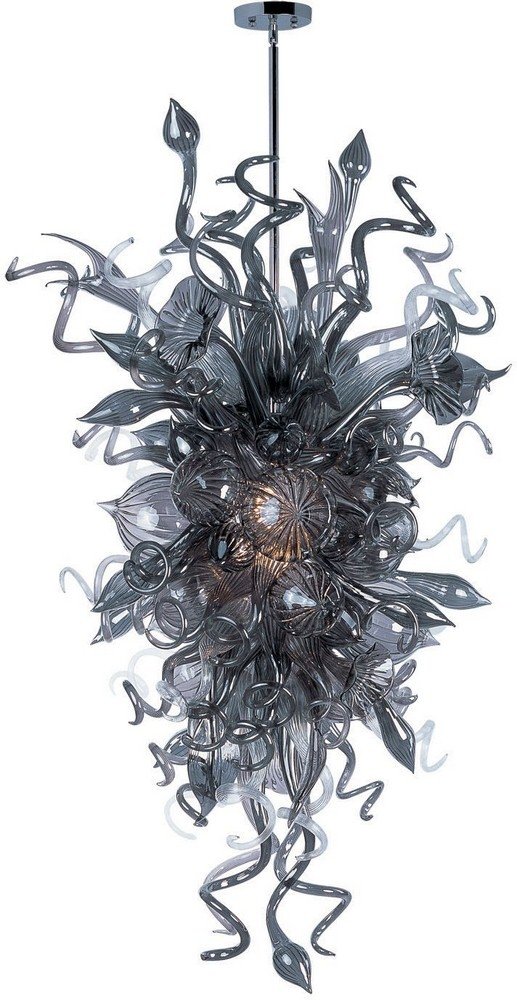
Image: The Maxim Lighting 39725FMPC Mimi LED Pendant Light shown installed in a room, demonstrating its aesthetic and scale.
Operating Instructions
After successful installation, restore power at the circuit breaker. The Mimi LED Pendant Light is designed for operation via a standard wall switch or, if configured, through an app control method.
- Standard Operation: Use the wall switch connected to the fixture to turn the light on and off.
- App Control: If your fixture is connected to a smart home system or a compatible app, follow the instructions provided by your smart home system or app manufacturer to pair and control the light. The fixture supports app control for enhanced functionality.
Maintenance
Proper maintenance ensures the longevity and appearance of your pendant light.
- Cleaning: Always turn off the power before cleaning. Use a soft, dry, or slightly damp cloth to wipe the fixture. Do not use abrasive cleaners, solvents, or polishes as they may damage the finish or glass.
- Bulb Replacement: This fixture uses integrated LED bulbs that are designed for long life and are not user-replaceable. If the LEDs fail, the entire fixture may need servicing or replacement. Contact customer support for assistance.
- Inspection: Periodically check the fixture for any loose connections or signs of wear.
Troubleshooting
If your pendant light is not functioning correctly, refer to the following common issues and solutions:
| Problem | Possible Cause | Solution |
|---|---|---|
| Light does not turn on. | No power to the fixture. | Check the circuit breaker or fuse. Ensure the wall switch is in the 'ON' position. |
| Light flickers. | Loose wiring connection. | Turn off power at the breaker. Check all wire connections for tightness. Consult an electrician if unsure. |
| App control not working. | Improper pairing or network issue. | Refer to your smart home system or app's instructions for pairing and troubleshooting network connectivity. |
Specifications
| Feature | Detail |
|---|---|
| Brand | Maxim |
| Model Number | 39725FMPC |
| Product Dimensions | 30 x 55 x 30 inches |
| Material | Glass |
| Finish | Polished Chrome |
| Style | Contemporary |
| Light Source Type | LED |
| Number of Light Sources | 18 |
| Voltage | 120 Volts |
| Wattage | 1 Watt (per LED, total 18W) |
| Power Source | Corded Electric |
| Control Method | App |
| Fixture Type | Non Removable |
| Mounting Type | Protruding |
| Rating | Dry Rated |
| Specification Met | UL Listed |
| Included Components | Bulb (integrated LED) |
Warranty Information
All products purchased have a 30-day replacement parts policy to ensure a fully working item. All products are covered under a 1-year warranty when purchased on Amazon. The warranty period begins on the day the product is originally shipped. The warranty covers all of the items and conditions identified in the original manufacturer's warranty. Some of the items specifically not covered by the warranty are loss and theft, water damage, customer abuse, and finish deterioration due to UV or coastal exposure.
Customer Support
For further assistance, technical support, or warranty claims, please contact Maxim Lighting customer service. Refer to your purchase documentation for specific contact details or visit the official Maxim Lighting website.


