
SureLife AMR-30U
SureLife Classic Arm Blood Pressure Monitor
Model: AMR-30U
Introduction
Thank you for choosing the SureLife Classic Arm Blood Pressure Monitor. This device is designed to provide accurate and reliable blood pressure measurements for home use. Please read this manual thoroughly before using the monitor to ensure proper operation and to understand all safety precautions.

Image: Front view of the SureLife Classic Arm Blood Pressure Monitor, displaying a large LCD screen and two control buttons.
Important Safety Information
Always consult with a healthcare professional for diagnosis and treatment of any health condition. Self-diagnosis and treatment based on measurement results can be dangerous.
- Do not use this device on infants, young children, or individuals who cannot express their consent.
- Do not use this device if you have a serious arrhythmia or other cardiovascular conditions without consulting a physician.
- Avoid taking measurements immediately after exercise, bathing, or consuming alcohol or caffeine.
- Ensure the cuff is applied correctly and comfortably to avoid inaccurate readings or discomfort.
- Keep the device away from strong electromagnetic fields.
- Statements regarding dietary supplements have not been evaluated by the FDA and are not intended to diagnose, treat, cure, or prevent any disease or health condition.
Package Contents
Verify that all the following components are included in your package:
- SureLife Classic Arm Blood Pressure Monitor
- Standard Arm Cuff (fits arm circumference 9-14 inches)
- 4 AA Batteries
- Instruction Manual (this document)

Image: The SureLife Classic Arm Blood Pressure Monitor shown in its retail packaging, alongside an image of an older woman and a child.
Product Features
- Heartbeat Detection: Detects irregular heartbeats during measurement.
- Fully Automatic: Provides comfortable, high-quality blood pressure readings at the push of a button.
- Wide Cuff Size: Designed for comfortable measurements, fits arms between 9 and 14 inches in circumference.
- Jumbo LCD Display: Large display for easy viewing of readings.
- Recording Memory: Stores 199 blood pressure readings for up to 2 users.
- Automatic Shut-Off: Conserves battery life.

Image: A graphic detailing the Classic Model Features, including Irregular Heart Beat Detection, Fully Automatic operation, 99 Memories, Low Battery Indicator, Jumbo LCD Display, and Automatic Shut Off. It also states that batteries are included.
Setup
1. Battery Installation
- Open the battery compartment cover on the back of the monitor.
- Insert four (4) AA batteries, ensuring the correct polarity (+/-) as indicated inside the compartment.
- Close the battery compartment cover securely.
2. Connecting the Arm Cuff
- Locate the air tube connector on the arm cuff.
- Firmly insert the air tube connector into the air jack on the side of the blood pressure monitor. Ensure it is fully inserted to prevent air leakage during measurement.

Image: The SureLife Arm Blood Pressure Monitor connected to its standard cuff. Labels point to the 'Memory Button' and 'Power Button' on the device. Text indicates the cuff fits arms 9-14 inches.
Operating Instructions
Follow these steps to take an accurate blood pressure measurement:
- Prepare for Measurement: Sit comfortably with your back supported and feet flat on the floor. Rest your arm on a table so the cuff is at heart level. Avoid talking or moving during the measurement.
- Apply the Cuff: Wrap the cuff around your bare upper left arm, 2-3 cm (about 1 inch) above your elbow. Ensure the air tube runs down the center of your arm in line with your middle finger. The cuff should be snug but not too tight; you should be able to insert two fingers between the cuff and your arm.
- Start Measurement: Press the Power Button (⏻) to turn on the monitor. The cuff will automatically inflate.
- Measurement Process: The cuff will inflate to a suitable pressure and then slowly deflate. The monitor will detect your pulse and display your systolic pressure, diastolic pressure, and pulse rate on the LCD screen.
- Review Results: Once the measurement is complete, the results will be displayed. The monitor will automatically store the reading in its memory.
- Turn Off: Press the Power Button (⏻) again to turn off the monitor, or it will automatically shut off after a period of inactivity.

Image: A visual guide showing four steps for using the blood pressure monitor: Step 1 (wrap cuff), Step 2 (check tightness), Step 3 (rest arm at heart level), and Step 4 (press start button, remain still).
Memory Function
The SureLife Classic Arm Blood Pressure Monitor can store up to 199 readings for two users. To review past measurements:
- Ensure the monitor is turned off.
- Press the Memory Button (M). The most recent reading will be displayed first.
- Press the Memory Button (M) repeatedly to scroll through older readings.
- To switch between User 1 and User 2 memory, press and hold the Memory Button (M) for a few seconds when the monitor is off.

Image: A graphic featuring the SureLife Blood Pressure Monitor with text stating 'Store 199 readings per user, up to 2 users', illustrating the device's memory capacity.
Maintenance and Storage
- Cleaning: Wipe the monitor and cuff with a soft, dry cloth. If necessary, use a slightly damp cloth with mild soap, then wipe dry. Do not use abrasive cleaners or immerse the device in water.
- Storage: Store the device in a clean, dry place away from direct sunlight, extreme temperatures, and humidity. Keep it out of reach of children.
- Battery Replacement: Replace all four batteries when the low battery indicator appears on the display. Do not mix old and new batteries or different types of batteries.
Troubleshooting
If you encounter any issues with your blood pressure monitor, refer to the table below for common problems and solutions:
| Problem | Possible Cause | Solution |
|---|---|---|
| Monitor does not turn on. | Batteries are dead or incorrectly inserted. | Replace all batteries with new AA batteries, ensuring correct polarity. |
| Cuff does not inflate or inflates weakly. | Cuff air tube is not properly connected or is leaking. | Ensure the air tube is firmly inserted into the monitor's air jack. Check the cuff and tube for any damage or leaks. |
| Inconsistent or inaccurate readings. | Improper cuff placement, movement during measurement, or talking. | Re-apply the cuff correctly. Remain still and silent during measurement. Take multiple readings with a few minutes in between. |
| Error message on display. | Various operational errors. | Refer to the specific error code in the full manual (if available) or turn off the device, wait a few minutes, and try again. |
Specifications
| Feature | Detail |
|---|---|
| Model Number | AMR-30U |
| Product Dimensions | 6.5"L x 3.5"W x 7"Th (approx. 3.5 x 6.5 x 7 inches) |
| Weight | Approx. 1.28 Pounds |
| Power Source | 4 AA Batteries (included) |
| Display Type | LCD |
| Cuff Size | 9-14 inches (arm circumference) |
| Memory Capacity | 199 readings per user, for 2 users |
| Measurement Method | Oscillometric |
| Measurement Location | Upper Arm |
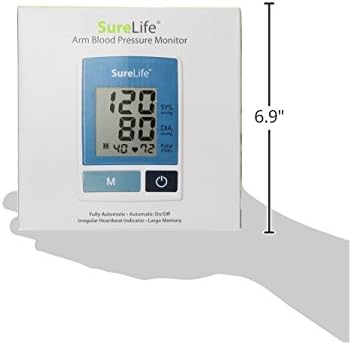
Image: The SureLife Arm Blood Pressure Monitor shown with a vertical dimension of 6.9 inches indicated, providing a sense of its physical size.
Warranty and Support
SureLife products are manufactured under strict quality control standards. For any questions, technical support, or warranty inquiries, please contact SureLife customer service. Refer to the product packaging or the SureLife official website for the most current contact information.
Please retain your purchase receipt as proof of purchase for warranty purposes.
Related documentsAMR-30U


Ask a question about this manual
Ask about setup, troubleshooting, compatibility, parts, safety, or missing instructions. Manuals+ will review the question and use this page’s manual context to help answer it.