
1. Introduction
This manual provides detailed instructions for the safe and efficient operation of your Vivitek Qumi Q5 Pocket DLP Projector. Please read this manual thoroughly before using the projector and retain it for future reference. The Vivitek Qumi Q5 is a compact, high-definition LED projector designed for portability and versatility, featuring 500 lumens brightness, WXGA resolution, and various connectivity options.
2. Important Safety Information
Observe the following safety precautions to prevent damage to the projector and ensure user safety:
- Do not block ventilation openings. Ensure adequate airflow around the projector.
- Do not look directly into the projector lens when the lamp is on. The bright light can cause eye damage.
- Use only the power adapter supplied with the projector.
- Do not expose the projector to rain or moisture to reduce the risk of fire or electric shock.
- Place the projector on a stable, level surface.
- Unplug the projector from the power outlet before cleaning or when not in use for extended periods.
- Refer all servicing to qualified service personnel.
3. Package Contents
Verify that all items listed below are included in your package:
- Vivitek Qumi Q5 Projector
- Power Adapter
- Universal I/O to VGA Cable
- HDMI Cable
- 3.5mm AV-in Cable
- Carrying Pouch
- Remote Control
- Quick Start Guide
- Warranty Card
4. Product Overview
Familiarize yourself with the various components and features of your Vivitek Qumi Q5 projector.
4.1 Front View

Image 4.1: Front view of the Vivitek Qumi Q5 projector, showing the lens and ventilation grilles.
The front of the projector features the projection lens and air vents for cooling. Ensure these vents are not obstructed during operation.
4.2 Top View

Image 4.2: Top view of the Vivitek Qumi Q5 projector, highlighting the touch-sensitive control panel.
The top panel includes touch-sensitive controls for navigation and menu selection. The "Qumi" logo is also visible.
4.3 Rear View (Connectivity Ports)

Image 4.3: Rear view of the Vivitek Qumi Q5 projector, displaying all input and output ports.
The rear panel houses all essential connectivity ports:
- DC IN: For connecting the power adapter.
- AUDIO OUT: 3.5mm jack for external speakers or headphones.
- AV IN: 3.5mm jack for composite video and stereo audio input.
- USB: For connecting USB storage devices.
- HDMI: High-Definition Multimedia Interface for digital video and audio input.
- UNIVERSAL I/O: Multi-purpose port for VGA and other analog inputs via adapter.
5. Setup
Follow these steps to set up your Vivitek Qumi Q5 projector.
5.1 Powering On the Projector
- Connect the power adapter to the DC IN port on the projector.
- Plug the power adapter into a wall outlet.
- Press the power button on the projector or remote control to turn on the device. The power indicator light will illuminate.
5.2 Connecting Input Sources
The Qumi Q5 supports various input sources:
- HDMI: Connect an HDMI cable from your source device (e.g., laptop, Blu-ray player) to the HDMI port on the projector.
- VGA: Use the supplied Universal I/O to VGA cable to connect your computer's VGA output to the UNIVERSAL I/O port.
- AV (Composite): Use the supplied 3.5mm AV-in cable to connect composite video and stereo audio devices to the AV IN port.
- USB: Insert a USB flash drive into the USB port to play media files directly.
- Wireless (Optional): If using an optional WiFi USB dongle, insert it into the USB port for wireless connectivity. Refer to the dongle's instructions for setup.
5.3 Adjusting Focus
Locate the focus wheel on the side of the projector. Rotate the wheel until the projected image appears sharp and clear on your screen or wall.
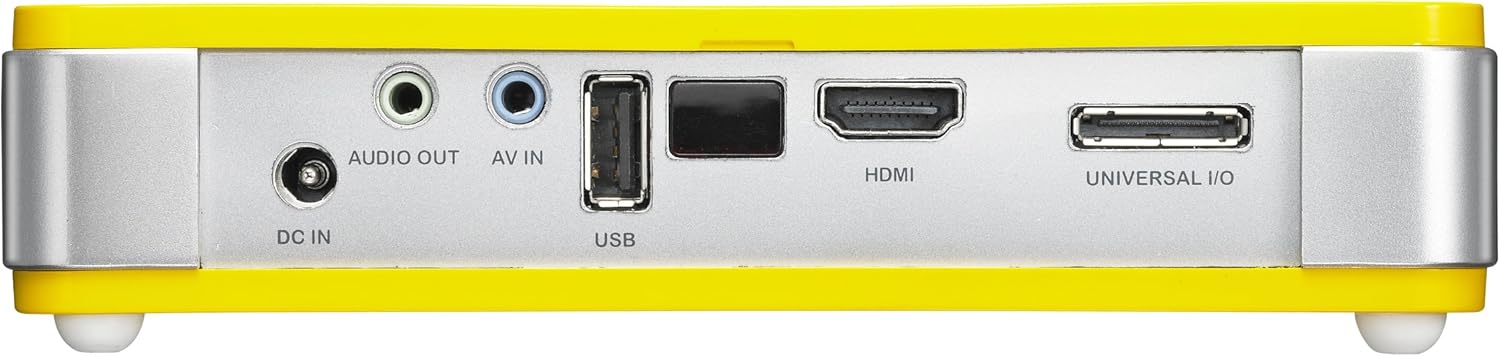
Image 5.3: Side view of the Vivitek Qumi Q5, indicating the location of the focus adjustment wheel.
6. Operating the Projector
6.1 Navigating the Menu
Use the touch-sensitive buttons on the top panel or the remote control to navigate the projector's on-screen display (OSD) menu. The menu allows you to adjust image settings, input sources, and other system configurations.
6.2 Selecting Input Source
Press the "Source" button on the remote control or navigate through the OSD menu to select the desired input source (HDMI, VGA, AV, USB, or Wireless).
6.3 Image Adjustments
Within the OSD menu, you can adjust various image parameters:
- Brightness/Contrast: Adjust for optimal image visibility.
- Color/Tint: Fine-tune color reproduction.
- Aspect Ratio: Select between 4:3, 16:9, or other available ratios to match your content.
- Keystone Correction: Correct trapezoidal distortion if the projector is not perfectly perpendicular to the screen.
6.4 Playing Media from USB
When a USB drive is inserted, the projector's media player interface will typically launch automatically. You can browse and play supported video, audio, and image files directly from the USB drive.
6.5 3D Functionality
The Qumi Q5 is 3D-ready via DLP Link technology. To view 3D content, you will need compatible 3D source material, a 3D-capable player, and active DLP Link 3D glasses (sold separately).
7. Maintenance
Proper maintenance ensures the longevity and optimal performance of your projector.
7.1 Cleaning the Projector
- Exterior: Use a soft, lint-free cloth slightly dampened with water or a mild cleaning solution. Do not use abrasive cleaners or solvents.
- Lens: Gently wipe the lens with a lens cleaning cloth or lens paper. Avoid touching the lens surface with your fingers.
- Vents: Use a soft brush or compressed air to clear dust from the ventilation openings.
7.2 LED Light Source
The Qumi Q5 utilizes an LED light source with an estimated operational life of up to 30,000 hours, significantly reducing the need for lamp replacement compared to traditional projectors.
7.3 Storage
When not in use for extended periods, store the projector in its carrying pouch in a cool, dry place, away from direct sunlight and extreme temperatures.
8. Troubleshooting
Refer to this section for solutions to common issues you may encounter.
| Problem | Possible Cause | Solution |
|---|---|---|
| No image displayed. |
|
|
| Image is blurry. |
|
|
| No audio. |
|
|
| Projector overheats or shuts down. |
|
|
9. Specifications
Key technical specifications for the Vivitek Qumi Q5 projector:
- Model: Qumi Q5
- Display Technology: DLP Pico chipset
- Native Resolution: WXGA (1280 x 720)
- Brightness: Up to 500 Lumens
- Light Source: LED (Estimated 30,000 hours operation)
- Connectivity: HDMI, Universal I/O (VGA), AV mini-jack, USB, Audio-out mini-jack, Wireless (via optional USB dongle)
- Internal Memory: 4GB
- 3D Ready: Yes, via DLP Link
- Dimensions: 4 x 6.3 x 1.3 inches (10.16 x 16.00 x 3.30 cm)
- Weight: 1.1 pounds (0.5 kg)
- Power Supply: External Power Adapter
10. Warranty and Support
Your Vivitek Qumi Q5 projector is covered by a limited warranty. Please refer to the included Warranty Card for specific terms and conditions, including warranty period and coverage details. For technical support, service, or further inquiries, please visit the official Vivitek website or contact their customer service department. Keep your purchase receipt as proof of purchase for warranty claims.


