
Pic Solution SF1145240
Pic Solution Classic Med Manual Blood Pressure Monitor User Manual
Model: SF1145240
Introduction
The Pic Solution Classic Med Manual Blood Pressure Monitor is designed to provide high-quality, accurate blood pressure measurements. Its large dial ensures easy reading of values, and the complete set of accessories makes it a reliable tool for personal health monitoring.
This manual provides essential information for the proper use, maintenance, and troubleshooting of your device. Please read it thoroughly before first use and keep it for future reference.
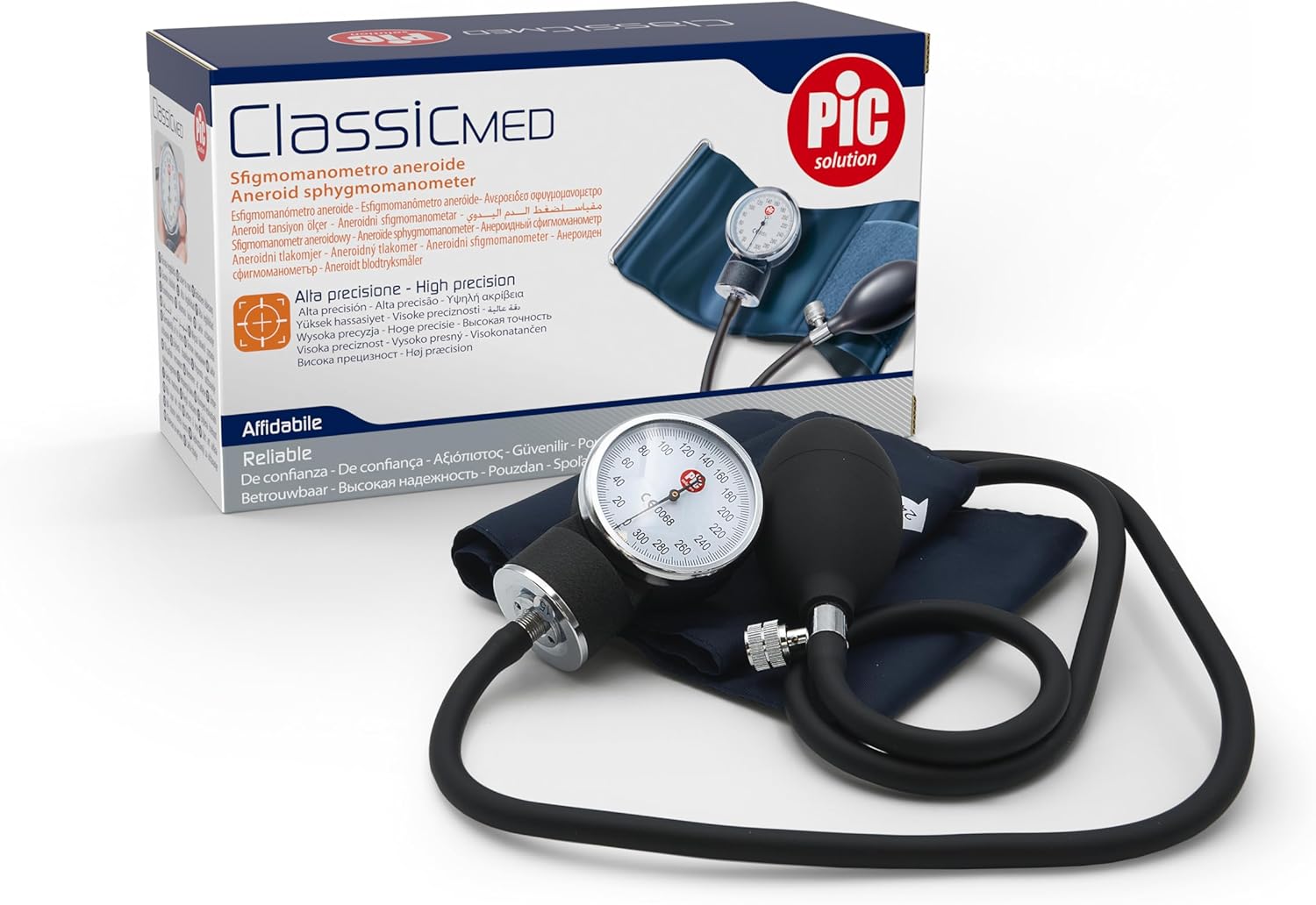
Image: The Pic Solution Classic Med Manual Blood Pressure Monitor, shown in its retail packaging, highlighting its design and key features.
Components
Your Pic Solution Classic Med Manual Blood Pressure Monitor includes the following components:
- Manometer (Gauge): The circular dial that displays blood pressure readings.
- Cuff: A comfortable cuff with Velcro closure, designed to fit around the arm.
- Inflation Bulb: A rubber bulb used to inflate the cuff.
- Air Release Valve: A screw valve on the inflation bulb to control air release.
- Carrying Case: A practical zippered case for storage and transport.

Image: Close-up view of the main components: the manometer (gauge), the arm cuff, and the inflation bulb with its air release valve.
Setup
Before taking a measurement, ensure the device is properly assembled and you are in a suitable environment.
- Unpack the Device: Carefully remove all components from the carrying case.
- Connect the Cuff: Ensure the air tube from the cuff is securely connected to the manometer.
- Prepare for Measurement: Sit comfortably with your back supported and feet flat on the floor. Rest your arm on a table so that the cuff will be at heart level. Avoid talking or moving during the measurement.
- Apply the Cuff: Wrap the cuff firmly around your bare upper arm, approximately 2-3 cm above the elbow. The artery mark on the cuff should be positioned over your brachial artery (on the inside of your arm). Ensure it is snug but not too tight; you should be able to slide two fingers under the cuff.

Image: The Pic Solution Classic Med Manual Blood Pressure Monitor laid out next to its compact zippered carrying case, ready for setup or storage.
Operating Instructions
Follow these steps to accurately measure your blood pressure using the auscultatory method (requires a stethoscope, not included):
- Locate Pulse: Place the diaphragm of a stethoscope over the brachial artery in the crook of your elbow.
- Close Valve: Turn the air release valve on the inflation bulb clockwise until it is fully closed.
- Inflate Cuff: Rapidly pump the inflation bulb to inflate the cuff. Watch the manometer dial and inflate the cuff to about 20-30 mmHg above your usual systolic pressure, or until the pulse sound disappears.
- Release Air Slowly: Slowly open the air release valve by turning it counter-clockwise, allowing the pressure to drop at a rate of 2-3 mmHg per second.
- Listen for Systolic Pressure: Listen carefully through the stethoscope. The first distinct, tapping sound you hear is your systolic blood pressure. Note the reading on the manometer.
- Listen for Diastolic Pressure: Continue to release air. The point at which the sounds disappear or become very faint is your diastolic blood pressure. Note this reading.
- Deflate Completely: Once the diastolic reading is taken, fully open the air release valve to rapidly deflate the cuff.
- Record Readings: Record your systolic and diastolic blood pressure readings. Wait at least 5 minutes before taking another measurement.
Note: For accurate readings, it is recommended to consult with a healthcare professional for proper technique and interpretation of results.
Maintenance and Care
Proper maintenance ensures the longevity and accuracy of your blood pressure monitor.
- Cleaning: Clean the cuff with a soft, damp cloth and mild soap. Do not immerse the cuff or manometer in water. Wipe the manometer and inflation bulb with a dry or slightly damp cloth.
- Storage: Store the device in its practical zippered carrying case in a cool, dry place, away from direct sunlight and extreme temperatures.
- Avoid Damage: Do not drop the manometer or subject it to strong impacts. Avoid bending the air tubes sharply.
- Calibration: Manual blood pressure monitors should be calibrated periodically (e.g., every 1-2 years) by a qualified technician to ensure continued accuracy.

Image: The compact zippered carrying case for the Pic Solution Classic Med Manual Blood Pressure Monitor, designed for convenient storage and portability.
Troubleshooting
If you encounter issues with your blood pressure monitor, refer to the following common problems and solutions:
| Problem | Possible Cause | Solution |
|---|---|---|
| Cuff does not inflate or inflates slowly. | Air release valve is open; loose connection; leak in cuff or tubing. | Ensure valve is fully closed. Check all connections. Inspect cuff and tubing for damage. |
| Readings are inconsistent or inaccurate. | Improper cuff placement; rapid deflation; movement/talking during measurement; need for calibration. | Re-apply cuff correctly. Deflate at 2-3 mmHg/sec. Remain still and silent. Consider professional calibration. |
| Difficulty hearing Korotkoff sounds. | Stethoscope placement; environmental noise; low inflation pressure. | Ensure stethoscope is correctly placed and functional. Measure in a quiet environment. Inflate cuff sufficiently. |
If the problem persists after trying these solutions, please contact customer support.
Specifications
| Product Name | Pic Solution Classic Med Manual Blood Pressure Monitor |
| Model Number | SF1145240 |
| Brand | Pic Solution |
| Type | Aneroid Sphygmomanometer |
| Dimensions (L x W x H) | 19 x 7.5 x 10.7 cm (approx. 7.5 x 3 x 4.2 inches) |
| Weight | 360 grams (approx. 0.79 lbs) |
| Included Components | Manometer, Cuff, Inflation Bulb, Carrying Case |
| Country of Origin | Italy |
| ASIN | B008LVM70Q |
Warranty and Support
Pic Solution products are manufactured to high-quality standards. For information regarding warranty coverage, product support, or service, please refer to the warranty card included with your product or visit the official Pic Solution website.
For direct assistance, you may contact Pic Solution customer service through their official channels. Please have your model number (SF1145240) and purchase details ready when contacting support.
This manual is for informational purposes only and does not replace professional medical advice. Always consult with a healthcare professional for diagnosis and treatment of health conditions.
Related documentsSF1145240


Ask a question about this manual
Ask about setup, troubleshooting, compatibility, parts, safety, or missing instructions. Manuals+ will review the question and use this page’s manual context to help answer it.