
Introduction
This manual provides instructions for the proper installation, use, and maintenance of the Crouse-Hinds TP740 Steel 2-Gang Surface Cover. This product is designed to provide a durable and protective enclosure for electrical connections in various applications.
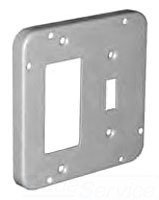
Image: Crouse-Hinds TP740 Steel 2-Gang Surface Cover. This image shows the front view of the steel surface cover, highlighting its two-gang configuration and screw-in mounting points.
Setup and Installation
The Crouse-Hinds TP740 surface cover is designed for screw-in installation. Ensure all power is disconnected before beginning any electrical work.
- Safety First: Always turn off the power at the circuit breaker or fuse box before installing or servicing electrical components. Verify power is off using a voltage tester.
- Prepare the Box: Ensure the electrical box is properly mounted and free from debris.
- Position the Cover: Align the TP740 surface cover over the electrical box, ensuring the openings for devices (e.g., switches, outlets) are correctly oriented.
- Secure the Cover: Use appropriate screws (not included) to firmly attach the cover to the electrical box. Do not overtighten, as this can strip threads or damage the cover.
- Install Devices: Once the cover is secured, install the desired electrical devices (switches, receptacles) into the cover's openings, then secure them with their respective screws.
- Restore Power: After all devices are installed and secured, restore power to the circuit.
Note: Installation should be performed by a qualified electrician or in accordance with local electrical codes.
Operation
The Crouse-Hinds TP740 Steel 2-Gang Surface Cover functions as a protective enclosure for electrical devices. Once installed, its primary role is to shield internal wiring and components from environmental factors and provide a safe interface for electrical devices. There are no operational controls on the cover itself.
Maintenance
The TP740 surface cover is constructed from durable steel, requiring minimal maintenance.
- Regular Inspection: Periodically inspect the cover for any signs of damage, corrosion, or loose screws.
- Cleaning: Clean the surface with a damp cloth as needed. Avoid abrasive cleaners or solvents that could damage the finish.
- Tighten Fasteners: If any screws appear loose, carefully tighten them. Do not overtighten.
- Corrosion: While steel is durable, prolonged exposure to harsh environments may lead to corrosion. If corrosion is observed, consider replacement or appropriate protective measures.
Troubleshooting
Most issues related to a surface cover are installation-related or due to external factors.
| Problem | Possible Cause | Solution |
|---|---|---|
| Cover does not fit flush. | Obstruction behind the cover; electrical box not flush with surface; incorrect cover size. | Check for wires or debris. Ensure the electrical box is properly installed. Verify the cover dimensions match the box. |
| Screws do not tighten. | Stripped screw threads in the electrical box or on the cover. | Use larger screws if the box threads are stripped (ensure they are appropriate for electrical use). If cover threads are stripped, replace the cover. |
| Visible corrosion. | Exposure to moisture or harsh chemicals. | Clean with a mild solution. If severe, replace the cover. Consider a more corrosion-resistant option for the environment. |
Specifications
- Model: TP740
- Brand: Crouse-Hinds
- Material: Alloy Steel
- Configuration: Double (2-Gang)
- Product Dimensions: 4.94"W x 4.94"H (4-11/16 Inch x 4-11/16 Inch)
- Depth: 1/2 Inch
- Installation Type: Screw-In
- Item Weight: 7.2 ounces
- UPC: 662277015219
- Manufacturer: CROUSEH
Warranty Information
Specific warranty details for the Crouse-Hinds TP740 Steel 2-Gang Surface Cover are not provided in the product information. For warranty inquiries, please contact Crouse-Hinds directly or refer to the documentation included with your purchase.
Customer Support
For technical assistance, replacement parts, or further information regarding the Crouse-Hinds TP740 Steel 2-Gang Surface Cover, please contact Crouse-Hinds customer service.
You can typically find contact information on the manufacturer's official website or on the product packaging.
