Introduction
Welcome to the user manual for your Timberland Washington Summit Digital Sensor Pacer Watch, Model 13386JPBUS_01. This guide provides detailed instructions for setting up, operating, maintaining, and troubleshooting your watch. Designed for durability and functionality, this watch features a digital display, chronograph, dual-time, alarm, compass, day-date, month display, finger touch heart rate meter, light, lap timer, digital sensor, and timer functions.
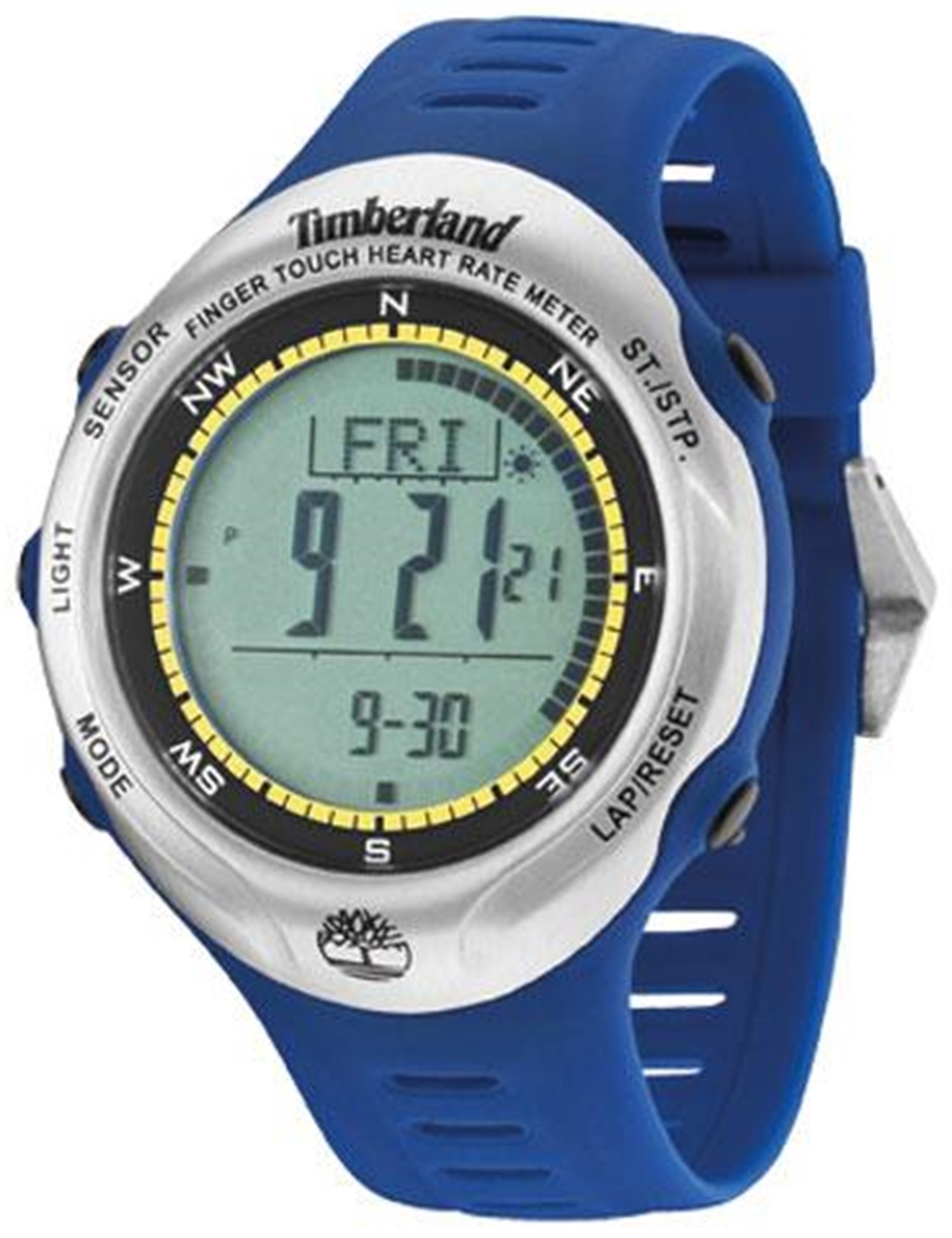
This image displays the Timberland Washington Summit Digital Sensor Pacer Watch, highlighting its digital grey dial, blue rubber strap, and function pushers.
Setup
1. Unboxing and Initial Inspection
- Carefully remove the watch from its packaging.
- Inspect the watch for any visible damage.
- Confirm all components are present.
2. Activating the Watch
Your watch comes with a pre-installed battery. If the display is not active, gently press any button to wake the watch. If the watch remains inactive, refer to the Troubleshooting section.
3. Setting Time and Date
- Locate the mode button (usually on the left side). Press it repeatedly until the time setting mode is displayed.
- Use the adjustment buttons (typically on the right side) to change the hour, minute, year, month, and day.
- Press the mode button again to confirm settings and exit the time setting mode.
Operating Instructions
Mode Navigation
Press the Mode button (refer to your watch's specific button layout) to cycle through the following functions: Time, Chronograph, Dual-Time, Alarm, Compass, Heart Rate, Lap Timer, and Timer.
1. Time and Date Display
- The default display shows the current time, day, and date.
- To activate the backlight, press the Light button.
2. Chronograph (Stopwatch)
- Navigate to the Chronograph mode.
- Press the Start/Stop button to begin timing.
- Press Start/Stop again to pause/resume.
- Press the Reset button to clear the time.
3. Dual-Time
This function allows you to view a second time zone. In Dual-Time mode, use the adjustment buttons to set the desired second time.
4. Alarm
- Enter Alarm mode.
- Use the adjustment buttons to set the alarm time.
- Activate or deactivate the alarm using the designated button (refer to your watch's specific button functions).
5. Compass
In Compass mode, hold the watch level and allow it to calibrate. The display will indicate the cardinal directions. For accurate readings, avoid strong magnetic fields.
6. Finger Touch Heart Rate Meter
To measure your heart rate, ensure your fingers are clean and dry. In Heart Rate mode, place your finger firmly on the designated sensor area (usually on the bezel or case back). Remain still until the reading is displayed.
7. Lap Timer and Timer
The Lap Timer function allows you to record multiple lap times during an activity. The Timer (countdown timer) can be set for a specific duration, alerting you when it reaches zero. Refer to the on-screen prompts and button functions in their respective modes for detailed operation.
Maintenance
1. Cleaning Your Watch
- Wipe the watch case and strap with a soft, damp cloth.
- Avoid using harsh chemicals, solvents, or abrasive cleaners.
- For rubber straps, a mild soap solution can be used, followed by rinsing with clean water and thorough drying.
2. Water Resistance
Your watch is water resistant to 30 meters (99 feet). This means it can withstand splashes of water and rain. It is not suitable for showering, swimming, or submersion in water. Do not operate buttons when the watch is wet.
3. Battery Replacement
When the display dims or functions become erratic, the battery may need replacement. This watch uses 1 product-specific battery. It is recommended to have the battery replaced by a qualified watch technician to ensure proper sealing and maintain water resistance.
Troubleshooting
| Problem | Possible Cause | Solution |
|---|---|---|
| Display is blank or dim. | Low battery. | Replace battery (recommended by a professional). |
| Time is incorrect. | Time not set correctly or accidental adjustment. | Refer to "Setting Time and Date" in the Setup section. |
| Buttons are unresponsive. | Watch may be in a locked mode or internal error. | Try pressing all buttons to see if it unlocks. If unresponsive, a battery reset may be needed by a technician. |
| Heart rate sensor not working. | Improper finger placement, dirty sensor, or dry skin. | Ensure clean, firm contact with the sensor. Moisten finger slightly if skin is very dry. |
Specifications
| Model Number | 13386JPBUS_01 |
| Brand | Timberland |
| Movement Type | Quartz |
| Case Diameter | 47 Millimetres |
| Case Thickness | 14 Millimetres |
| Band Material Type | Rubber |
| Band Colour | Blue |
| Crystal Type | Mineral glass with sapphire coating |
| Water Resistance Depth | 30 Meters (99 Feet) |
| Batteries Required | 1 Product Specific battery (included) |
| Item Weight | 249 g |
Warranty Information
This Timberland Washington Summit Digital Sensor Pacer Watch comes with a 2-year store warranty. For any warranty claims or service, please contact the seller of record directly. Keep your proof of purchase for warranty validation.
Support
For further assistance, technical support, or inquiries not covered in this manual, please refer to the official Timberland website or contact their customer service department.
- Manufacturer: Timberland
- Online Resources: Visit the official Timberland website for product updates and additional support.
- Seller Support: For purchase-specific issues, contact the retailer from whom the watch was purchased.


