1. Product Overview
The Maxitrol TD244 is a wall-mounted space temperature selector designed for precise temperature control within a range of 55 to 90 degrees Fahrenheit. This device functions as a remote selector, allowing users to set their desired ambient temperature. Manufactured by Maxitrol Company in the United States, the TD244 is built for reliable performance in industrial and scientific applications.
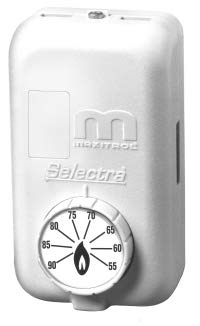
Figure 1: Maxitrol TD244 Wall Mount Space Temperature Selector. This image displays the front view of the white, rectangular temperature selector unit with a circular dial at the bottom for temperature adjustment, marked from 55 to 90 degrees Fahrenheit. The Maxitrol logo is visible on the upper part of the unit.
2. Safety Information
Please read and understand all instructions before installing or operating this device. Failure to follow these instructions could result in property damage, personal injury, or death.
- Installation and servicing must be performed by a qualified, experienced technician.
- Disconnect power to the heating/cooling system before installation or maintenance to prevent electrical shock.
- Ensure all wiring complies with local electrical codes and regulations.
- Do not use this device for purposes other than its intended use as a space temperature selector.
- Keep the device dry. Although listed as waterproof, prolonged exposure to moisture or submersion is not recommended and may cause damage.
3. Package Contents
Verify that all components are present upon unpacking:
- Maxitrol TD244 Wall Mount Space Temperature Selector Unit
- Mounting Hardware (screws, wall anchors - typically included)
- Instruction Manual (this document)
4. Setup and Installation
The Maxitrol TD244 is designed for wall mounting. Professional installation is highly recommended to ensure proper function and safety.
4.1 Mounting Location
- Select a location on an interior wall, approximately 5 feet (1.5 meters) above the floor.
- Avoid locations near heat sources (e.g., lamps, direct sunlight, appliances), cold drafts (e.g., windows, doors), or air vents, as these can affect temperature readings.
- Ensure the location allows for easy access for operation and maintenance.
4.2 Wiring
WARNING: Disconnect power to the system before performing any wiring.
- Carefully open the housing of the TD244 unit to access the wiring terminals.
- Connect the appropriate control wires from your heating/cooling system to the terminals on the TD244 as per your system's specific wiring diagram. Refer to the system's manual for correct terminal identification.
- Ensure all connections are secure and properly insulated.
- Close the housing securely after wiring is complete.
4.3 Mounting the Unit
- Mark the desired mounting holes on the wall using the TD244 unit as a template.
- Drill pilot holes if necessary and insert wall anchors if mounting into drywall.
- Secure the TD244 unit to the wall using the provided mounting screws. Do not overtighten.
5. Operating Instructions
The Maxitrol TD244 is straightforward to operate using its rotary dial.
- Power On: After installation, restore power to your heating/cooling system. The TD244 does not have an on/off switch; it is continuously active when powered.
- Set Temperature: Rotate the dial on the front of the unit to select your desired temperature. The dial is marked with temperature settings from 55 to 90 degrees Fahrenheit.
- Temperature Response: The system will activate heating or cooling as needed to maintain the selected temperature. Allow some time for the system to respond and stabilize the room temperature.
6. Maintenance
The Maxitrol TD244 requires minimal maintenance to ensure optimal performance.
- Cleaning: Periodically wipe the exterior of the unit with a clean, damp cloth. Do not use abrasive cleaners or solvents. Ensure the unit is dry after cleaning.
- Inspection: Annually inspect the unit for any visible damage or loose connections. If any issues are found, contact a qualified technician for repair.
- Airflow: Ensure that the area around the temperature selector is free from obstructions that could impede proper airflow and temperature sensing.
7. Troubleshooting
If you experience issues with your Maxitrol TD244, refer to the following common problems and solutions:
| Problem | Possible Cause | Solution |
|---|---|---|
| System not responding to temperature changes | No power to the unit or system; incorrect wiring; system malfunction | Check power supply; verify wiring connections; consult heating/cooling system manual or a technician. |
| Inaccurate temperature readings | Unit located near heat/cold source; obstructed airflow | Relocate the unit if possible; ensure clear airflow around the unit. |
| Dial not turning smoothly | Debris or internal issue | Gently clean the dial area; if issue persists, contact support. Do not force the dial. |
If troubleshooting steps do not resolve the issue, contact Maxitrol customer support or a qualified service technician.
8. Specifications
Key specifications for the Maxitrol TD244 Wall Mount Space Temperature Selector:
- Model Name: TD244
- Brand: Maxitrol
- Temperature Range: 55 - 90 Degrees Fahrenheit
- Outer Material: Plastic
- Display Type: Digital (internal sensing, dial is analog interface)
- Special Feature: Waterproof (refer to safety guidelines for usage)
- Product Care Instructions: Wipe Clean
- Unit Count: 1.0 Count
- Package Dimensions: 5.04 x 4.61 x 2.99 inches
- Package Weight: 7.36 ounces
- Manufacturer: Maxitrol Company
- Country of Origin: United States
- Date First Available: July 5, 2012
9. Warranty and Support
For warranty information, technical support, or service inquiries regarding your Maxitrol TD244, please contact Maxitrol Company directly. Refer to the product packaging or the official Maxitrol website for the most current contact details and warranty terms.
Maxitrol Company Contact: Please visit www.maxitrol.com for support information.


