
1. Introduction
Welcome to the user manual for your Philips Saeco Syntia HD8833/47 Automatic Espresso Machine. This machine is designed to provide pure espresso enjoyment with its innovative technology and sleek design. It features premium stainless steel and a glossy black and chrome finish, adapting well to various kitchen decors. This manual provides essential information for the safe and efficient operation, maintenance, and troubleshooting of your espresso machine.
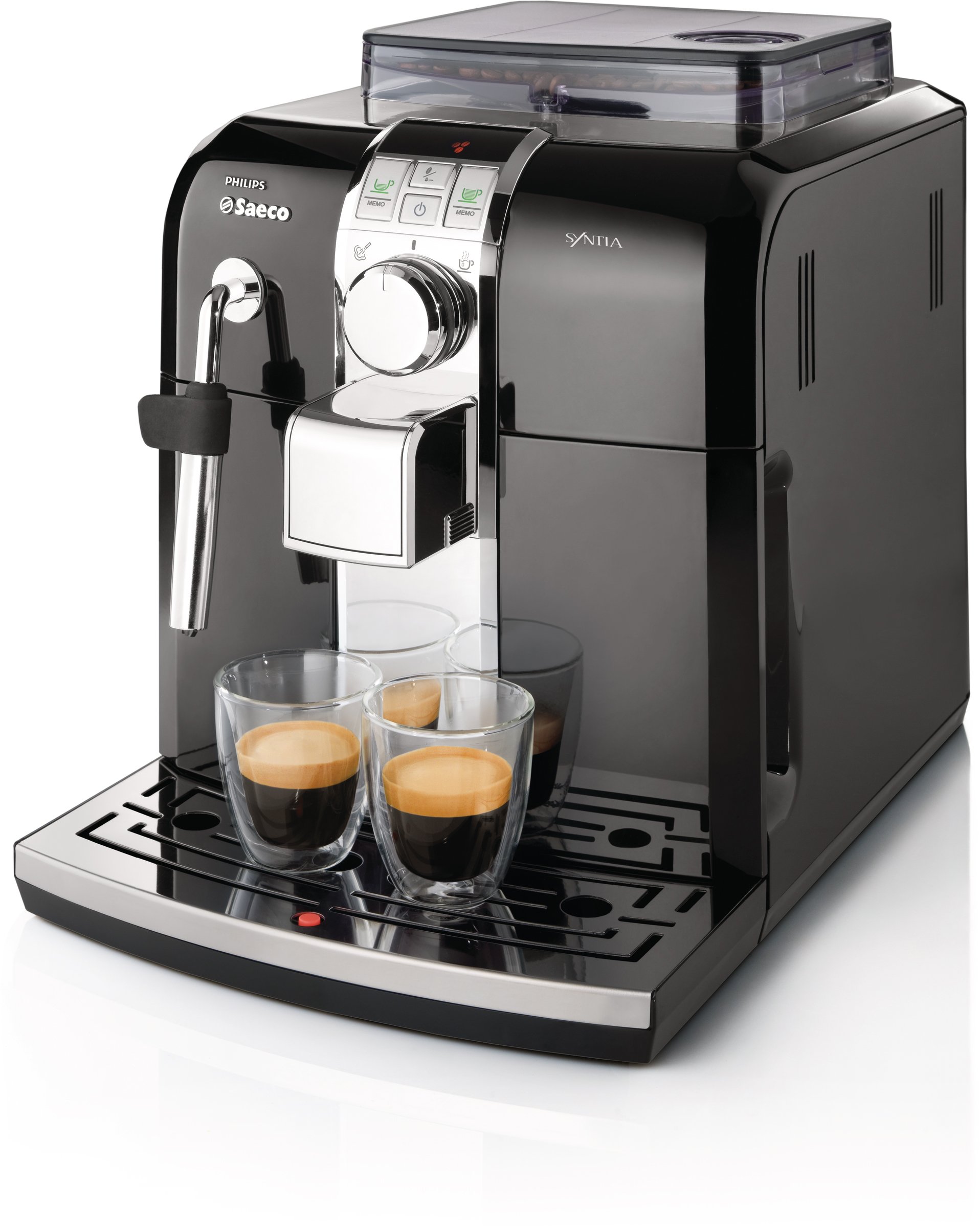
Figure 1.1: Front view of the Philips Saeco Syntia HD8833/47 Automatic Espresso Machine, showcasing its compact design and two cups of espresso on the drip tray.
2. Safety Information
Please read all safety instructions carefully before using the appliance. Failure to follow these instructions may result in electric shock, fire, or serious injury.
- Always connect the appliance to a grounded power outlet.
- Do not immerse the appliance, power cord, or plug in water or other liquids.
- Keep the appliance out of reach of children.
- Do not operate the appliance if the power cord or plug is damaged.
- Only use original Saeco spare parts and accessories.
- Unplug the appliance before cleaning and when not in use for extended periods.
3. Product Overview
The Saeco Syntia HD8833/47 is designed for user convenience, featuring front access to all components for easy refilling and cleaning.
3.1 Key Components
- Water Tank: Easily accessible from the front for refilling.
- Bean Hopper: Air-tight and UV protected, located at the top, also front-accessible.
- Drip Tray: Removable from the front for cleaning.
- Brew Group: Internal component responsible for brewing, accessible for maintenance.
- Control Panel: Features an LED display with nine intuitive icons and a central dial.
- Steam Wand: For frothing milk and dispensing hot water.

Figure 3.1: Top view of the machine with the bean hopper open, illustrating the easy access for adding coffee beans.

Figure 3.2: Detailed view of the control panel, highlighting the intuitive buttons and LED display for various functions.
4. Setup
4.1 Unpacking and Placement
- Carefully remove the machine from its packaging.
- Place the machine on a stable, level surface, away from heat sources and water.
- Ensure adequate space around the machine for ventilation and access to front-loading components.
4.2 Initial Preparation
- Fill the Water Tank: Remove the water tank from the front, fill it with fresh tap water up to the MAX level, and reinsert it.
- Fill the Bean Hopper: Open the lid of the bean hopper and pour fresh coffee beans into it. Close the lid securely to maintain freshness.
- Connect Power: Plug the power cord into a grounded electrical outlet.
- First Use Cycle: Follow the on-screen prompts for the initial rinse cycle. This primes the system and cleans internal components.
5. Operating Instructions
5.1 Brewing Espresso and Coffee
The machine offers one-touch brewing for your favorite coffee drinks.
- Place a cup under the dispensing spout.
- Press the desired coffee button (e.g., short espresso, long coffee). The machine will automatically grind the beans and brew.
- Memo Function: To store your preferred drink volume, press and hold the desired coffee button until the display indicates programming mode. Release the button when the desired volume is reached.

Figure 5.1: Espresso being dispensed, illustrating the brewing process.
5.2 Using Pre-Ground Coffee
For decaffeinated coffee or a different blend, you can use pre-ground coffee.
- Open the pre-ground coffee bypass doser (usually a small hatch near the bean hopper).
- Add one scoop of pre-ground coffee. Do not add whole beans to this slot.
- Select the pre-ground coffee function on the control panel.
5.3 Steaming Milk and Hot Water
The Rapid Steam feature allows quick transition between brewing and steaming.
- For Steam: Turn the central dial to the left. Immerse the steam wand into milk to froth for cappuccinos or lattes.
- For Hot Water: Turn the central dial to the right. Use for Americanos, tea, or hot chocolate.
5.4 Adjusting Coffee Strength (OptiDose)
The Saeco OptiDose feature allows you to regulate the amount of ground coffee beans per cup.
- Use the aroma button on the control panel to select mild, medium, or strong coffee.
- The adjustable built-in ceramic disc grinder ensures quiet operation and consistent results.
6. Maintenance
Regular maintenance ensures optimal performance and longevity of your espresso machine.
6.1 Daily Cleaning
- Drip Tray: Empty and rinse the drip tray daily to prevent overflow.
- Coffee Grounds Container: Empty and clean the coffee grounds container when indicated by the machine.
- Brew Group: Remove and rinse the brew group under lukewarm water weekly. Allow it to air dry before reinserting.
6.2 Descaling
The machine will indicate when descaling is required. This process removes mineral buildup and is crucial for machine health.
- Use only Saeco descaling solution.
- Follow the detailed instructions provided in the machine's display and the full manual for the multi-step descaling process. This process typically involves several rinse cycles and can take approximately one hour.
- Ensure the descaling alarm clears after the process is complete.
6.3 Water Filtration
The machine features water filtration to improve coffee taste and reduce limescale buildup. Replace the water filter cartridge as recommended by the manufacturer or when indicated by the machine.
7. Troubleshooting
Refer to this section for common issues and their solutions.
| Problem | Possible Cause | Solution |
|---|---|---|
| Machine does not turn on. | No power supply. | Check if the power cord is securely plugged into the machine and a working outlet. |
| Descaling alarm does not clear. | Descaling process not completed correctly or interrupted. | Repeat the full descaling process, ensuring all steps are followed without interruption. |
| Water overflows from drip tray. | Drip tray is full. | Empty and clean the drip tray regularly. The machine has an indicator for a full drip tray. |
| Coffee is not hot enough. | Cups are cold; machine not preheated. | Preheat cups with hot water. Allow the machine to fully preheat before brewing. |
| No coffee is dispensed. | Water tank empty; brew group clogged; no coffee beans. | Refill water tank. Clean the brew group. Refill bean hopper. |
For issues not listed here, please consult the comprehensive manual or contact customer support.
8. Specifications
| Feature | Detail |
|---|---|
| Brand | Philips (Saeco) |
| Model Number | HD8833/47 |
| Color | Black |
| Coffee Maker Type | Espresso Machine (Super-Automatic) |
| Material | Stainless Steel |
| Item Weight | 21.6 Pounds |
| Wattage | 1400 watts |
| Voltage | 120 Volts |
| Human Interface Input | Dial |
| Filter Type | Reusable |
| UPC | 075020021274 |
| ASIN | B008H1L3PK |
9. Warranty and Support
For warranty information and customer support, please refer to the documentation included with your purchase or visit the official Philips Saeco website. Keep your proof of purchase for warranty claims.
Manufacturer: Phillips Saeco


