
1. Product Overview
The techno line WT 643 is a versatile projection alarm clock and weather station designed to provide you with essential time, date, temperature, and weather forecast information. Its key features include a quartz clock with time projection, date and day of the week display in 7 languages, 3D laser-etched weather symbols with white LED illumination, and indoor/outdoor temperature display in Celsius or Fahrenheit.

Image 1.1: The techno line WT 643 main unit (left) displaying time, indoor/outdoor temperature, and day, alongside its wireless remote sensor (right).
2. Setup
2.1 Unpacking
Carefully remove all components from the packaging. Ensure you have the main unit, the wireless remote sensor, and this instruction manual.
2.2 Battery Installation
The main unit and remote sensor require batteries for operation. Refer to the battery compartment markings for correct polarity.
- Main Unit: Open the battery compartment cover on the back of the main unit. Insert the required batteries (type and quantity specified in the specifications section). Close the cover securely.
- Remote Sensor: Open the battery compartment cover on the back of the remote sensor. Insert the required batteries. Close the cover.
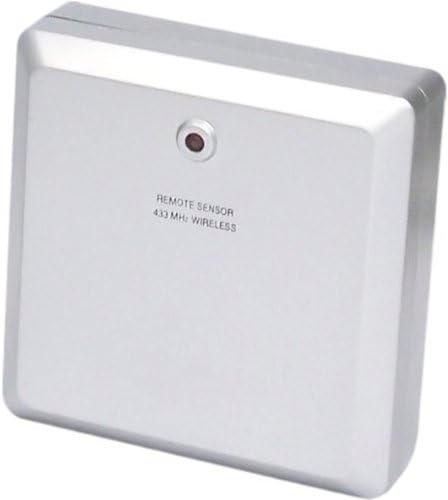
Image 2.1: Close-up view of the wireless remote sensor, showing its compact design.
2.3 Initial Power-On and Sensor Pairing
After installing batteries, the main unit will power on. It will automatically attempt to connect with the remote sensor. Place the remote sensor within range of the main unit during this process. Once connected, the outdoor temperature will appear on the main unit's display.
2.4 Placement Recommendations
- Main Unit: Place the main unit on a stable, flat surface indoors, away from direct sunlight or heat sources. For optimal projection, position it where the projected time can be clearly seen on a wall or ceiling.
- Remote Sensor: Place the remote sensor outdoors in a shaded, dry location, protected from direct rain and sunlight, to ensure accurate temperature readings. Ensure it is within the wireless range of the main unit.
3. Operating Instructions
3.1 Setting Time and Date
Refer to the buttons on the main unit (e.g., MODE, SET, ADJUST) to enter the time/date setting mode. Use the ADJUST button to change values and SET to confirm. The manual supports 7 languages for the day of the week display.
3.2 Alarm Setting and Snooze
To set the alarm, press the ALARM button (or similar, depending on model specifics) to enter alarm setting mode. Use the ADJUST button to set the desired alarm time and SET to confirm. The snooze function can typically be activated by pressing a designated button (e.g., SNOOZE/LIGHT) when the alarm sounds.
3.3 Projection Feature
The WT 643 features a projection function to display the time on a wall or ceiling. Locate the projector lens and adjustment wheel. You can typically:
- Activate/Deactivate Projection: Use a dedicated button or switch.
- Adjust Projection Angle: Rotate the projector lens housing to change the projection direction.
- Adjust Focus: Use the focus wheel near the lens to sharpen the projected image.
3.4 Temperature Display
The unit displays both indoor ('IN') and outdoor ('OUT') temperatures. You can switch between Celsius (°C) and Fahrenheit (°F) display modes using a dedicated button (often labeled °C/°F or similar).
3.5 Weather Forecast
The 3D laser-etched weather symbols on the unit illuminate to indicate the predicted weather conditions (e.g., sunny, cloudy, rainy). These forecasts are based on atmospheric pressure changes detected by the unit. Note that these are predictions and may not always perfectly match actual conditions.

Image 3.1: The techno line WT 643 positioned on a bedside table, demonstrating its use in a bedroom environment.
4. Maintenance
4.1 Cleaning
Wipe the unit with a soft, dry cloth. Do not use abrasive cleaners or solvents, as these may damage the display or casing.
4.2 Battery Replacement
When the display dims or the unit malfunctions, replace the batteries in both the main unit and the remote sensor. Dispose of old batteries responsibly according to local regulations.
4.3 Storage
If storing the unit for an extended period, remove all batteries to prevent leakage and damage.
5. Troubleshooting
- No Display / Unit Not Powering On:
Check battery installation and ensure batteries are fresh. Verify correct polarity. - Incorrect Time / Date:
Re-enter the time and date manually following section 3.1. - Outdoor Temperature Not Displaying:
Ensure the remote sensor batteries are fresh and correctly installed. Place the sensor within range of the main unit. Try re-pairing the sensor by removing batteries from both units, then reinserting them first into the main unit, then the sensor. - Projection Unclear / Not Visible:
Adjust the focus wheel on the projector lens. Ensure the projection surface is within the optimal distance. Check if the projection feature is activated. - Inaccurate Weather Forecast:
Weather forecasts are based on local atmospheric pressure changes. Significant changes in altitude or environmental factors can affect accuracy. The unit provides a general trend, not a precise forecast. - Buttons Not Responding:
Try removing and reinserting the batteries to perform a soft reset.
6. Specifications
| Feature | Specification |
|---|---|
| Brand | techno line |
| Model | WT 643 |
| Color | White |
| Product Dimensions | 16 x 3.8 x 11 cm |
| Item Weight | 443 g |
| Material | Plastic |
| Display Type | Digital |
| Special Features | Projection, Snooze, Temperature Display, Weather Forecast |
| Power Source | Battery |
| Indoor/Outdoor Use | Indoor (Main Unit), Outdoor (Sensor) |
7. Warranty Information
This product comes with a standard manufacturer's warranty. Please retain your proof of purchase for any warranty claims. For specific details regarding warranty duration and terms, refer to the documentation provided with your purchase or contact customer support.
8. Support
For further assistance, technical support, or inquiries not covered in this manual, please contact techno line customer service. Contact information can typically be found on the product packaging or the official techno line website.