
1. Important Safety Information
Please read all instructions carefully before proceeding with battery replacement. This procedure requires disassembling your shaver and soldering. If you are not confident in your ability to perform these steps, it is recommended to seek assistance from a qualified technician.
- Battery Handling: Do not attempt to open or disassemble the battery pack. Do not crush, puncture, or short external contacts.
- Temperature: Do not expose the battery to temperatures above 60°C (140°F) or dispose of it in fire or water.
- Compatibility: Replace only with the battery pack designed for this specific product and compatible shaver models.
- Soldering: Exercise extreme caution when soldering. Ensure proper ventilation and use appropriate safety gear.
2. Package Contents
- HQRP Ni-CD Rechargeable Battery (2.4V, 700mAh)
- HQRP Screwdriver (for shaver disassembly)

The HQRP Ni-CD battery pack, consisting of two cells, is shown alongside its protective packaging. This image displays the product as it arrives.

A black and yellow handled screwdriver with a specialized tip, included to assist with disassembling compatible Philips Norelco shavers.
3. Setup and Installation (Battery Replacement)
This section outlines the steps for replacing the battery in your Philips Norelco shaver. This process requires soldering.
Required Tools (Not Included, except screwdriver):
- Soldering Iron
- Solder
- Desoldering wick or pump (recommended)
- Small pliers or tweezers
- Safety glasses
Installation Steps:
- Power Off and Disconnect: Ensure your shaver is turned off and disconnected from any power source.
- Disassemble Shaver: Carefully disassemble your Philips Norelco shaver. This typically involves removing screws (using the provided HQRP screwdriver) and prying open the casing. Refer to your shaver's original manual or online resources for specific disassembly instructions for your model.
- Locate Old Battery: Identify the existing battery pack within the shaver. Note its orientation and how it is connected to the shaver's circuit board.
- Desolder Old Battery: Using a soldering iron and desoldering tools, carefully desolder the connections of the old battery from the circuit board. Be gentle to avoid damaging the board.
- Remove Old Battery: Once desoldered, remove the old battery pack. Dispose of it responsibly according to local regulations for Ni-CD batteries.
- Prepare New Battery: The HQRP replacement battery comes with solder tabs. Ensure these tabs align correctly with the connection points on your shaver's circuit board.
- Solder New Battery: Carefully solder the tabs of the new HQRP battery to the corresponding connection points on the circuit board. Ensure strong, clean solder joints. Double-check polarity (+/-) before soldering.
- Reassemble Shaver: Once the new battery is securely soldered, carefully reassemble the shaver casing, ensuring all components are correctly seated and screws are tightened.
- Initial Charge: After reassembly, fully charge your shaver before its first use.
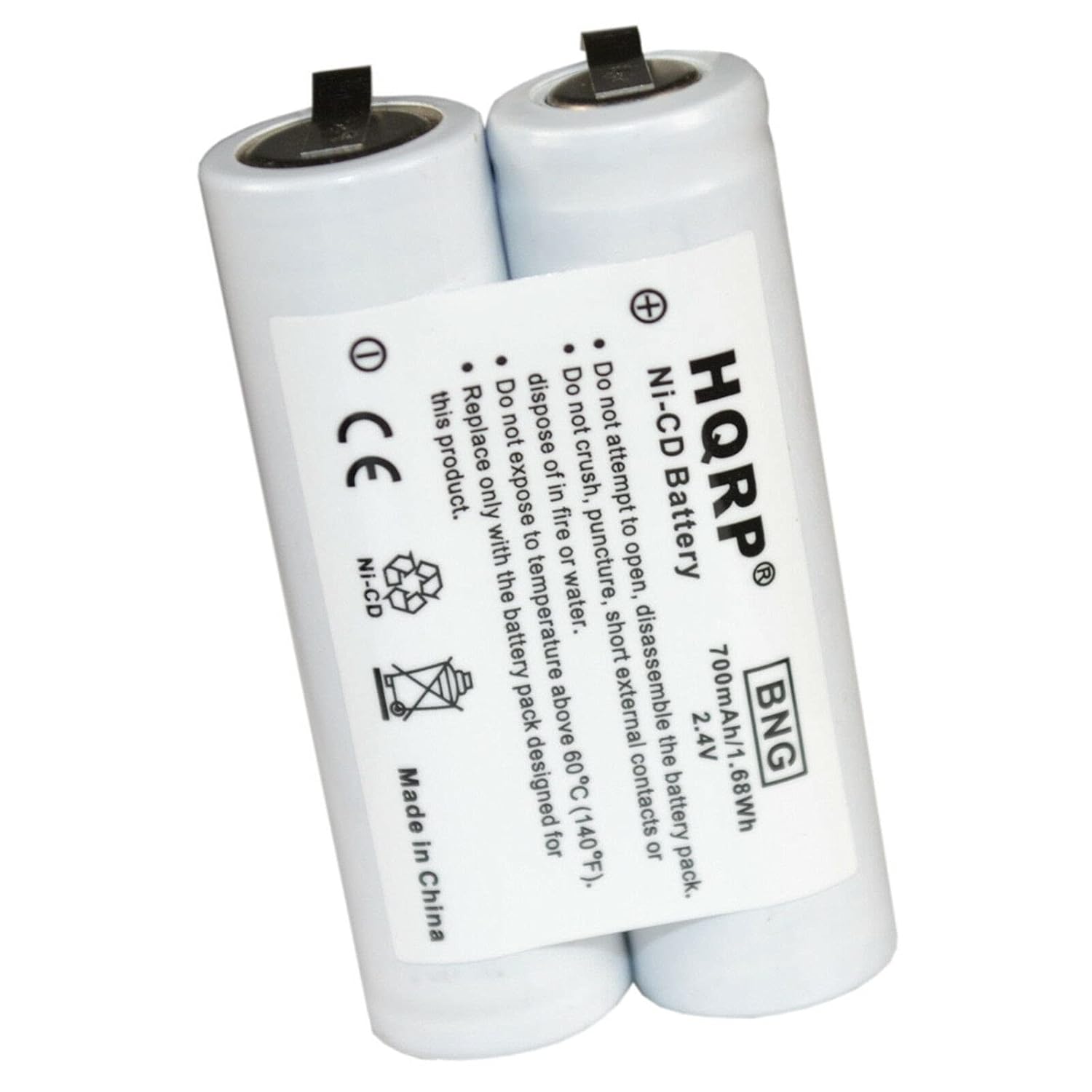
A detailed view of the HQRP Ni-CD battery, showing its specifications (700mAh, 2.4V) and important safety warnings regarding handling, temperature, and disposal.

An image illustrating the physical dimensions of the HQRP Ni-CD battery pack, showing a length of 48 mm and a height of 29 mm for the two-cell configuration.
4. Operating Instructions
Once the HQRP battery is successfully installed, your Philips Norelco shaver will operate as it did with the original battery. Ensure the shaver is fully charged before its initial use after battery replacement.
- Charging: Connect the shaver to its original charging adapter and allow it to charge until the charging indicator shows a full charge.
- Usage: Use the shaver according to the original manufacturer's instructions.
5. Maintenance
Proper maintenance helps extend the life of your new battery.
- Regular Charging: For Ni-CD batteries, it is often recommended to fully discharge the battery before recharging to prevent memory effect, though modern chargers may mitigate this.
- Storage: If storing the shaver for an extended period, ensure the battery is partially charged (around 50%) and store in a cool, dry place. Avoid extreme temperatures.
- Cleaning: Maintain your shaver according to its original manual to ensure optimal performance, which indirectly benefits battery life.
6. Troubleshooting
If your shaver does not function correctly after battery replacement, consider the following:
- No Power/Not Charging:
- Check all soldered connections for cold joints or shorts.
- Verify battery polarity was correct during installation.
- Ensure the shaver's charging circuit is intact and functional.
- Short Run Time:
- Ensure the battery was fully charged after installation.
- Confirm the battery capacity (700mAh) is sufficient for your shaver model.
- Shaver Not Reassembling:
- Check for any misplaced wires or components preventing the casing from closing properly.
If issues persist, consult a professional or contact HQRP customer support.
7. Specifications
| Feature | Specification |
|---|---|
| Battery Type | Ni-CD (Nickel-Cadmium) |
| Voltage | 2.4V |
| Capacity | 700mAh |
| Compatibility | Philips Norelco 4825XL, 4845XL, 4852XL, 4853XL, 4865X, 4865XL Shavers |

This graphic highlights the quality features of the HQRP battery, including high-quality cells, over 1000 charge-discharge cycles, safety, reliability, and long-lasting stable performance.
8. Warranty Information
This HQRP battery comes with a 200-day warranty from the date of purchase. Please retain your proof of purchase for warranty claims. The warranty covers manufacturing defects but does not cover damage due to improper installation, misuse, or normal wear and tear.
9. Support
For further assistance, technical support, or warranty inquiries, please contact HQRP customer service through their official website or the retailer where the product was purchased.

