
Introduction
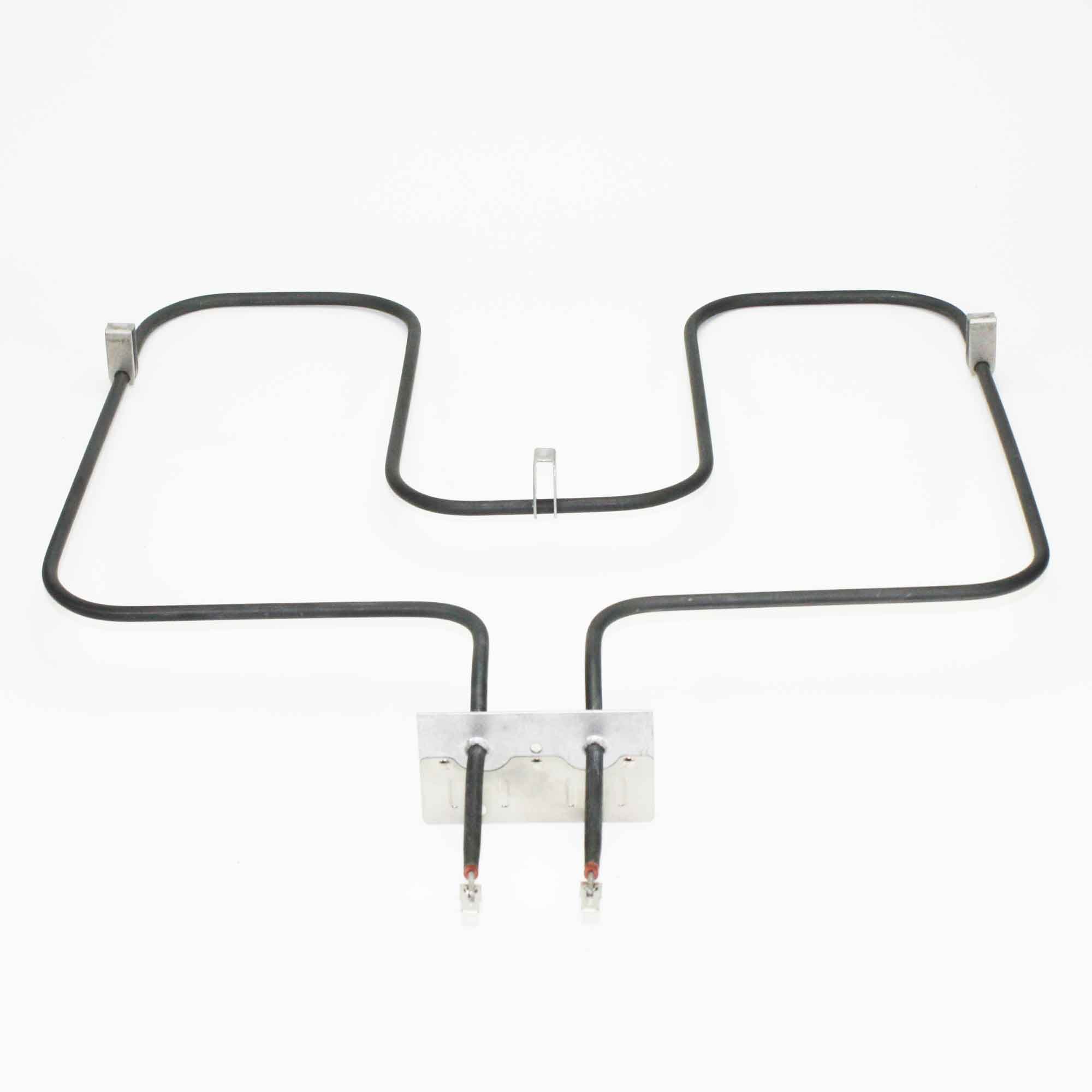
This manual provides essential information for the safe and correct installation, operation, and maintenance of your Whirlpool Part Number 7406P438-60 oven heating element. This component is designed as a direct replacement part for compatible Whirlpool and Maytag oven models, ensuring proper heating function for baking.
Safety Information
- Disconnect Power: Always disconnect power to the oven at the circuit breaker or fuse box before attempting any installation, maintenance, or repair. Failure to do so can result in electric shock or serious injury.
- Wear Protective Gear: Wear appropriate personal protective equipment, such as gloves and eye protection, during installation.
- Professional Installation: If you are unsure about any step or lack the necessary tools or experience, it is recommended to seek assistance from a qualified appliance technician.
- Handle with Care: Heating elements can be fragile. Handle the new element carefully to avoid bending or damaging it.
Installation
This section outlines the steps for replacing an existing oven heating element with the Whirlpool Part Number 7406P438-60. Typical tools required include a Phillips head screwdriver and possibly pliers.
- Prepare the Oven: Ensure the oven is cool. Open the oven door and remove any racks or other items from inside.
- Disconnect Power: Locate the circuit breaker for your oven and switch it to the OFF position. Verify that the power is off before proceeding.
- Access the Element: Identify the old heating element. It is typically secured by two screws at the back of the oven cavity.
- Remove Old Element: Using a Phillips head screwdriver, remove the two screws holding the old element in place. Carefully pull the element forward a few inches to expose the electrical terminals.
- Disconnect Wires: Note the position of the wires connected to the old element's terminals. Disconnect these wires. Pliers may be helpful to gently pull off the spade terminals. Ensure the wires do not retract into the oven wall.
- Install New Element: Connect the electrical wires to the terminals of the new Whirlpool Part Number 7406P438-60 heating element. Ensure connections are secure.
- Secure New Element: Carefully push the new element into position, aligning the mounting plate with the screw holes. Reinstall the two screws to secure the element firmly.
- Restore Power: Close the oven door. Return to the circuit breaker and switch the power back ON.
- Test Functionality: Turn on the oven to a bake setting and observe if the new element heats up and glows orange.
Operating
The Whirlpool Part Number 7406P438-60 is a baking element. Once installed, its operation is controlled by the oven's thermostat and control board. When the oven is set to a bake function, the element receives electrical current, heats up, and radiates heat to cook food. Ensure the oven door is properly closed during operation to maintain consistent temperatures.
Maintenance
Heating elements generally require minimal maintenance. However, proper care can extend their lifespan:
- Avoid Direct Contact: Do not allow food or cooking utensils to directly touch the heating element, as this can cause damage or uneven heating.
- Clean Spills Promptly: If food spills onto the element, allow the oven to cool completely, then gently wipe away any residue. Avoid using abrasive cleaners or sharp objects that could scratch or damage the element's surface.
- Regular Oven Cleaning: Maintain a clean oven cavity to prevent excessive buildup of grease and food particles, which can affect element performance and lifespan.
Troubleshooting
If your oven is not heating correctly after replacing the element, consider the following:
- Element Not Heating: Ensure the oven has power and the circuit breaker is not tripped. Check that the electrical connections to the element are secure and properly seated.
- Uneven Heating: Verify that the element is correctly installed and not bent or obstructed. Ensure the oven racks are positioned correctly.
- Element Not Glowing: A properly functioning bake element should glow red/orange when the oven is set to a high temperature. If it does not, recheck power and connections. If issues persist, the element itself may be faulty, or there could be an issue with the oven's control system.
- Oven Not Reaching Temperature: This could indicate a problem with the element, the oven's thermostat, or the temperature sensor.
For persistent issues, consult a qualified appliance repair technician.
Specifications
| Brand Name | Whirlpool |
| Model Info | 7406P438-60 |
| Item Weight | 1.6 pounds |
| Product Dimensions | 17.8 x 2.8 x 22 inches |
| Part Number | 7406P438-60 |
Warranty and Support
For specific warranty information regarding your Whirlpool Part Number 7406P438-60 heating element, please refer to the documentation provided with your original appliance or contact Whirlpool customer support directly. You can typically find support contact information on the official Whirlpool website or within your appliance's main user manual.
Whirlpool Customer Support: For technical assistance, parts inquiries, or warranty claims, please visit the official Whirlpool website or consult your appliance's user manual for contact details.
