
Venstar CECOMINOD058081
Venstar Platinum Slimline Thermostat User Manual
Model: CECOMINOD058081
1. Introduction
The Venstar Platinum Slimline Thermostat (Model CECOMINOD058081) is designed to provide reliable and flexible temperature control for your HVAC system. This programmable thermostat offers a range of features to enhance comfort and energy efficiency in your home or office.
Key features include 1-day programming with up to 4 time periods, auto changeover, compatibility with 2-stage heat and 1-stage cool systems (gas/electric, heat pump, electric & hydronic heat), and a large, easy-to-read backlit display. It also includes service indicators for filter and UV light maintenance.

Figure 1: Front view of the Venstar Platinum Slimline Thermostat, showing the display screen and control buttons.
2. Safety Information
Please read all instructions carefully before installing or operating this thermostat. Failure to follow these instructions could result in property damage, personal injury, or death.
- Power Disconnection: Always disconnect power to the heating and cooling system before installing or servicing the thermostat.
- Professional Installation: Installation should be performed by a qualified HVAC technician.
- Voltage Requirement: This thermostat requires a 24V "common" wire (C-wire) for operation. It is not suitable for 2-wire, heat-only applications.
- Electrical Hazards: Do not touch uninsulated wires or terminals.
3. Setup and Installation
3.1 Pre-installation Checklist
- Ensure power to the HVAC system is OFF at the circuit breaker.
- Gather necessary tools: screwdriver, wire strippers, drill (if needed for mounting).
- Confirm your system has a 24V common wire (C-wire) available at the thermostat location.
3.2 Mounting the Thermostat
The Venstar Platinum Slimline Thermostat is designed for wall mounting.
- Carefully separate the thermostat faceplate from the backplate.
- Position the backplate on the wall where the old thermostat was located, ensuring wires can pass through the opening.
- Mark the mounting holes and drill pilot holes if necessary.
- Secure the backplate to the wall using the provided screws.
3.3 Wiring Instructions
Proper wiring is crucial for the thermostat's functionality. This model requires a 24V common wire (C-wire). Refer to the wiring diagram on the backplate and the image below.
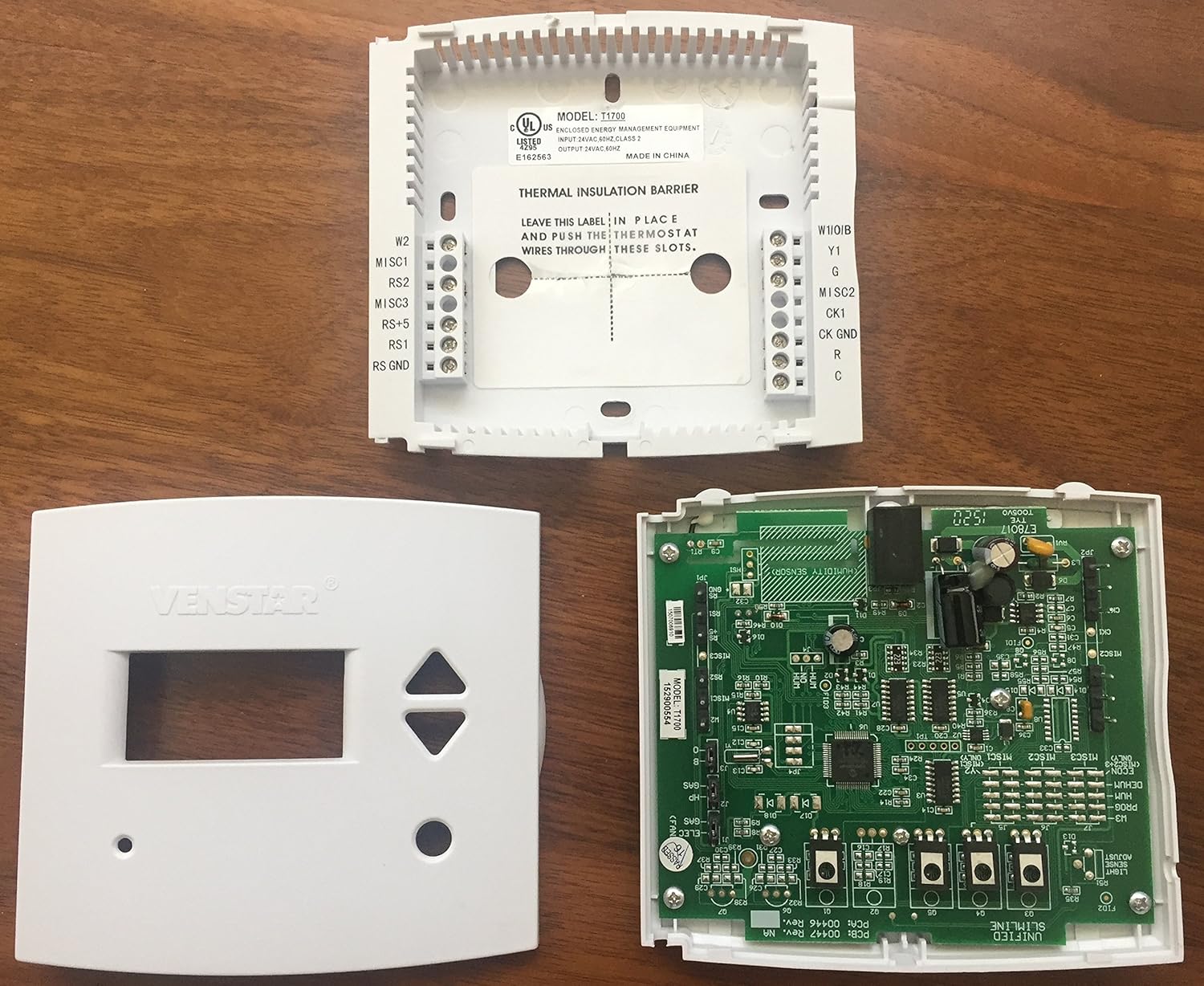
Figure 2: Internal view of the Venstar Platinum Slimline Thermostat, showing the backplate with wiring terminals and the circuit board.
- Match the wires from your HVAC system to the corresponding terminals on the thermostat backplate. Common terminals include R (24V power), C (24V common), G (fan), Y (cooling), W (heating).
- Ensure all connections are secure.
- Once wiring is complete, carefully attach the thermostat faceplate to the backplate.
3.4 Initial Power-up
After installation, restore power to your HVAC system at the circuit breaker. The thermostat display should illuminate. Follow any on-screen prompts for initial setup, such as setting the current time and day.
4. Operating Instructions
4.1 Basic Operation
- Setting Temperature: Use the UP and DOWN arrow buttons to adjust the desired temperature.
- Mode Selection: Use the MODE button (if present, or cycle through options) to select between Heat, Cool, Auto, or Off. The thermostat supports auto changeover.
- Fan Control: Use the FAN button to select between Auto (fan runs only when heating/cooling) or On (fan runs continuously).
4.2 Programming Schedule
The thermostat features 1-day programming with up to 4 time periods. This allows you to set different temperatures for different times of the day (e.g., Wake, Day, Evening, Sleep).
- Access the programming menu (refer to the on-screen prompts or specific button combinations, typically a "Program" or "Set" button).
- Set the start time and desired temperature for each of the 4 periods.
- Save the program settings.
The thermostat can also be configured for non-programmable operation if a fixed temperature is preferred.
4.3 Display Information
The large backlit display shows the current room temperature, set temperature, operating mode, and fan status. LED indicators glow green for cooling and red for heating.
- Fahrenheit or Celsius: The display can be configured to show temperatures in Fahrenheit (°F) or Celsius (°C). Consult the advanced settings menu for this option.
4.4 Keypad Lock
The thermostat features a keypad lock function to prevent unauthorized changes to settings. Refer to the advanced settings or specific button sequence in the full manual for activation and deactivation.
5. Maintenance
5.1 Cleaning the Thermostat
To clean the thermostat, gently wipe the exterior with a soft, damp cloth. Do not use abrasive cleaners or solvents. Ensure no moisture enters the internal components.
5.2 Service Indicators
The thermostat includes indicators for service reminders:
- Service Filter: An indicator will appear when it's time to check or replace your HVAC system's air filter.
- UV Light: If your system includes a UV light, an indicator will signal when it requires service or replacement.
Follow your HVAC system manufacturer's guidelines for filter and UV light maintenance. Reset the indicators after performing the service.
6. Troubleshooting
| Problem | Possible Cause | Solution |
|---|---|---|
| Thermostat display is blank. | No power to the thermostat; C-wire not connected or faulty. | Check circuit breaker for HVAC system. Ensure 24V C-wire is properly connected to the thermostat. Consult a qualified technician. |
| System not responding to thermostat settings. | Incorrect wiring; system mode incorrect; safety lockout. | Verify wiring connections. Ensure thermostat is in the correct mode (Heat/Cool/Auto). Wait a few minutes for system safety lockout to reset. |
| Temperature varies significantly from setpoint. | System cycling issues; thermostat placement; system deadband setting. | Ensure thermostat is not in direct sunlight or near heat sources/drafts. Some systems have a "deadband" (temperature differential) before activating. Consult advanced settings or a technician if variance is excessive. |
| Service Filter/UV Light indicator remains on after service. | Indicator not reset. | Refer to the thermostat's advanced settings or specific button sequence to reset the service indicator. |
For issues not listed here or if troubleshooting steps do not resolve the problem, please contact a qualified HVAC professional or Venstar customer support.
7. Specifications
| Feature | Detail |
|---|---|
| Brand | Venstar |
| Model Number | CECOMINOD058081 (T1700) |
| Product Dimensions | 6.25 x 4.63 x 2 inches |
| Item Weight | 10.5 ounces |
| Voltage | 24 Volts |
| Controller Type | Push Button |
| Special Feature | Programmable |
| Connectivity Technology | Wired |
| Display Type | Backlit |
| Mounting Type | Wall Mount |
| Power Source | Corded Electric |
| Compatibility | 2-stage heat, 1-stage cool (gas/electric, heat pump, electric & hydronic heat) |
8. Warranty and Support
For information regarding the product warranty, please refer to the documentation included with your purchase or visit the official Venstar website.
For technical support, troubleshooting assistance, or to inquire about replacement parts, please contact Venstar customer service directly.
Venstar Official Website: www.venstar.com
Ask a question about this manual
Ask about setup, troubleshooting, compatibility, parts, safety, or missing instructions. Manuals+ will review the question and use this page’s manual context to help answer it.