
Braeburn 1220NC
Braeburn 1220NC Non-Programmable Thermostat User Manual
Model: 1220NC
Introduction
This manual provides detailed instructions for the installation, operation, and maintenance of your Braeburn 1220NC Non-Programmable Thermostat. Please read this manual thoroughly before installation and use to ensure proper function and safety.
The Braeburn 1220NC is designed for simple and reliable temperature control in residential and light commercial applications. It is compatible with most single-stage and multi-stage conventional and heat pump systems.
Safety Information
Always turn off power to the heating/cooling system at the main fuse or circuit breaker panel before installing or servicing this thermostat. Failure to do so could result in electrical shock or equipment damage.
All wiring must conform to local electrical codes and ordinances. This thermostat is a low-voltage device. Do not connect it to line voltage (120V or 240V) systems.
Do not short (jumper) the terminals on the gas valve or at the air handler to test the system. This could damage the thermostat and/or the system.
Setup and Installation
Package Contents
- Braeburn 1220NC Thermostat
- Wallplate (Sub-base)
- Mounting Hardware (Screws and Wall Anchors)
- AA Alkaline Batteries (2)
Mounting Location
Install the thermostat approximately 5 feet (1.5m) above the floor. Select an area with good air circulation, away from direct sunlight, drafts, and heat sources (e.g., lamps, fireplaces, appliances). Avoid mounting on exterior walls.
Installation Steps
- Turn Off Power: Disconnect power to the heating and cooling system at the main fuse or circuit breaker panel.
- Remove Old Thermostat: Carefully remove the old thermostat from the wall. Note the wire connections to each terminal. It is recommended to label each wire with the terminal designation from your old thermostat.
- Mount Wallplate: Separate the thermostat from its wallplate. Position the wallplate on the wall and mark the mounting holes. Drill holes if necessary and insert wall anchors. Secure the wallplate to the wall using the provided screws. The thermostat can be mounted to a horizontal junction box.
- Connect Wires: Connect the system wires to the appropriate terminals on the new thermostat's wallplate. Refer to the wiring diagram for your specific system type (conventional or heat pump). The thermostat uses standard wire connection codes.
- Install Batteries: Insert the two AA alkaline batteries into the battery compartment. Ensure correct polarity. The thermostat can also be hardwired for 24 VAC power.
- Attach Thermostat: Align the thermostat with the mounted wallplate and gently push until it snaps securely into place.
- Restore Power: Turn on power to the heating and cooling system at the main fuse or circuit breaker panel.

Figure 1: Front view of the Braeburn 1220NC Thermostat, showing the display, buttons, and system/fan switches.
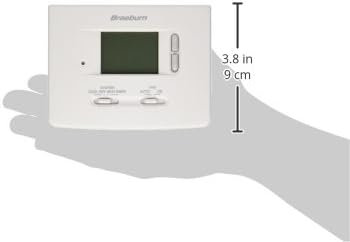
Figure 2: The Braeburn 1220NC Thermostat held in a hand, illustrating its compact size and approximate dimensions (3.8 inches / 9 cm height shown).
Operating Instructions
Display and Controls
The thermostat features a large 2 square inch LCD display with a bright blue backlight for easy readability. Controls include up/down buttons for temperature adjustment and slide switches for system and fan modes.
Setting the Temperature
- Press the UP or DOWN arrow buttons to adjust the desired temperature setting. The display will show the set temperature.
- The temperature control range is between 45°F and 90°F (7°C and 32°C).
System Mode Switch
Use the SYSTEM slide switch to select the desired operating mode:
- COOL: The thermostat will control your cooling system.
- OFF: The heating and cooling systems are turned off.
- HEAT: The thermostat will control your heating system.
- EMER (Emergency Heat): For heat pump systems only. Activates auxiliary/emergency heat.
Fan Mode Switch
Use the FAN slide switch to select the desired fan operation:
- AUTO: The fan runs only when the heating or cooling system is actively operating.
- ON: The fan runs continuously, regardless of whether the heating or cooling system is active.
Additional Features
- Low Battery Indication: A low battery icon will appear on the display when the batteries need to be replaced.
- Reset Button: A front access reset button is available. Pressing this button will return all user settings to their default values.
- F°/C° Switch: A switch is located on the back of the thermostat to select between Fahrenheit and Celsius temperature display.
- Compressor Short Cycle Protection: This feature prevents damage to your compressor by delaying its restart for a few minutes after it has been turned off.
- Non-Volatile Memory: User settings are retained even during power outages or battery changes.
Maintenance
Battery Replacement
When the low battery indicator appears on the display, replace the two AA alkaline batteries immediately. To replace batteries:
- Gently pull the thermostat straight off the wallplate.
- Remove the old batteries and insert new AA alkaline batteries, ensuring correct polarity (+/-).
- Snap the thermostat back onto the wallplate.
Cleaning
Clean the thermostat's exterior with a soft, damp cloth. Do not use abrasive cleaners or solvents. Avoid spraying liquids directly onto the thermostat.
Troubleshooting
| Problem | Possible Cause | Solution |
|---|---|---|
| Display is blank or dim. | Low or dead batteries; No 24 VAC power. | Replace batteries. Check circuit breaker for HVAC system. |
| System not responding (no heating/cooling). | System switch in OFF position; Incorrect wiring; Blown fuse in HVAC system. | Set system switch to HEAT or COOL. Verify wiring connections. Check HVAC system fuse. |
| Temperature reading seems inaccurate. | Thermostat exposed to direct sunlight, drafts, or heat sources. | Relocate thermostat if possible. Ensure proper air circulation around the unit. |
| Thermostat does not turn on/off at set temperature. | Temperature differential setting; Compressor short cycle protection active. | Allow for temperature differential (accuracy +/- 1°F). Wait for compressor protection delay to clear. |
| Thermostat is unresponsive. | Temporary electronic glitch. | Press the front reset button to restore default settings. |
Specifications
| Feature | Detail |
|---|---|
| Model | 1220NC |
| Dimensions (H x W x D) | 3.62 x 4.72 x 1.38 inches (9.2 x 12.0 x 3.5 cm) |
| Weight | 9.6 ounces (272 grams) |
| Power Source | 24 VAC or 2 AA Alkaline Batteries (3.0 Volts DC) |
| Temperature Control Range | 45°F to 90°F (7°C to 32°C) |
| Temperature Accuracy | +/- 1°F (+/- 0.5°C) |
| Humidity Range | 5% to 95% Relative Humidity (non-condensing) |
| Display Type | LCD with Blue Backlight (2 sq. in.) |
| Compatibility | Multi-stage conventional (2H/1C) or heat pump systems (1C/1Aux) |
| Mounting Type | Wall Mount (Horizontal Junction Box compatible) |
| Special Features | Low Battery Indicator, Non-Volatile Memory, Adjustable Temperature Limits, Auxiliary Heat Indicator, Compressor Short Cycle Protection, Front Reset Button, F°/C° Switch |
Warranty and Support
Specific warranty details for the Braeburn 1220NC Non-Programmable Thermostat are not provided in the available product information. Please refer to the product packaging or the manufacturer's official website for warranty terms and conditions.
For technical support or further assistance, please contact Braeburn customer service. Contact information can typically be found on the manufacturer's website or product packaging.
Related documents1220NC


Ask a question about this manual
Ask about setup, troubleshooting, compatibility, parts, safety, or missing instructions. Manuals+ will review the question and use this page’s manual context to help answer it.