Important Safety Information
Please read all instructions carefully before installation and use. Retain this manual for future reference.
- Ensure the bidet is connected to a 120V GFCI (Ground Fault Circuit Interrupter) outlet to prevent electrical shock.
- Do not immerse the unit, power cord, or plug in water or other liquids.
- Unplug the bidet from the electrical outlet before cleaning or performing any maintenance.
- Do not allow children or individuals with reduced physical, sensory, or mental capabilities to operate the bidet without supervision.
- Avoid using abrasive cleaners, solvents, or harsh chemicals on the bidet surface, as they may damage the material.
- Do not attempt to repair or disassemble the bidet yourself. Contact qualified service personnel for assistance.
Package Contents
Verify that all components are present before beginning installation:
- Lotus Smart Bidet Seat (ATS-1000 Elongated)
- Wireless Remote Control
- Remote Control Wall Mount and Screws
- T-Valve Connector
- Water Supply Hose
- Mounting Plate and Bolts
- User Manual
Setup and Installation
Before You Begin
- Ensure you have a standard 120V GFCI electrical outlet within reach of the bidet's power cord.
- Confirm your toilet is an elongated type. The ATS-1000 Elongated model is designed for elongated toilet bowls.
- Turn off the water supply to your toilet at the shut-off valve. Flush the toilet to drain the tank.
Installation Steps
- Remove your existing toilet seat and lid.
- Install the mounting plate onto the toilet bowl using the provided bolts. Adjust for proper alignment.
- Attach the T-valve connector to the toilet's fill valve, then connect the water supply hose from the T-valve to the bidet unit.
- Slide the Lotus Smart Bidet seat onto the mounting plate until it clicks securely into place.
- Connect the bidet's power cord to the GFCI electrical outlet.
- Slowly turn on the water supply to the toilet and check for any leaks.

This diagram illustrates the difference in dimensions between round and elongated toilet seats, ensuring proper fit for DIY installation. All necessary installation parts are included.
Operating Instructions
Overview of Controls
The Lotus Smart Bidet ATS-1000 is operated primarily via its wireless remote control, offering convenient access to all functions.
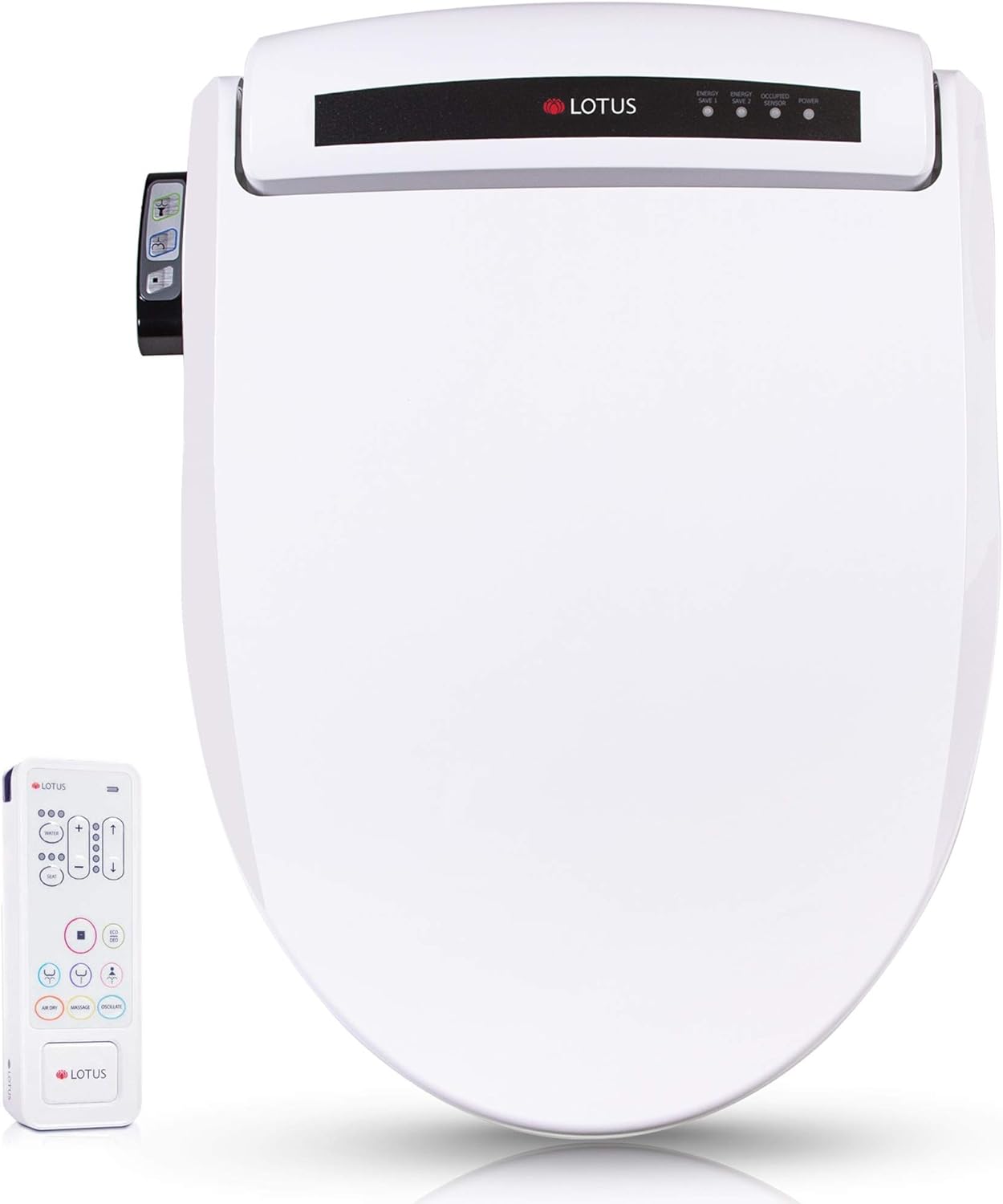
The Lotus Smart Bidet ATS-1000, shown with its intuitive wireless remote control for easy operation of all features.
Core Functions
- PureStream Function: Provides a therapeutic jet stream designed for deep cleansing and effective constipation relief.
- Rear Wash: Standard posterior cleansing with adjustable water pressure and temperature.
- Feminine Wash: Gentle anterior cleansing with adjustable water pressure and temperature.
- Warm Air Dryer: After washing, a warm air stream provides a comfortable drying experience. Air temperature is adjustable.
- Heated Seat: The seat temperature is adjustable to provide comfort, especially in colder environments.
- Water Temperature Control: Adjust the water temperature for washing to your preferred comfort level.
- Water Pressure Adjustment: Control the intensity of the water spray for both rear and feminine washes.
- Nozzle Position Adjustment: Fine-tune the nozzle's position for optimal cleansing.
- Energy Save Mode: Activates a power-saving mode to reduce electricity consumption when not in use.

An overview of the Lotus Smart Bidet's key features, including Purestream, various wash modes, drying, and energy-saving capabilities, with their respective adjustable levels.

A detailed view of the bidet's self-cleansing nozzle, featuring anti-bacterial material, 5-level oscillation function, and an easy-to-replace tip for hygiene and convenience.

This image demonstrates the patented Purestream Technology, which delivers a therapeutic jet stream for deep cleansing and effective constipation relief.
Maintenance
Cleaning the Nozzle
The bidet features a self-cleansing nozzle. For additional cleaning, gently pull the nozzle forward and wipe it with a soft cloth and mild, non-abrasive cleaner. Do not use harsh chemicals.
General Cleaning
Wipe the exterior of the bidet seat with a soft, damp cloth and a mild household cleaner. Avoid spraying water directly onto the control panel or electrical components. Ensure the bidet is unplugged before cleaning.
Filter Maintenance
Periodically check and clean the water inlet filter located at the connection point of the water supply hose. Turn off the water supply and unplug the unit before removing and cleaning the filter screen under running water. Reinstall securely.
Troubleshooting
| Problem | Possible Cause | Solution |
|---|---|---|
| No power / Unit not turning on | Power cord unplugged, GFCI tripped, no power to outlet. | Ensure power cord is securely plugged into a 120V GFCI outlet. Reset the GFCI if tripped. Check the circuit breaker. |
| No water spray / Weak spray | Water supply valve closed, water inlet filter clogged, low water pressure. | Open the toilet's water supply valve fully. Clean the water inlet filter. Check household water pressure. |
| Water temperature not adjusting | Temperature setting incorrect, internal heating element issue. | Adjust water temperature settings using the remote control. If issue persists, contact customer support. |
| Heated seat not working | Seat heating function off, temperature setting too low. | Ensure the heated seat function is activated and set to a desired temperature via the remote control. |
| Remote control not responding | Batteries low or dead, remote out of range, interference. | Replace remote control batteries. Ensure remote is within operating range of the bidet. Remove any obstructions. |
Specifications
| Feature | Detail |
|---|---|
| Model Number | ATS-1000 Elongated |
| Dimensions (L x W x H) | 20.6 x 18.6 x 7.28 inches |
| Item Weight | 19.41 pounds |
| Color | White |
| Material | Plastic |
| Operation Mode | Automatic |
| Power Supply | 120V AC (GFCI outlet required) |
| Water Temperature Control | Adjustable |
| Seat Temperature Control | Adjustable |
| Air Dryer Temperature | Adjustable |
| Nozzle Oscillation | 5 Levels |
| UPC | 608641008579 |
Warranty and Support
For warranty information, technical support, or service inquiries, please contact Lotus customer service. Details can typically be found on the product packaging or the official Lotus website.
Please have your model number (ATS-1000 Elongated) and purchase date available when contacting support.


