Introduction
This manual provides instructions for the setup, operation, and maintenance of your Magnavox NC003UD Remote Control Unit. This remote is designed to work seamlessly with compatible Magnavox DVR/HDD/DVD recorder models, offering direct control without the need for complex programming.
Compatible Models: MDR515H/F7, MDR533H/F7, MDR535H/F7, MDR537H/F7, MDR557H/F7.
Package Contents
- Magnavox NC003UD Remote Control Unit
- (Batteries are not included and must be purchased separately)
Setup
1. Installing Batteries
The Magnavox NC003UD remote control requires two AAA batteries (not included).
- Locate the battery compartment cover on the back of the remote control.
- Press down on the tab and slide the cover off in the direction of the arrow.
- Insert two AAA batteries, ensuring the positive (+) and negative (-) terminals align correctly with the markings inside the compartment.
- Slide the battery compartment cover back into place until it clicks securely.
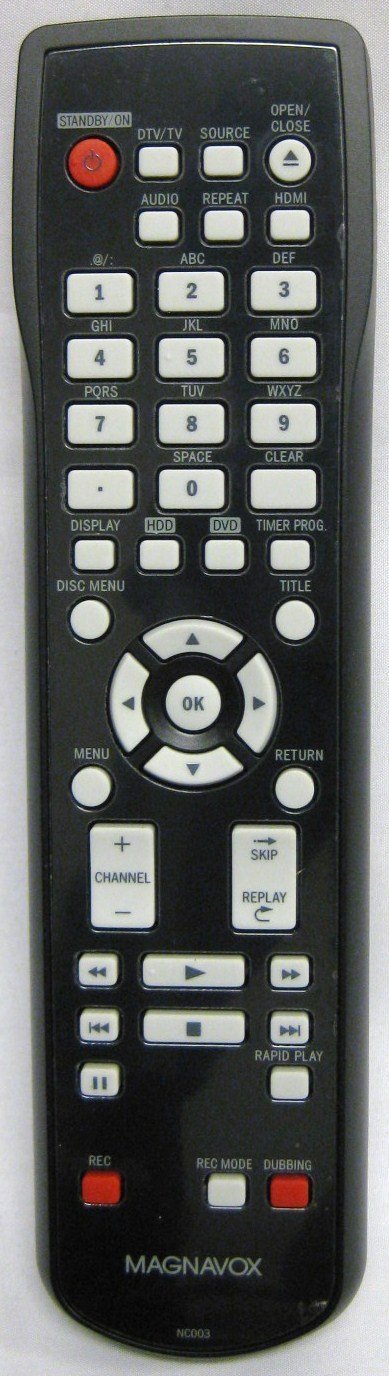
Image: The Magnavox NC003UD Remote Control Unit. This image displays the front of the remote, showing its various buttons and ergonomic design. The battery compartment is located on the reverse side.
2. Initial Use
This remote control is an original factory replacement and typically requires no programming for the specified compatible Magnavox models. Once batteries are installed, it should function immediately with your device.
- Point the remote control directly at the infrared sensor on your Magnavox DVR/HDD/DVD recorder.
- Press any function button (e.g., Power, Play, Channel Up) to test its operation.
Operating Instructions
The NC003UD remote control provides full functionality for your compatible Magnavox DVR/HDD/DVD recorder. Refer to your device's specific manual for detailed functions of each button if needed.
Key Functions Overview:
| Button | Function |
|---|---|
| Power | Turns the connected Magnavox device on or off. |
| Play/Pause | Starts or pauses playback of recorded content or DVDs. |
| Stop | Stops playback. |
| Rewind/Fast Forward | Navigates backward or forward through content. |
| Record | Initiates recording. |
| Channel Up/Down | Changes channels on the connected device. |
| Volume Up/Down | Adjusts the volume. |
| Menu | Accesses the device's main menu. |
| Navigation Arrows (Up, Down, Left, Right) | Used to navigate through menus and selections. |
| OK/Enter | Confirms selections. |
Note: Specific button layouts and advanced functions may vary slightly depending on the exact Magnavox model you are using.
Maintenance
Cleaning the Remote
- Wipe the remote control with a soft, dry cloth.
- For stubborn dirt, slightly dampen the cloth with water or a mild cleaning solution. Do not use abrasive cleaners or solvents.
- Ensure no liquid enters the remote control's interior.
Battery Replacement
- Replace batteries when the remote's response becomes sluggish or stops working.
- Always replace both batteries at the same time with new AAA batteries.
- Do not mix old and new batteries, or different types of batteries.
- Remove batteries if the remote control will not be used for an extended period to prevent leakage.
- Dispose of used batteries according to local regulations.
Troubleshooting
| Problem | Solution |
|---|---|
| Remote is not responding. |
|
| Some buttons are not working. |
|
| Remote works intermittently. |
|
Specifications
- Model Number: NC003UD
- Brand: Magnavox
- Compatible Devices: Magnavox DVR/HDD/DVD Recorders (MDR515H/F7, MDR533H/F7, MDR535H/F7, MDR537H/F7, MDR557H/F7)
- Connectivity Technology: Infrared
- Power Source: 2 x AAA Batteries (not included)
- Product Dimensions: 8 x 1 x 2 inches (approximately)
- Item Weight: 5 ounces (approximately)
- Special Feature: Ergonomic design
Warranty and Support
This product is an original factory remote control. For specific warranty information, please refer to the documentation provided with your original Magnavox DVR/HDD/DVD recorder or contact Magnavox customer support directly.
For further assistance or technical support, please visit the official Magnavox support website or consult your device's original user manual.
Note: As this is a replacement part, warranty terms may differ from the original device.


