Introduction
The Sterling Power ProCharge Ultra PCU1260 PLUS is an advanced all-digital, 3-bank marine battery charger designed for a wide range of battery types, including LiFePO4, GEL, AGM, Calcium, and Flooded Lead Acid. It features a 90-270 Volt AC input for worldwide usage and a 4-stage charging profile to optimize battery life and performance. This manual provides essential information for the safe and efficient installation, operation, and maintenance of your battery charger.
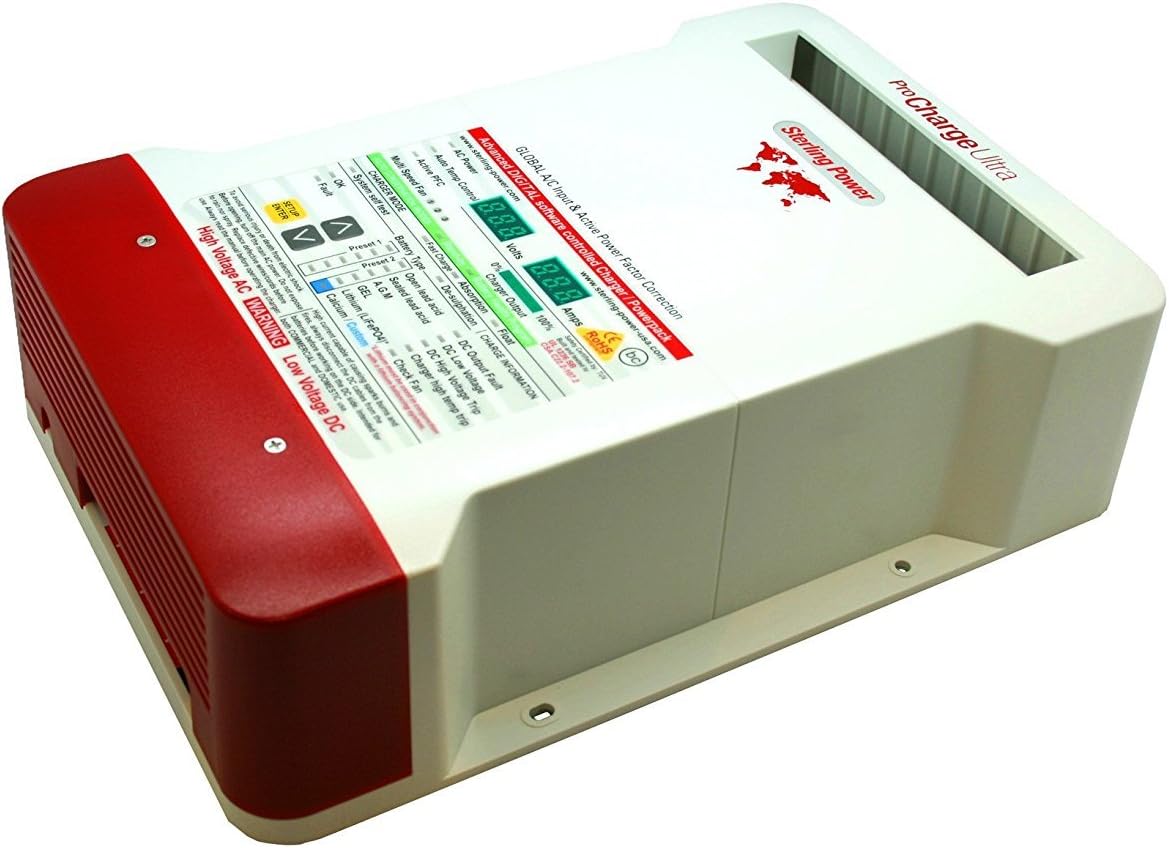
Figure 1: Front view of the Sterling Power ProCharge Ultra PCU1260 PLUS Marine Battery Charger.
Safety Information
Please read and understand all safety instructions before installing or operating the charger. Failure to follow these instructions may result in serious injury, death, or property damage.
- Electrical Shock Hazard: To avoid serious injury or death from electric shock, always turn off the main AC power supply to the charger before performing any installation, maintenance, or troubleshooting.
- Disconnect DC Cables: Always disconnect the DC cables from the batteries before working on the DC side of the charger to prevent sparks, burns, and potential fires.
- Environmental Protection: Do not expose the charger to rain or water spray. Ensure the installation location is dry and well-ventilated.
- Cable Integrity: Regularly inspect all wires and cords. Replace any defective or damaged wires/cords immediately.
- Intended Use: This charger is intended for both commercial and domestic use in marine and RV applications.
- Ventilation: Ensure adequate ventilation around the charger to prevent overheating.
Setup and Installation
Proper installation is crucial for the safe and efficient operation of your ProCharge Ultra battery charger.
1. Mounting the Charger
Select a dry, well-ventilated location for mounting the charger. Ensure there is sufficient space around the unit for airflow and access to connections. Mount the charger securely using appropriate fasteners for your vessel or vehicle.
2. Wiring Connections
The ProCharge Ultra features three isolated outputs, allowing it to charge up to three separate battery banks. Refer to the diagram below for proper wiring.
- AC Input: Connect the AC input cable to a suitable 90-270VAC power source. Ensure the AC supply is protected by an appropriate circuit breaker.
- DC Outputs: Connect the positive (+) and negative (-) terminals of each battery bank to the corresponding DC output terminals on the charger. Ensure all connections are tight and secure.
- Grounding: Ensure the charger is properly grounded according to local electrical codes.

Figure 2: Wiring connections for the Sterling Power ProCharge Ultra PCU1260 PLUS.
3. Battery Type Selection
The charger offers eleven pre-programmed battery charge curves. It is critical to select the correct battery type to ensure optimal charging and battery longevity. Use the "SETUP ENTER" and arrow buttons on the charger's front panel to navigate and select your battery type.
- LiFePO4 (Lithium Iron Phosphate) - Note: Lithium batteries must be used in conjunction with a lithium balancing system.
- GEL
- AGM (Absorbed Glass Mat)
- Calcium
- Flooded Lead Acid (Open Lead Acid)
- Custom (User programmable charge profile)
Operating Instructions
Once installed and configured, the ProCharge Ultra operates largely automatically. The front panel provides real-time status information.

Figure 3: Front panel display and controls of the Sterling Power ProCharge Ultra PCU1260 PLUS.
1. Powering On
After all connections are secure and the battery type is selected, apply AC power to the charger. The unit will perform a system self-test.
2. Charging Process (4-Stage Profile)
The charger utilizes a 4-stage charging profile to ensure efficient and safe charging, extending battery life:
- Fast Charge (Bulk): Delivers maximum current to rapidly charge the battery to approximately 80% capacity.
- Absorption: Charges the battery to 100% by delivering a constant voltage while the current gradually decreases.
- Float: Maintains the battery at full charge by providing a constant, lower voltage, compensating for self-discharge.
- Energy-Save Mode: Once charging is complete, the charger enters an energy-save mode to prevent overcharging and conserve power.
3. Digital Meters and Indicators
The two digital meters on the front panel display real-time voltage and current measurements. Various LED indicators provide status information:
- AC Power: Indicates AC input is present.
- Auto Temp Control: Indicates temperature compensation is active.
- Active PFC: Indicates Power Factor Correction is active.
- Multi Speed Fan: Indicates fan operation speed.
- Charger Mode: Displays the current charging stage (Fast Charge, Absorption, Float).
- OK / Fault: Indicates normal operation or a fault condition.
- Battery Type: Confirms the selected battery chemistry.
- Charge Information: Provides status on de-sulphation, DC output fault, low/high voltage, high temp trip, and fan check.
4. Optional Remote Control
An optional remote control is available for the Sterling ProCharge Ultra, allowing for remote monitoring and control. This remote can be surface, recess, or flush-mounted up to 30 feet away from the charger.
Maintenance
Regular maintenance ensures the longevity and optimal performance of your battery charger.
- Cleaning: Periodically clean the exterior of the charger with a dry cloth. Ensure ventilation openings are free from dust and debris. Do not use liquid cleaners or solvents.
- Connection Check: Annually inspect all AC and DC wiring connections for tightness and corrosion. Loose connections can lead to overheating and poor performance.
- Cable Inspection: Check all cables for signs of wear, fraying, or damage. Replace any damaged cables immediately.
- Ventilation: Ensure the area around the charger remains clear to allow for proper airflow and cooling.
Troubleshooting
If you encounter issues with your ProCharge Ultra, refer to the following common problems and solutions. Always disconnect AC power before inspecting connections.
| Problem/Indicator | Possible Cause | Solution |
|---|---|---|
| Fault Indicator ON | General fault detected. | Check other fault indicators for specific issues. Disconnect and reconnect AC power to reset. If fault persists, contact support. |
| DC Output Fault | Short circuit or overload on a DC output. | Inspect DC wiring for shorts. Reduce load on the battery bank. |
| DC Low Voltage | Battery voltage is too low for charging to safely begin or continue. | Check battery connections. Allow charger to attempt recovery, or manually charge battery to a higher voltage if possible. |
| DC High Voltage Trip | Battery voltage has exceeded safe limits. | Verify correct battery type selection. Check battery health. |
| Charger High Temp Trip | Internal temperature of the charger is too high. | Ensure adequate ventilation around the charger. Clear any obstructions from cooling fan or vents. Allow unit to cool down. |
| Check Fan | Cooling fan malfunction or obstruction. | Inspect fan for obstructions. Ensure fan is operating. If not, contact support. |
| No Power / Display Off | No AC input power. | Check AC power source, circuit breaker, and AC input cable connection. |
Specifications
| Feature | Detail |
|---|---|
| Model Name | Pro Charge Ultra Plus 12V, 60A Battery Charger (3 output) |
| Part Number | PCU1260 PLUS |
| Brand | STERLING |
| Input Voltage | 90-270 Volts AC |
| Output Voltage | 12 Volts DC |
| Output Current | 60 Amps |
| Number of Outputs | 3 (Isolated) |
| Charging Stages | 4-Stage (Fast Charge, Absorption, Float, Energy-Save) |
| Supported Battery Types | LiFePO4, GEL, AGM, Calcium, Flooded Lead Acid, Custom |
| Item Dimensions (LxWxH) | 11 x 14.5 x 6 inches (27.94 x 36.83 x 15.24 cm) |
| Item Weight | 9 Pounds (4.08 kg) |
| Color | White |
| Manufacturer | Sterling Power |
Warranty Information
The Sterling Power ProCharge Ultra PCU1260 PLUS battery charger comes with a 5-year manufacturer's warranty. This warranty covers defects in materials and workmanship under normal use. Please retain your proof of purchase for warranty claims. For specific terms and conditions, refer to the warranty documentation provided with your product or contact Sterling Power directly.
Customer Support
For technical assistance, troubleshooting beyond this manual, or warranty inquiries, please contact Sterling Power customer support. Visit the official Sterling Power website for contact details and additional resources.
Website: www.sterling-power.com