
1. Introduction
This user manual provides essential information for the safe and efficient installation, operation, and maintenance of the TRU Components LAS0-A3Y-20X/31 Rotary Switch. Please read this manual thoroughly before using the product and retain it for future reference.
2. Product Overview
The TRU Components LAS0-A3Y-20X/31 is a robust rotary switch designed for various electrical applications. It features three switching positions and an IP40 protection rating, making it suitable for environments where protection against solid objects larger than 1mm is required.
Key Features:
- 3 switching positions (ON-OFF-ON)
- Rated for 250V/AC and 5A
- 2 x 45° switching angles
- IP40 protection rating
- Panel mount design with screw terminals
- Durable plastic construction with brass contacts
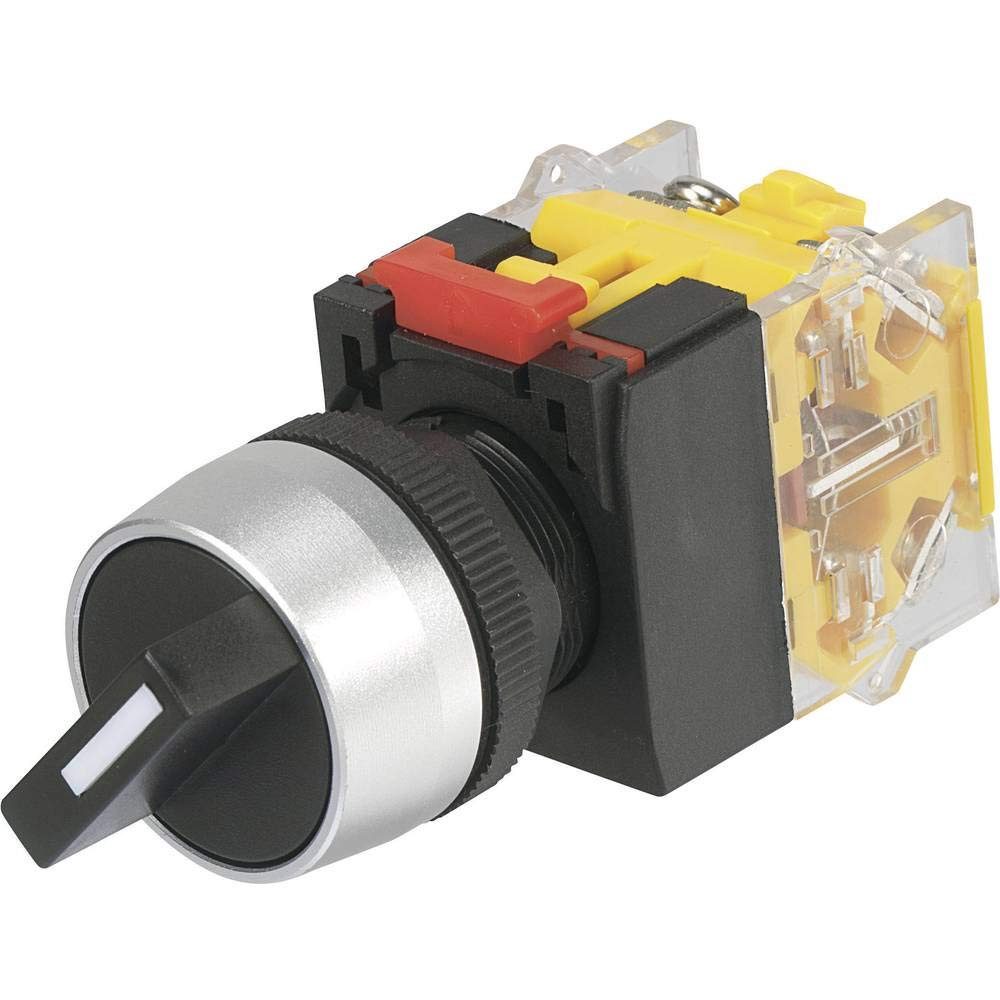
This image shows the TRU Components LAS0-A3Y-20X/31 Rotary Switch, highlighting its black body and rotary actuator.
3. Safety Information
Always observe the following safety precautions to prevent injury or damage to the product:
- Electrical Hazard: Installation and wiring should only be performed by qualified personnel. Ensure power is disconnected before installation or maintenance.
- Voltage and Current: Do not exceed the specified voltage (250V/AC) and current (5A) ratings.
- Environment: The IP40 rating provides protection against solid objects but not against water ingress. Do not expose the switch to liquids or high humidity.
- Proper Tools: Use appropriate tools for installation to avoid damaging the switch or terminals.
- Inspection: Regularly inspect the switch for any signs of damage or wear. Replace if necessary.
4. Specifications
| Specification | Value |
|---|---|
| Model Number | LAS0-A3Y-20X/31 |
| Brand | TRU Components |
| Manufacturer | Conrad |
| Operating Mode | ON-OFF-ON |
| Current Rating | 5 Ampere |
| Operating Voltage | 250 Volt AC |
| Contact Type | Normally Open |
| Connector Type | Screw |
| Terminal Type | Screw |
| Material | Plastic (Body), Brass (Contacts) |
| Circuit Type | 3-way |
| Switch Type | Rotary Switch |
| Mounting Type | Panel Mount |
| Actuator Type | Rotary |
| Number of Positions | 3 |
| Control Type | Manual |
| Compatible Devices | General electrical installations and equipment |
| Color | Black |
| International Protection Rating | IP40 |
| Compliance | CE, IP40 |
5. Installation
Follow these steps for proper installation of the rotary switch:
- Disconnect Power: Ensure all power to the circuit is completely disconnected before beginning installation. Verify with a voltage tester.
- Prepare Mounting Hole: Drill or cut a suitable hole in the panel according to the switch's dimensions for panel mounting. Ensure the hole is clean and free of burrs.
- Mount the Switch: Insert the switch into the prepared panel hole. Secure it using the provided mounting hardware (e.g., nut and washer) from the rear of the panel. Tighten firmly but do not overtighten.
- Wire Connections: Connect the electrical wires to the screw terminals on the back of the switch. Ensure correct polarity and secure all connections tightly. Refer to your circuit diagram for specific wiring requirements.
- Verify Installation: Double-check all connections and ensure the switch is securely mounted.
- Restore Power: Once installation is complete and verified, restore power to the circuit.
6. Operation
The TRU Components LAS0-A3Y-20X/31 is a 3-position rotary switch with an ON-OFF-ON operating mode. To operate the switch:
- Position 1 (ON): Rotate the actuator to the first 'ON' position. This will close the circuit for the first function.
- Position 2 (OFF): Rotate the actuator to the center 'OFF' position. This will open the circuit, disconnecting power to both functions.
- Position 3 (ON): Rotate the actuator to the third 'ON' position. This will close the circuit for the second function.
The switch provides tactile feedback for each position, ensuring clear indication of the selected state.
7. Maintenance
The TRU Components LAS0-A3Y-20X/31 Rotary Switch requires minimal maintenance. Adhere to the following guidelines:
- Regular Cleaning: Keep the switch surface clean and free from dust and debris. Use a soft, dry cloth for cleaning. Do not use abrasive cleaners or solvents.
- Inspect Connections: Periodically check the screw terminals to ensure they remain tight and free from corrosion.
- Visual Inspection: Inspect the switch body and actuator for any signs of physical damage, cracks, or excessive wear.
- Environmental Conditions: Ensure the operating environment remains within the specified IP40 rating. Avoid exposure to moisture.
8. Troubleshooting
If you encounter issues with your rotary switch, consider the following common troubleshooting steps:
- Switch Not Functioning:
- Check if power is supplied to the circuit.
- Verify all wiring connections are secure and correct.
- Ensure the switch is properly seated in its mounting.
- Intermittent Operation:
- Inspect for loose wiring connections at the terminals.
- Check for any internal damage or debris obstructing the switch mechanism.
- Stiff Actuator:
- Ensure no foreign objects are lodged around the actuator.
- Avoid applying excessive force; if the actuator is stiff, it may indicate internal damage or incorrect installation.
If problems persist after performing these checks, it is recommended to consult a qualified electrician or contact TRU Components customer support.
9. Warranty and Support
This product is manufactured by Conrad under the TRU Components brand. For specific warranty information, please refer to the terms and conditions provided at the point of purchase or contact your retailer. For technical support or inquiries, please reach out to TRU Components customer service or your local distributor.


