
1. Introduction
The Roland GR-55 is an advanced guitar synthesizer designed to provide guitarists with a vast array of sounds and creative possibilities. It integrates guitar synthesis with powerful COSM guitar modeling, offering a unique fusion of traditional guitar tones and modern synth capabilities. This manual provides essential information for setting up, operating, maintaining, and troubleshooting your GR-55 unit.
2. Key Features
- Revolutionary fusion of guitar synthesis and powerful COSM guitar modeling.
- Up to four sound sources simultaneously: Two PCM Synth tones, plus COSM guitar modeling and normal guitar input.
- User-friendly interface with hundreds of ready-to-use sounds for various musical genres.
- Advanced Roland technology ensuring superb sound quality and lightning-fast processing.
- Over 900 fully editable PCM sounds, including pianos, organs, strings, vintage synths, and more.
- Comprehensive COSM guitar and amp modeling capabilities.
- Two types of multi-effects engines, plus global reverb, chorus, and delay effects.
- Integrated onboard looper for creative layering.
- Built-in USB Audio player with foot control for playback and recording.
- Includes the GK-3 divided pickup for precise string tracking.
3. Package Contents
Ensure all items are present in the package:
- BOSS GR-55 Guitar Synthesizer Unit
- GK-3 Divided Pickup
- AC Adapter (Power Supply)
- Owner's Manual (this document)
4. Safety Information
Please read and adhere to the following safety precautions to prevent damage to the unit or injury to yourself and others.
- Power Supply: Use only the specified AC adapter (9 Volts) provided with the unit. Do not use other adapters as this may cause malfunction or fire.
- Ventilation: Do not block ventilation openings. Ensure adequate airflow around the unit to prevent overheating.
- Liquid Exposure: Do not expose the unit to rain, moisture, or any liquids. If liquid enters the unit, disconnect the power immediately and contact Roland service.
- Handling: Avoid dropping or subjecting the unit to strong impacts. Do not place heavy objects on the unit.
- Placement: Place the unit on a stable, level surface. Avoid placing it near heat sources or in direct sunlight.
- Cleaning: Disconnect power before cleaning. Use a soft, dry cloth. Do not use abrasive cleaners or solvents.
5. Setup
5.1 Installing the GK-3 Divided Pickup
The GK-3 Divided Pickup is essential for the GR-55 to track individual string vibrations. Proper installation and calibration are crucial for optimal performance and accurate tracking.
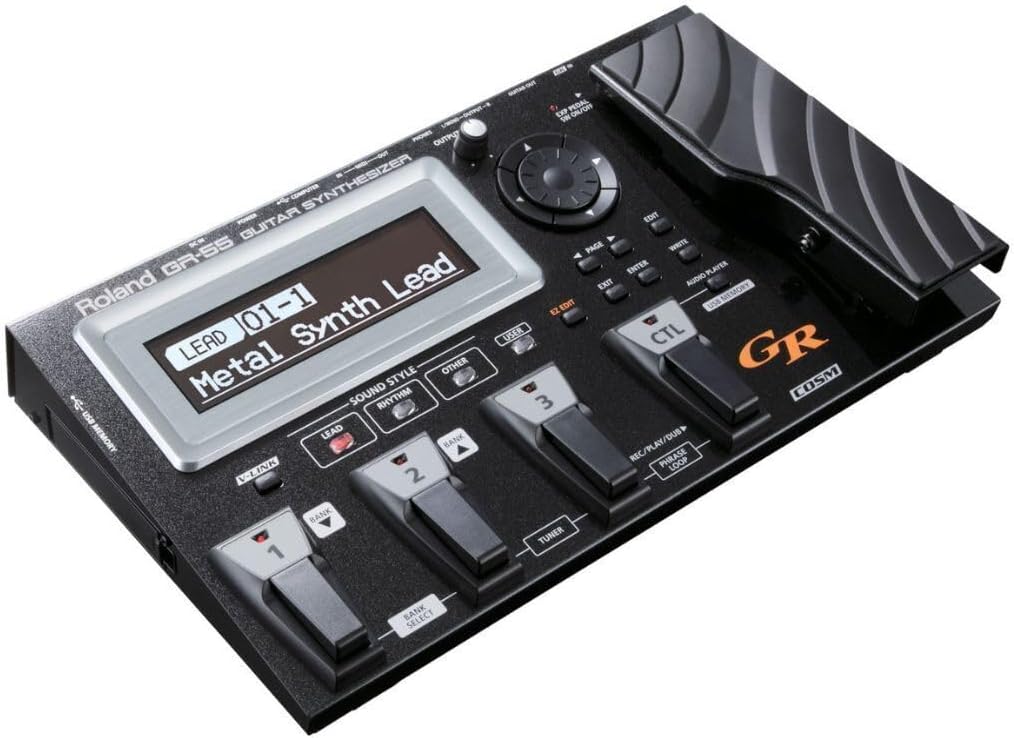
Figure 5.1: Roland GR-55 with GK-3 Divided Pickup. The GK-3 pickup is mounted near the bridge of the guitar, allowing the GR-55 to process each string independently.
Refer to the GK-3 manual for detailed installation instructions. Key steps include:
- Mount the GK-3 pickup as close to the bridge as possible.
- Secure the selector unit to the guitar strap holder.
- Connect the 13-pin cable from the GK-3 to the GR-55's GK IN port.
5.2 Connecting the GR-55
The GR-55 offers various input and output options for integration into your setup.

Figure 5.2: Rear panel of the Roland GR-55. This view displays all available connection ports, including power, audio outputs, MIDI, and USB.
- Power Connection: Connect the supplied AC adapter to the DC IN port (9V) and plug it into a power outlet.
- Audio Output: Connect the L/MONO and R OUTPUT jacks to your amplifier, mixer, or audio interface. For mono output, use the L/MONO jack.
- Headphones: Connect headphones to the PHONES jack for private monitoring.
- Guitar Out: This jack outputs the signal from your guitar's normal pickups, allowing you to route it to a separate guitar amplifier or effects unit.
- MIDI IN/OUT: Use standard MIDI cables to connect to other MIDI devices for control or data exchange.
- USB (COMPUTER): Connect a USB cable to your computer for data backup, patch management, and using the GR-55 as a USB audio interface.
- USB MEMORY: Insert a USB flash drive for saving/loading patches and playing audio files.
5.3 Initial Calibration and Settings
After connecting the GK-3 pickup, it is crucial to perform initial calibration within the GR-55 to optimize tracking and sound quality. This involves setting parameters such as string sensitivity and pickup type.
- Navigate to the GK SETTING menu on the GR-55's display.
- Adjust the sensitivity for each string individually to ensure balanced output and accurate tracking.
- Select the correct guitar type (e.g., Strat, Les Paul) or manually input measurements if using a custom setup.
- Save your settings to prevent the need for re-calibration.
6. Operating the GR-55
The GR-55 features an intuitive control layout for easy navigation and sound manipulation.

Figure 6.1: Top panel of the Roland GR-55. This image highlights the LCD display, footswitches, expression pedal, and various control buttons for sound selection and editing.
6.1 Front Panel Controls
- LCD Display: Shows patch names, parameters, and menu options.
- Navigation Buttons (PAGE, EDIT, EXIT, ENTER, WRITE): Used to browse menus, edit parameters, confirm selections, and save changes.
- Sound Style Buttons (LEAD, RHYTHM, OTHER, USER, EZ EDIT): Quickly access different categories of preset and user-created sounds. EZ EDIT allows for simplified parameter adjustments.
- Footswitches (1, 2, 3, CTL): Used to switch between patches, activate effects, or control specific functions. The CTL footswitch is assignable.
- Expression Pedal: Controls volume, wah, or other assignable parameters.
- BANK SELECT: Used with footswitches 1, 2, 3 to change sound banks.
- TUNER: Activates the built-in guitar tuner.
- REC/PLAY/DUB (Phrase Loop): Controls the onboard looper function.
- AUDIO PLAYER: Controls playback of audio files from a USB memory stick.
6.2 Sound Generation and Patch Management
The GR-55 combines two PCM synthesizer engines with COSM modeling. This allows for a wide range of sounds, from realistic instruments to classic guitar tones and synth textures.
- PCM Tones: Access over 900 high-quality PCM sounds (pianos, strings, brass, synths, etc.) that can be layered and edited.
- COSM Modeling: Emulate various guitar types, amplifiers, and effects. This section can be used independently or combined with PCM tones.
- Creating Patches: Combine PCM tones, COSM models, and effects to create custom sounds. Use the EDIT button to access detailed parameters.
- Saving Patches: After editing, press the WRITE button to save your custom patches to a user bank.
6.3 USB Audio Player and Looper
The GR-55 includes a built-in USB audio player and a phrase looper for practice, performance, and creative exploration.
- USB Audio Player: Load audio files (WAV, MP3) onto a USB memory stick and play them back through the GR-55. Use the dedicated controls to play, pause, and skip tracks.
- Phrase Looper: Record and layer guitar phrases in real-time. This is useful for building complex arrangements or practicing improvisation.
7. Maintenance
Proper maintenance ensures the longevity and optimal performance of your GR-55.
- Cleaning: Regularly wipe the unit with a soft, dry cloth to remove dust and fingerprints. For stubborn dirt, use a slightly damp cloth and then dry thoroughly. Avoid harsh chemicals.
- Storage: When not in use for extended periods, store the GR-55 in a cool, dry place away from direct sunlight and extreme temperatures.
- Cable Management: Ensure all cables are neatly organized and not under strain to prevent damage to connectors and ports.
- Software Updates: Periodically check the Roland website for firmware updates to ensure your unit has the latest features and bug fixes.
8. Troubleshooting
This section addresses common issues you might encounter with your GR-55.
| Problem | Possible Cause | Solution |
|---|---|---|
| Poor tracking or inaccurate notes from GK-3 | Improper GK-3 installation or calibration. | Ensure the GK-3 pickup is correctly positioned and calibrated. Adjust individual string sensitivities in the GR-55's GK SETTING menu. Refer to the GK-3 manual for precise measurements. |
| "Ghost notes" or unintended sounds | String sensitivity too high, or sloppy playing technique. | Lower the string sensitivity settings in the GK SETTING menu. Practice clean playing techniques, ensuring only desired strings are vibrating. |
| No sound output | Incorrect cable connections, low volume, or incorrect patch selection. | Check all audio cable connections. Ensure the GR-55's output level knob is turned up. Verify that the selected patch has audible volume. Check amplifier/mixer settings. |
| Unit does not power on | Power adapter not connected, or faulty power source. | Ensure the AC adapter is securely connected to the GR-55 and a working power outlet. Verify the power outlet is active. Use only the supplied Roland AC adapter. |
| USB memory not recognized | Incompatible USB format or corrupted data. | Ensure the USB memory stick is formatted correctly (FAT32 is usually recommended). Try a different USB stick. |
9. Specifications
Technical specifications for the Roland GR-55 (GR-55GK-BK) Guitar Synthesizer.
| Attribute | Detail |
|---|---|
| Model Number | GR-55GK-BK |
| Brand | Roland |
| Item Weight | 11.48 pounds (approx. 5.2 kg) |
| Product Dimensions (L x W x H) | 24 x 14 x 6 inches (approx. 61 x 35.6 x 15.2 cm) |
| Included Components | GK-3 Divided Pickup |
| Power Source | Corded Electric |
| Voltage | 9 Volts |
| Hardware Interface | USB, MIDI |
| Signal Format | Analog |
| UPC | 761294503089 |
| Manufacturer | Roland |
10. Warranty and Support
For detailed warranty information, please refer to the warranty card included with your product or visit the official Roland website. Roland provides customer support and resources for their products.
- Manufacturer: Roland Corporation
- Online Support: Visit the official Roland website for product registration, FAQs, driver downloads, and service information.
- Contact: Refer to the Roland website for contact details for technical support in your region.