
Introduction
This instruction manual provides essential information for the safe and effective installation, operation, and maintenance of the Gewiss GW62535 CEE Wall Socket. This product is an IP67 rated industrial connector, specifically designed for demanding environments and high-current applications, featuring a 3P+N+T (3-phase + Neutral + Earth) configuration, rated for 125 Amperes at 400 Volts. Please read this manual thoroughly before proceeding with any installation or use.
Safety Information
WARNING: Electrical installation and maintenance should only be performed by qualified personnel. Failure to follow these instructions can result in serious injury, electric shock, fire, or property damage.
- Always disconnect power at the main circuit breaker or fuse box before installing, servicing, or removing the socket.
- Ensure that the voltage and current ratings of the power supply match the specifications of the GW62535 socket (400V, 125A).
- Verify proper grounding (Earth connection) to prevent electric shock.
- Do not use the socket if it appears damaged or if any parts are missing.
- Protect the socket from mechanical impact and unauthorized access.
- The IP67 rating ensures protection against dust and temporary immersion in water. However, do not intentionally submerge the socket or expose it to high-pressure water jets.
Product Overview
The Gewiss GW62535 is a robust CEE wall-mounted socket designed for industrial environments. Its key features include:
- Type: CEE Wall Socket, fixed, 90° parallel entry.
- Configuration: 3P+N+T (3-phase, Neutral, Earth).
- Current Rating: 125 Amperes.
- Voltage Rating: 400 Volts.
- IP Rating: IP67 (Dust tight and protected against temporary immersion in water).
- Material: High-quality, durable plastic for industrial use.
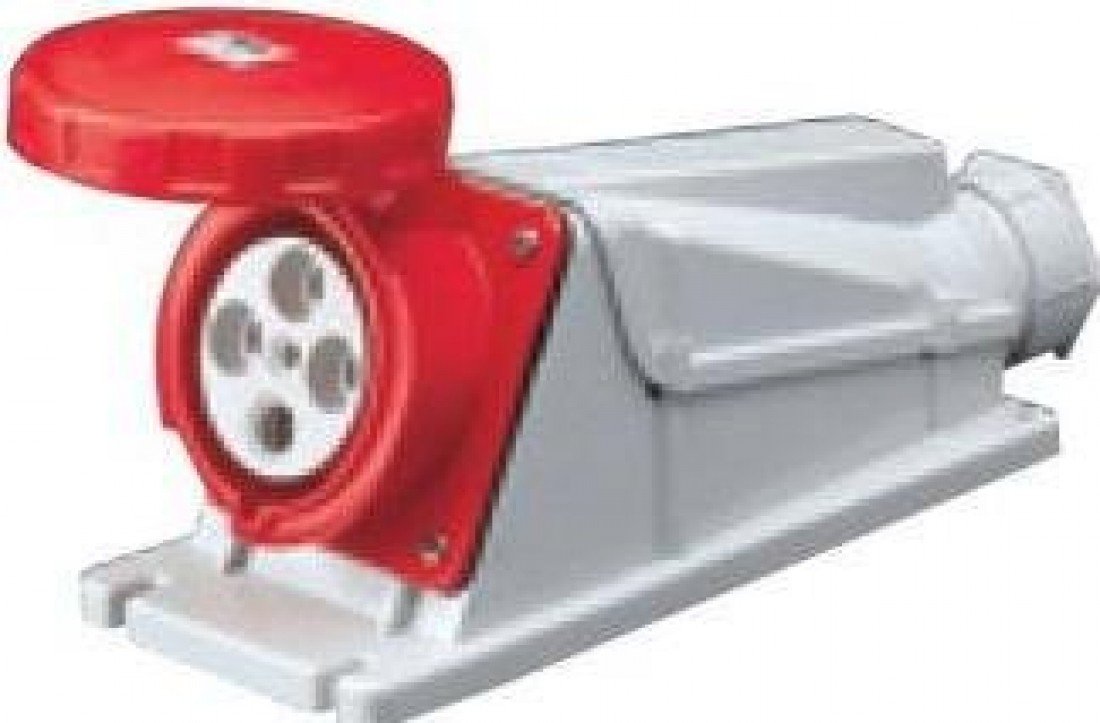
Figure 1: Gewiss GW62535 CEE wall socket, highlighting its robust construction and angled design for industrial applications.
Setup and Installation
Installation of the Gewiss GW62535 CEE Wall Socket requires adherence to local electrical codes and safety regulations. It must be installed by a qualified electrician.
- Preparation:
- Ensure the power supply is completely disconnected.
- Gather necessary tools: screwdriver set, wire strippers, crimping tool (if required), mounting hardware, drill.
- Select a suitable mounting location that is flat, stable, and protected from excessive mechanical stress.
- Mounting the Socket:
- Open the socket housing by unscrewing the retaining screws.
- Position the socket base on the chosen wall surface.
- Mark the drilling points for the mounting screws.
- Drill pilot holes if necessary and secure the socket base firmly to the wall using appropriate screws and anchors.
- Wiring Connections:
- Route the power cable into the socket housing through the designated cable entry point. Ensure the cable gland provides a secure, watertight seal to maintain the IP67 rating.
- Strip the outer sheath and individual wire insulation to the appropriate lengths.
- Connect the wires to the corresponding terminals:
- L1, L2, L3: Phase conductors (typically brown, black, grey).
- N: Neutral conductor (typically blue).
- PE (Earth): Protective Earth conductor (green/yellow).
- Ensure all terminal screws are tightened securely to prevent loose connections and overheating.
- Final Assembly:
- Verify all connections are correct and secure.
- Close the socket housing, ensuring the gasket is properly seated to maintain the IP67 seal.
- Tighten the retaining screws evenly.
- Testing:
- Before restoring power, perform continuity and insulation resistance tests as per local regulations.
- Restore power and test the socket with a suitable load.
Operating Instructions
The Gewiss GW62535 CEE Wall Socket is designed for straightforward operation with compatible CEE plugs.
- Connecting a Plug:
- Ensure the plug is clean and free from debris.
- Align the keyway on the plug with the corresponding keyway on the socket.
- Insert the plug firmly into the socket until it clicks or is fully seated.
- For some plugs, a locking ring may need to be twisted to secure the connection.
- Disconnecting a Plug:
- If a locking ring is present, twist it to unlock the plug.
- Grasp the plug body firmly and pull it straight out of the socket. Do not pull by the cable.
- Avoid disconnecting under load if possible, especially with high-current applications, to prevent arcing and wear.
Maintenance
Regular maintenance ensures the longevity and safe operation of your Gewiss GW62535 CEE Wall Socket.
- Periodic Inspection: Visually inspect the socket regularly for any signs of damage, cracks, discoloration, or loose parts. Check the cable entry for secure sealing.
- Cleaning: Clean the exterior of the socket with a damp cloth. Do not use abrasive cleaners or solvents that could damage the plastic. Ensure the socket is dry before use.
- Terminal Check: Periodically (e.g., annually or as per site requirements), with power disconnected, open the housing and check that all terminal screws are tight. Loose connections can cause overheating and fire hazards.
- Gasket Integrity: Ensure the sealing gasket between the housing parts is intact and properly seated to maintain the IP67 rating. Replace if damaged.
Troubleshooting
This section addresses common issues you might encounter with the Gewiss GW62535 CEE Wall Socket.
| Problem | Possible Cause | Solution |
|---|---|---|
| No power at the socket. |
|
|
| Plug does not fit or is difficult to insert. |
|
|
| Socket feels warm during operation. |
|
|
If troubleshooting steps do not resolve the issue, contact a qualified electrician or Gewiss customer support.
Specifications
| Feature | Detail |
|---|---|
| Brand | Gewiss |
| Model Number | GW62535 |
| Product Type | CEE Wall Socket, Fixed, 90° Parallel Entry |
| Configuration | 3P+N+T (3-phase + Neutral + Earth) |
| Current Rating | 125 Amperes |
| Voltage Rating | 400 Volts |
| IP Rating | IP67 (Dust tight, protected against temporary immersion) |
| Manufacturer | Gewiss |
| ASIN | B0085AL1W8 |
| International Article Code (EAN) | 08011564005372 |
Warranty and Support
Specific warranty information for the Gewiss GW62535 CEE Wall Socket is not provided in the product data. For warranty details, please refer to the documentation included with your purchase or contact your point of sale. For technical support or further assistance, please contact Gewiss customer service or visit the official Gewiss website.
Gewiss Official Website: www.gewiss.com

