
1. Introduction
This manual provides detailed instructions for the installation, setup, operation, and maintenance of your Gewiss GW12703 Digital Programmable Thermostat. Please read this manual thoroughly before attempting installation or operation to ensure correct usage and to prevent potential hazards.
2. Safety Information
- Always disconnect power at the main circuit breaker before installing or servicing the thermostat.
- Installation should only be performed by a qualified electrician in accordance with local electrical codes.
- Do not expose the thermostat to water or excessive humidity.
- Ensure the thermostat is used within its specified voltage range (230 Volts).
- Keep packaging materials away from children.
3. Package Contents
Verify that all items are present in the package:
- Gewiss GW12703 Digital Programmable Thermostat
- Mounting screws (if applicable)
- Instruction Manual (this document)
4. Product Overview
The Gewiss GW12703 is a built-in digital programmable thermostat designed for daily and weekly temperature control. It features an LCD display for clear information and intuitive button controls.
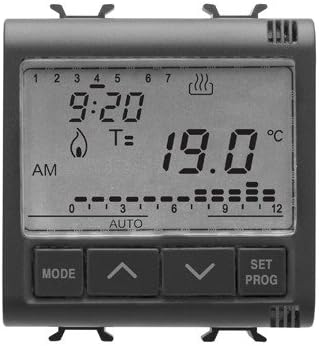
Figure 1: Front View of Gewiss GW12703 Thermostat
This image displays the front panel of the Gewiss GW12703 thermostat. It features a clear LCD screen showing time (e.g., 9:20), current temperature (e.g., 19.0 °C), and operational indicators such as heating (flame icon) or cooling (wavy lines icon). Below the screen are four control buttons: "MODE", an "Up" arrow, a "Down" arrow, and "SET PROG". A timeline with markers from 0 to 12 and "AUTO" is also visible, indicating programming segments.
4.1. Display Elements
- Time Display: Shows current time (e.g., 9:20).
- Day Indicators: Numbers 1-7 at the top for days of the week.
- Temperature Display: Shows current room temperature or set temperature (e.g., 19.0 °C).
- Operating Mode Icons: Flame icon for heating, wavy lines for cooling (if applicable).
- Program Timeline: Segmented bar indicating programmed periods (0-12, AUTO).
4.2. Control Buttons
- MODE: Cycles through operating modes (e.g., Auto, Manual, Off).
- Up Arrow (⌃): Increases temperature setting or navigates menu options.
- Down Arrow (⌄): Decreases temperature setting or navigates menu options.
- SET PROG: Enters programming mode or confirms settings.
5. Installation
The Gewiss GW12703 is designed for flush-mounted installation. Ensure the installation location is free from direct sunlight, drafts, or heat sources that could affect temperature readings.
5.1. Wiring Instructions
- Power Disconnection: Before starting, turn off the main power supply to the heating system at the circuit breaker.
- Mounting: Install the thermostat into a standard flush-mounting box.
- Wiring: Connect the electrical wires according to the wiring diagram provided with the product packaging. The thermostat operates on 230 Volts. Ensure all connections are secure.
- Securing: Secure the thermostat to the mounting box using the provided screws.
- Power Restoration: Once installation is complete and verified, restore power at the circuit breaker.
Warning: Incorrect wiring can cause damage to the thermostat or the heating system, and poses a risk of electric shock. If you are unsure, consult a qualified electrician.
6. Initial Setup
After successful installation and power restoration, the thermostat will power on. You may need to set the current time and day.
- First Power-On: The display will illuminate. It may show a default time or require initial setup.
- Setting Time and Day:
- Press and hold the SET PROG button for a few seconds until the time or day indicator flashes.
- Use the Up and Down arrow buttons to adjust the value.
- Press SET PROG again to confirm and move to the next setting (e.g., minutes, then day).
- Repeat until all time and day settings are correct.
- Initial Temperature Setting: In manual mode, use the Up and Down arrows to set your desired temperature.
7. Operating the Thermostat
7.1. Mode Selection
Press the MODE button to cycle through the available operating modes:
- AUTO (Automatic Mode): The thermostat follows the programmed schedule for temperature control. This is indicated by "AUTO" on the display.
- MANUAL (Constant Mode): The thermostat maintains a single set temperature until changed.
- OFF (Standby Mode): The heating system is turned off.
7.2. Programming the Schedule (Daily/Weekly)
The GW12703 allows for daily and weekly programming to optimize energy consumption and comfort.
- Press and hold the SET PROG button until the programming interface appears (e.g., a flashing segment on the timeline or a specific day/time setting).
- Use the MODE button to select the day or group of days you wish to program (e.g., Mon-Fri, Sat-Sun, or individual days).
- Use the Up and Down arrow buttons to adjust the start time and desired temperature for each program segment. The timeline display will help visualize the segments.
- Press SET PROG to confirm each segment's setting and move to the next.
- Once all desired segments are programmed, press SET PROG repeatedly or wait for the thermostat to exit programming mode automatically.
Refer to the detailed programming section in the full manual for specific steps on setting multiple time/temperature periods per day.
7.3. Temperature Adjustment
In Manual mode, or to temporarily override the program in Auto mode:
- Press the Up or Down arrow buttons to increase or decrease the desired temperature.
- In Auto mode, this will typically initiate a temporary override until the next programmed event.
8. Maintenance
8.1. Cleaning
To clean the thermostat, gently wipe the surface with a soft, damp cloth. Do not use abrasive cleaners, solvents, or chemical sprays, as these can damage the display or casing.
8.2. Battery Replacement (if applicable)
The GW12703 is a wired thermostat and typically does not require battery replacement for primary operation. However, some models may include a small backup battery to retain settings during power outages. If your model has such a battery and settings are lost frequently, consult the full product documentation or a qualified technician.
9. Troubleshooting
| Problem | Possible Cause | Solution |
|---|---|---|
| Display is blank | No power; circuit breaker tripped; incorrect wiring. | Check circuit breaker. Verify wiring connections. Ensure main power is on. |
| Thermostat not controlling heating/cooling | Incorrect mode selected; wiring issue; heating/cooling system fault. | Ensure thermostat is in AUTO or MANUAL mode. Check wiring. Consult heating/cooling system manual. |
| Temperature reading seems inaccurate | Thermostat exposed to direct sunlight, drafts, or heat sources. | Relocate thermostat if possible, or shield it from external influences. |
| Programming not working | Thermostat not in AUTO mode; programming steps not followed correctly. | Ensure thermostat is in AUTO mode. Review "Programming the Schedule" section. |
If the problem persists after attempting these solutions, please contact customer support or a qualified technician.
10. Specifications
- Brand: Gewiss
- Model Number: GW12703
- Color: Black
- Voltage: 230 Volts
- Display Type: LCD
- Special Feature: Remote control capability (as per manufacturer specifications)
- Dimensions (Package): 18.2 x 11.6 x 7.4 cm
- Item Weight: 9.07 grams
- Type: Built-in daily/weekly programmable thermostat
11. Warranty and Support
For warranty information, please refer to the warranty card included with your product or contact your point of purchase. For technical support or service, please contact Gewiss customer service or visit their official website for contact details.