
Beurer BM 20 Onpack
Contents
Beurer Medical BM20 Blood Pressure Monitor User Manual
Model: BM 20 Onpack
1. Introduction
This manual provides essential instructions for the safe and effective operation of your Beurer Medical BM20 Blood Pressure Monitor. Please read this manual thoroughly before first use and keep it for future reference. This device is designed for non-invasive measurement and monitoring of arterial blood pressure in adults.
2. Important Safety Information
- Consult your doctor before using this device if you have any medical conditions.
- Do not self-diagnose or self-medicate based on measurements. Always consult a healthcare professional.
- Keep the device out of reach of children.
- Use only the specified cuff and accessories.
- Avoid taking measurements in electrically noisy environments.
- Do not modify or attempt to repair the device yourself.
3. Package Contents
Verify that all items are present and undamaged upon unpacking:
- Beurer Medical BM20 Blood Pressure Monitor unit
- Upper arm cuff (standard size)
- 4 x 1.5V AA batteries
- Storage pouch
- User manual (this document)
- AC Power Adapter (if included, check packaging)
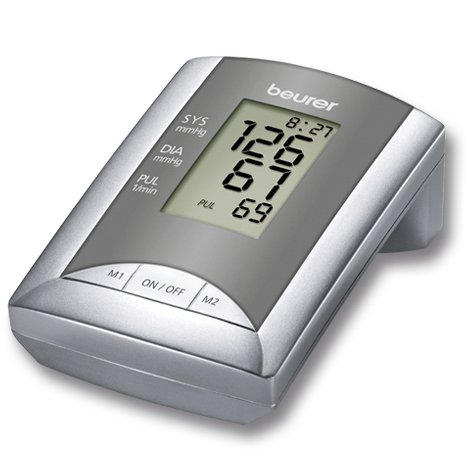
Image 1: Beurer Medical BM20 Blood Pressure Monitor main unit with display.

Image 2: Standard upper arm cuff (22-32 cm) with diagram for correct placement.

Image 3: AC power adapter, optional for continuous power.
4. Setup and Initial Use
4.1 Installing Batteries
- Open the battery compartment cover on the back of the device.
- Insert the 4 x 1.5V AA batteries, ensuring correct polarity (+/-).
- Close the battery compartment cover securely.
Alternatively, connect the optional AC power adapter to the device and a wall outlet.
4.2 Connecting the Cuff
Insert the air tube connector from the cuff firmly into the air socket on the side of the blood pressure monitor unit.
5. Operating Instructions
5.1 Preparing for Measurement
- Avoid eating, smoking, or exercising for at least 30 minutes before measurement.
- Rest for 5 minutes in a quiet environment before taking a reading.
- Sit comfortably with your back supported and feet flat on the floor.
- Place your arm on a table so the cuff is at heart level.
- Ensure the cuff is placed directly on bare skin, 2-3 cm above the elbow joint. The air tube should run along the inside of your arm.
5.2 Taking a Measurement
- Wrap the cuff snugly around your upper arm as described above.
- Press the ON/OFF button to start the measurement.
- The cuff will automatically inflate. Remain still and silent during inflation and measurement.
- Once the measurement is complete, the systolic pressure (SYS), diastolic pressure (DIA), and pulse rate (PUL) will be displayed on the screen.
- The device will automatically store the reading in one of the 30 memory spaces for the active user (M1 or M2).
- Press the ON/OFF button again to turn off the device, or it will automatically switch off after approximately one minute of inactivity.
5.3 Interpreting Results (WHO Classification)
The Beurer BM20 interprets your blood pressure values according to the World Health Organization (WHO) guidelines. A color scale on the display (or indicated by symbols) will help you understand your reading's classification (e.g., optimal, normal, high-normal, mild hypertension, moderate hypertension, severe hypertension). Consult your doctor for a precise interpretation of your individual results.
6. Memory Functions
The device features 2 x 30 memory spaces, allowing two users to store their readings separately.
6.1 Selecting a User
Before taking a measurement, press the M1 or M2 button to select the desired user profile. The selected user icon will be displayed.
6.2 Viewing Stored Readings
- With the device off, press the M1 or M2 button to view the average of the last three measurements for that user.
- Press the same M button repeatedly to scroll through individual stored readings, from most recent to oldest.
- To exit memory mode, press the ON/OFF button or wait for automatic switch-off.
7. Care and Maintenance
7.1 Cleaning the Device
- Clean the main unit and cuff with a soft, dry cloth.
- If necessary, use a slightly damp cloth with a mild detergent, then wipe dry.
- Do not use abrasive cleaners, solvents, or immerse the device in water.
7.2 Storage
- Store the device and cuff in the provided storage pouch.
- Keep in a cool, dry place, away from direct sunlight and extreme temperatures.
- Remove batteries if the device will not be used for an extended period.
8. Troubleshooting
| Problem | Possible Cause | Solution |
|---|---|---|
| Device does not turn on. | Batteries are depleted or incorrectly inserted. | Replace batteries or check polarity. Ensure AC adapter is properly connected. |
| Error message (e.g., "E1", "E2"). | Cuff not correctly applied, movement during measurement, or air leakage. | Re-apply cuff correctly. Remain still and silent. Check cuff connection. |
| Inaccurate readings. | Incorrect cuff placement, movement, talking, or improper preparation. | Review "Preparing for Measurement" section. Ensure proper technique. |
If problems persist, contact customer support.
9. Technical Specifications
- Model: BM 20 Onpack
- Measurement Method: Oscillometric, non-invasive blood pressure measurement on the upper arm
- Measurement Range:
- Systolic: 60-260 mmHg
- Diastolic: 40-199 mmHg
- Pulse: 40-180 beats/minute
- Accuracy:
- Pressure: +/- 3 mmHg
- Pulse: +/- 5% of reading
- Memory: 2 x 30 memory spaces
- Power Supply: 4 x 1.5V AA batteries or AC adapter (optional)
- Automatic Switch-off: Yes
- Display: Large LCD
- Dimensions: Approximately 24.4 x 13.2 x 10.6 cm
- Weight: Approximately 898 g (without batteries)
10. Warranty and Support
This Beurer Medical BM20 Blood Pressure Monitor comes with a 1-year manufacturer's warranty from the date of purchase. Please retain your proof of purchase for warranty claims.
For technical support, service, or warranty inquiries, please contact Beurer customer service. Contact details can typically be found on the official Beurer website or on the warranty card included with your product.
You can visit the official Beurer store for more information: Beurer Official Store
Ask a question about this manual
Ask about setup, troubleshooting, compatibility, parts, safety, or missing instructions. Manuals+ will review the question and use this page’s manual context to help answer it.