
Introduction
The Hitron HB-2 is a state-of-the-art digital bass reconstruction processor designed to enhance the low-frequency response of your car audio system. It restores and enhances bass frequencies that are often lost during the recording or compression process, providing a richer and more dynamic audio experience. This unit features a convenient dash-mount remote control for on-the-fly adjustments.
Safety Information
- Always disconnect the vehicle's battery before beginning any installation.
- Professional installation is highly recommended to ensure proper wiring and functionality.
- Do not expose the unit to moisture or extreme temperatures.
- Ensure all wiring connections are secure and properly insulated to prevent short circuits.
- Mount the unit in a location that does not obstruct the driver's view or interfere with vehicle operation.
Package Contents
Please check the package for the following items:
- Hitron HB-2 Digital Bass Reconstruction Processor Unit
- Dash-Mount Remote Control
- Remote Control Cable
- Power and Signal Wiring Harness
Setup and Installation
Mounting the HB-2 Unit
Choose a secure, dry location for mounting the HB-2 unit, such as under a seat or behind the dashboard. Ensure adequate ventilation around the unit. Use screws to firmly attach the unit to a flat surface.

Image: The main Hitron HB-2 unit, showing input/output connections and control knobs.
Wiring Connections
- Power Connection: Connect the +12V wire to a constant +12V power source, the GND wire to a solid chassis ground, and the REM (remote) wire to your head unit's remote turn-on output.
- Audio Input: Connect your head unit's RCA outputs to the HB-2's balanced RCA inputs.
- Audio Output: Connect the HB-2's RCA outputs to your amplifier's RCA inputs.
- Remote Control: Connect the dash-mount remote control cable to the dedicated port on the HB-2 unit.
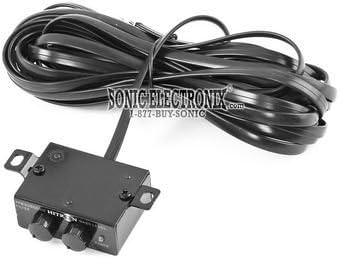
Image: The dash-mount remote control with its connecting cable, used for adjusting bass levels.
Operating Instructions
Controls on the HB-2 Unit
- MAX BASS CONTROL: Adjusts the overall intensity of the bass reconstruction. Start with a lower setting and increase gradually.
- FREQ CONTROL: Selects the center frequency for the bass reconstruction. This allows you to target specific bass frequencies for enhancement.
- WIDE/NARROW Switch: Determines the Q-factor or bandwidth of the bass reconstruction. 'Wide' affects a broader range of frequencies around the center frequency, while 'Narrow' focuses on a tighter range.
Dash-Mount Remote Control
The remote control allows you to adjust the bass output level from your listening position. Rotate the knob to increase or decrease the bass intensity. The illuminated display provides visual feedback.
Maintenance
- Keep the unit clean by wiping it with a soft, dry cloth. Do not use harsh chemicals or abrasive cleaners.
- Ensure all connections remain secure. Periodically check wiring for any signs of wear or damage.
- Avoid blocking the ventilation openings on the unit to prevent overheating.
Troubleshooting
- No Power: Check the +12V, Ground, and Remote connections. Ensure the remote turn-on signal from the head unit is active. Check for blown fuses in the power line.
- No Bass Output: Verify all RCA input and output connections. Ensure the HB-2 unit is powered on. Adjust the 'MAX BASS CONTROL' and 'FREQ CONTROL' settings. Check the remote control connection.
- Distorted Sound: Reduce the 'MAX BASS CONTROL' setting. Ensure the input signal from the head unit is not overdriven. Check amplifier gain settings.
- Remote Control Not Responding: Check the cable connection between the remote and the HB-2 unit.
Specifications
| Frequency Response | 10 Hz ~ 100 KHz |
| Input Noise Rejection | 60 dB (Balanced) |
| Maximum Output Level | 13.5 V |
| Total Harmonic Distortion (THD) | 0.03% |
| Power Supply | PWM High Head Room |
| Bass Control | Parametric Bass Control |
| Subsonic Filter | PFM Subsonic Filter |
| Product Weight | 1.36 kg |
Warranty and Support
For warranty information, please refer to the documentation provided with your purchase. For technical assistance or support, please contact your authorized Hitron dealer or the point of purchase.