
Introduction
This manual provides detailed instructions for the installation, operation, and maintenance of your Massive Audio EQ7X 7-Band Car Audio Equalizer. Please read this manual thoroughly before attempting installation or operation to ensure proper use and optimal performance of your device. Keep this manual for future reference.
Features
- 7-Band EQ Precision: Tune every frequency for crisp highs, rich mids, and deep lows.
- 8V Line Driver Output: Ensures clean, powerful signal with reduced noise and distortion.
- Subwoofer Level Control: Fine-tune your bass directly from the dashboard with ease.
- Front/Rear Fader Adjustment: Achieve balanced sound staging for full-range performance.
- Durable In-Dash Design: Built for audiophiles seeking premium, professional-grade sound tuning.
Package Contents
The Massive Audio EQ7X package includes:
- Massive Audio EQ 7 Car Equalizer
- Mounting hardware
- Owner's Manual (this document)
Safety Information
Always disconnect the vehicle's battery before installing or servicing any car audio equipment. Ensure all wiring is properly insulated and secured to prevent short circuits and damage. Consult a professional car audio installer if you are unsure about any part of the installation process. Do not operate the equalizer in a manner that distracts you from driving.
Setup and Installation
Component Overview

Image: Front panel of the Massive Audio EQ7X equalizer, showing the 7 equalization bands, subwoofer level, volume, auxiliary input, and fader controls.

Image: Rear panel of the Massive Audio EQ7X equalizer, displaying RCA input and output jacks, power connections, and high-level input terminals.
Wiring Connections
- Power Connection: Connect the +12V terminal to a constant +12V power source (battery). Connect the GND terminal to a solid chassis ground point. Connect the REM (remote) terminal to the remote turn-on output of your head unit.
- Audio Input: Connect your head unit's RCA outputs to the EQ7X's MAIN-IN RCA inputs. If your head unit does not have RCA outputs, use the HI INPUT AUTO POWER terminals for high-level speaker wire input.
- Audio Output: Connect the EQ7X's FRONT OUT, REAR OUT, and SUB-OUT RCA outputs to the corresponding inputs on your amplifiers.
- Auxiliary Input: For external audio sources, connect to the AUX-IN RCA inputs. Use the AUX-GAIN controls to adjust the input level.
Mounting
Choose a suitable location for mounting the EQ7X, typically in-dash or under the dashboard, ensuring it is easily accessible for adjustments and away from heat sources or moisture. Secure the unit using the provided mounting hardware.
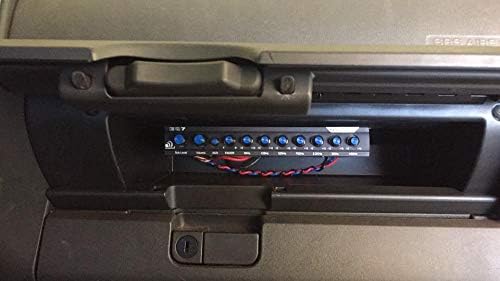
Image: Massive Audio EQ7X equalizer installed in a vehicle's dashboard compartment, showcasing its compact size and accessible controls.
Operating Instructions
Controls and Adjustments
- Sub Level: Adjusts the output level of the subwoofer.
- Volume: Controls the overall master volume of the system.
- Aux/Main Switch: Selects between the main input and auxiliary input.
- Fader: Balances the sound output between the front and rear speakers.
- Equalization Bands (50Hz - 16kHz): Each of the seven rotary controls allows you to boost or cut frequencies by up to +/-12dB for precise sound shaping.
- Low Pass Frequency Switch: Selects the low-pass crossover frequency for the subwoofer output (e.g., 60Hz or 120Hz).
- Light Switch: Toggles the LED backlighting for the controls.
Initial Setup
- Set all equalizer bands to the flat (0dB) position.
- Turn the master volume and subwoofer level to their minimum settings.
- Play a familiar audio track. Gradually increase the master volume to a comfortable listening level.
- Adjust each equalization band individually to tailor the sound to your preference.
- Adjust the subwoofer level and fader for optimal bass response and sound staging.
Product Video Overview
Video: An official overview of the Massive Audio EQ7X, highlighting its features and design. This video provides a visual guide to the product's capabilities and aesthetic.
Maintenance
The Massive Audio EQ7X requires minimal maintenance. Keep the unit clean by wiping it with a soft, dry cloth. Avoid using harsh chemicals or abrasive cleaners. Ensure all connections remain secure and free from corrosion. Periodically check wiring for any signs of wear or damage.
Troubleshooting
| Problem | Possible Cause | Solution |
|---|---|---|
| No Power | Blown fuse; improper power/ground connection; remote wire not connected. | Check and replace fuse; verify +12V, GND, and REM connections. |
| No Sound Output | Incorrect input/output connections; volume/sub level too low; Aux/Main switch in wrong position. | Verify all RCA connections; increase volume/sub level; check Aux/Main switch. |
| Distorted Sound | Input signal too high; equalizer bands set too aggressively; amplifier gain too high. | Reduce head unit volume; adjust EQ bands to a less extreme setting; lower amplifier gain. |
| Engine Noise/Whine | Poor grounding; RCA cables too close to power cables; faulty RCA cables. | Ensure proper ground connection; reroute RCA cables away from power cables; try different RCA cables. |
Specifications
- Item Weight: 1.8 pounds
- Product Dimensions: 8 x 2 x 6 inches
- Item Model Number: EQ-7
- Connector Type: Aux, RCA
- Voltage: 8 Volts (Output Line Driver)
- Equalization Bands: 7-Band Graphic Equalizer (50Hz, 125Hz, 320Hz, 750Hz, 2.2kHz, 6kHz, 16kHz)
- Equalization Boost/Cut: +/- 12dB
- Subwoofer Crossover: Selectable 60Hz or 120Hz Low Pass Filter
- Input Sensitivity: Adjustable for Main and Aux inputs
Warranty and Support
Massive Audio products are designed for reliability and performance. For specific warranty details, please refer to the warranty card included with your product or visit the official Massive Audio website. For technical support, troubleshooting assistance, or service inquiries, please contact Massive Audio customer service through their official channels.


