Deli E1710 Scientific Calculator User Manual
Model: E1710
Introduction
This manual provides comprehensive instructions for the operation and maintenance of your Deli E1710 Scientific Calculator. Designed for students and professionals, this calculator offers 240 functions to assist with various mathematical, scientific, and statistical calculations.
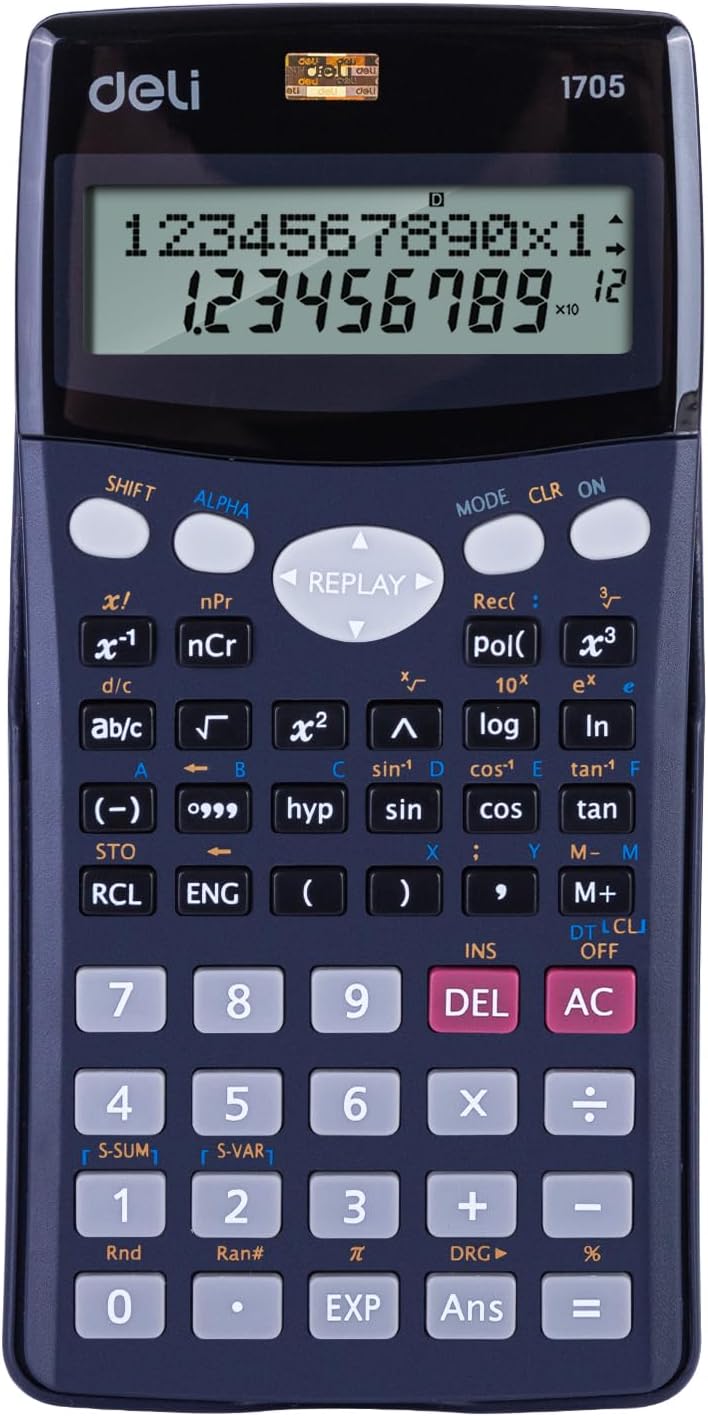
Front view of the Deli E1710 Scientific Calculator, showcasing its display, numeric keypad, and function buttons.
Setup
Unpacking
Carefully remove the calculator from its packaging. Ensure all components are present: the Deli E1710 Scientific Calculator and its protective cover.
Battery Installation
The Deli E1710 Scientific Calculator comes with 2 LR44 batteries pre-installed. If replacement is needed:
- Locate the battery compartment on the back of the calculator.
- Use a small screwdriver to open the compartment cover.
- Remove the old batteries and insert new LR44 batteries, observing the correct polarity (+/-).
- Replace the compartment cover and secure it.

Rear view of the Deli E1710 Scientific Calculator, showing the battery compartment cover and the smooth blue casing.
Initial Power On
Press the ON button to power on the calculator. The display should illuminate, showing "0" or a similar initial state.
Operating Instructions
Basic Operations
The calculator supports standard arithmetic operations: addition (+), subtraction (-), multiplication (×), and division (÷).
Enter numbers using the numeric keypad and press the corresponding operation button. Press = to get the result.
Scientific Functions
The Deli E1710 features 240 functions, including but not limited to:
- Trigonometric functions (sin, cos, tan, and their inverses).
- Logarithmic functions (log, ln).
- Exponential functions (e^x, 10^x).
- Statistical calculations.
- Fractions (ab/c).
- Square roots (√) and powers (x²).
To access secondary functions (indicated in yellow or red above buttons), press the SHIFT or ALPHA button first, then the desired function button.
Display Features
The calculator is equipped with a spacious 10+2 digit display, allowing for clear readability of numbers.
The dual-line display feature shows the input equation on the upper line and the calculated result on the lower line simultaneously, aiding in verification and complex calculations.

Angled view of the Deli E1710 Scientific Calculator, demonstrating its ergonomic design and the included protective slide-on cover.
Memory Functions
Use the STO (Store) button to store a value in memory and RCL (Recall) to retrieve it. The calculator may have multiple memory registers (e.g., A, B, C, D, X, Y, M).
The M+ and M- buttons add or subtract the displayed value from the independent memory.
Maintenance
Cleaning
Wipe the calculator's surface with a soft, dry cloth. For stubborn dirt, slightly dampen the cloth with water. Do not use abrasive cleaners or solvents.
Storage
When not in use, store the calculator in a cool, dry place, away from direct sunlight and extreme temperatures. Use the provided protective cover to prevent scratches and damage.
Battery Care
If the calculator will not be used for an extended period, it is recommended to remove the batteries to prevent leakage.
Troubleshooting
Display is Blank or Faint
- Check battery level. Replace batteries if necessary.
- Ensure the calculator is powered on by pressing the ON button.
Incorrect Calculation Results
- Verify the input values and the sequence of operations.
- Check if the calculator is in the correct mode (e.g., DEG, RAD, GRAD for trigonometric functions). Press MODE to cycle through modes.
- Clear all memory and previous calculations by pressing SHIFT then CLR (Clear).
Buttons are Unresponsive
- Ensure no foreign objects are lodged under the buttons.
- Clean the calculator surface as described in the Maintenance section.
- If the issue persists, try removing and reinserting the batteries to reset the device.
Specifications
| Feature | Detail |
|---|---|
| Model Number | E1710 |
| Display Digits | 10+2 Digits |
| Display Type | Dual-line display |
| Functions | 240 Functions |
| Dimensions (L×W×H) | 16.2 x 8.4 x 0.1 cm |
| Weight | 200 g |
| Power Source | 2 LR44 Batteries (included) |
| Material | Metal, Plastic |
| Color | Blue |
Warranty and Support
For warranty information and technical support, please refer to the official Deli website or contact your local retailer. Keep your purchase receipt as proof of purchase.
The product comes with a 3-year guarantee, as indicated on the product packaging.

The retail packaging for the Deli E1710 Scientific Calculator, highlighting key features like 240 functions, 10+2 digits, and a 3-year guarantee.
For further assistance, visit the official Deli store: Deli Official Store.


