
1. Product Overview
The Code Alarm CATX4 is a 4-button replacement transmitter remote designed for use with compatible Code Alarm keyless entry and alarm systems. This remote operates on a 433.92MHz frequency and features a red LED indicator for signal transmission confirmation.
Key Features:
- 4-button functionality for various system commands.
- Operates on AM, superheterodyne (SAW), 433.92MHz frequency.
- Equipped with a red LED for visual feedback.
- FCC ID: H5OT49 (also replaces H5OT43).
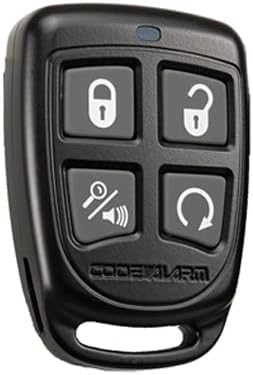
Figure 1: Code Alarm CATX4 4-Button Keyless Entry Remote. This image displays the black remote with four gray buttons: Lock (closed padlock icon), Unlock (open padlock icon), Mute/Panic (speaker with slash icon), and Remote Start/Trunk Release (circular arrow icon).
2. Programming Instructions
This section outlines the procedure for programming your CATX4 remote to your Code Alarm system. You will need access to your system's valet switch (programming/override button) to complete this process. Refer to your vehicle's alarm system installation manual for the exact location of the valet switch.
Compatible Systems:
- CA1050, CA1051, CA1053
- CA2050, CA2051
- CA5050, CA5051, CA5053, CA5054
Programming Steps:
- Ensure the vehicle's ignition is OFF.
- Open the driver's door.
- Insert the key into the ignition and turn it to the ON position.
- Within 5 seconds, press and release the valet switch once. The system will respond with a chirp or light flash.
- Press and hold the LOCK button on your new CATX4 remote. Hold until the system chirps or flashes lights to confirm programming.
- Release the LOCK button.
- Turn the ignition OFF to exit programming mode. The system will chirp or flash lights to confirm exit.
Note: If you are programming multiple remotes, repeat step 5 for each additional remote before turning the ignition OFF. All existing remotes must be reprogrammed at the same time; otherwise, they will be erased from the system's memory.
3. Operating Instructions
The CATX4 remote features four distinct buttons for controlling your vehicle's alarm and keyless entry system:
- Lock Button (Padlock Closed icon): Press to arm the alarm system and lock the vehicle doors.
- Unlock Button (Padlock Open icon): Press to disarm the alarm system and unlock the vehicle doors.
- Mute/Panic Button (Speaker with Slash icon):
- Press briefly to mute the arm/disarm chirps (if supported by your system).
- Press and hold for 3 seconds to activate the panic alarm. Press again to deactivate.
- Remote Start/Trunk Button (Circular Arrow icon):
- Press and hold for 3 seconds to activate the remote start function (if installed and enabled).
- Press briefly to open the trunk or activate auxiliary output (if installed and enabled).
Note: The exact functionality of each button may vary depending on your specific Code Alarm system's configuration and installed features.
4. Maintenance
The CATX4 remote control is powered by two Lithium Metal batteries. When the remote's range decreases significantly or the LED indicator fails to light up, it is likely time to replace the batteries.
Battery Replacement:
- Carefully open the remote casing. This usually involves prying it open with a small flat-head screwdriver at the seam.
- Remove the old batteries, noting their orientation.
- Insert two new Lithium Metal batteries, ensuring correct polarity.
- Snap the remote casing back together securely.
- Test the remote's functionality. If issues persist, refer to the Troubleshooting section.
Caution: Dispose of old batteries according to local regulations. Do not expose batteries to excessive heat or fire.
5. Troubleshooting
If you encounter issues with your Code Alarm CATX4 remote, consider the following troubleshooting steps:
- Remote Not Responding:
- Check the battery. Replace if necessary (refer to Section 4: Maintenance).
- Ensure you are within range of the vehicle's alarm system.
- Verify that the remote is properly programmed to your system (refer to Section 2: Programming Instructions).
- Programming Failure:
- Confirm you are using the correct valet switch and following the programming steps precisely.
- Ensure the vehicle's battery is fully charged.
- If multiple remotes are being programmed, ensure all are programmed during the same session.
- Intermittent Operation:
- Weak battery in the remote.
- Interference from other radio frequency devices.
- Obstructions between the remote and the vehicle.
If problems persist after attempting these steps, it is recommended to contact a professional automotive alarm technician or the Code Alarm customer support for further assistance.
6. Specifications
| Model Number | CATX4 |
| FCC ID | H5OT49 (Replaces H5OT43) |
| Frequency | 433.92MHz |
| Modulation | AM, Superheterodyne (SAW) |
| Indicator | Red LED |
| Power Source | 2 Lithium Metal batteries |
| Item Weight | 0.634 ounces |
| Package Dimensions | 4.33 x 2.76 x 0.75 inches |
| Manufacturer | Audiovox |
7. Warranty and Support
For specific warranty information regarding your Code Alarm CATX4 remote, please refer to the documentation provided with your original alarm system or contact the authorized seller from whom you purchased the product. Warranty terms typically vary by region and retailer.
For technical support or further assistance, it is recommended to contact the Code Alarm manufacturer or an authorized service center. You may also reach out to the seller for initial support inquiries.
Manufacturer: Audiovox


