
Introduction
This manual provides instructions for the safe and efficient operation of your Westpointe WWF0710A-WM 6-Inch Twin Window Fan. Please read this manual thoroughly before installation and use, and retain it for future reference.
The Westpointe WWF0710A-WM Twin Window Fan is designed to enhance air circulation in your home. It features two fans that can be used to either draw cool air in from outside or exhaust warm air out, helping to regulate indoor temperatures. Its slim design allows for installation without removing most window screens, and it fits most double-hung and slider windows.
Important Safety Instructions
WARNING: To reduce the risk of fire, electric shock, or injury to persons, observe the following:
- Read all instructions before using this fan.
- Use this fan only as described in this manual. Other uses not recommended may cause fire, electric shock, or injury to persons.
- Do not operate any fan with a damaged cord or plug. Discard fan or return to an authorized service facility for examination and/or repair.
- Do not run cord under carpeting. Do not cover cord with throw rugs, runners, or similar coverings. Do not route cord under furniture or appliances. Arrange cord away from traffic area and where it will not be tripped over.
- Always unplug fan when not in use, when moving from place to place, and before cleaning.
- Do not insert or allow foreign objects to enter any ventilation or exhaust opening as this may cause an electric shock or fire, or damage the fan.
- Do not block air intakes or exhaust in any manner.
- This fan is not intended for use in wet or damp locations.
- Do not use this fan near windows where water may accumulate.
Package Contents
- Westpointe WWF0710A-WM Twin Window Fan Unit
- Built-in Extender Panels
- Power Cord (integrated)
- User Manual
Setup and Installation
The Westpointe WWF0710A-WM Twin Window Fan is designed for easy installation in most double-hung and slider windows.
- Prepare the Window: Ensure the window opening is clean and clear of obstructions. The fan is designed to fit windows without needing to remove the screen.
- Position the Fan: Place the fan unit into the window opening. The main body of the fan should be centered.
- Extend Panels: Gently pull out the built-in extender panels on either side of the fan unit until they firmly contact the window frame. This secures the fan in place and seals the opening.
- Secure the Window: Lower the top sash of a double-hung window or slide the side sash of a slider window down/across until it rests snugly against the top edge of the fan unit. This further secures the fan and prevents it from falling.
- Plug In: Connect the power cord to a standard electrical outlet.
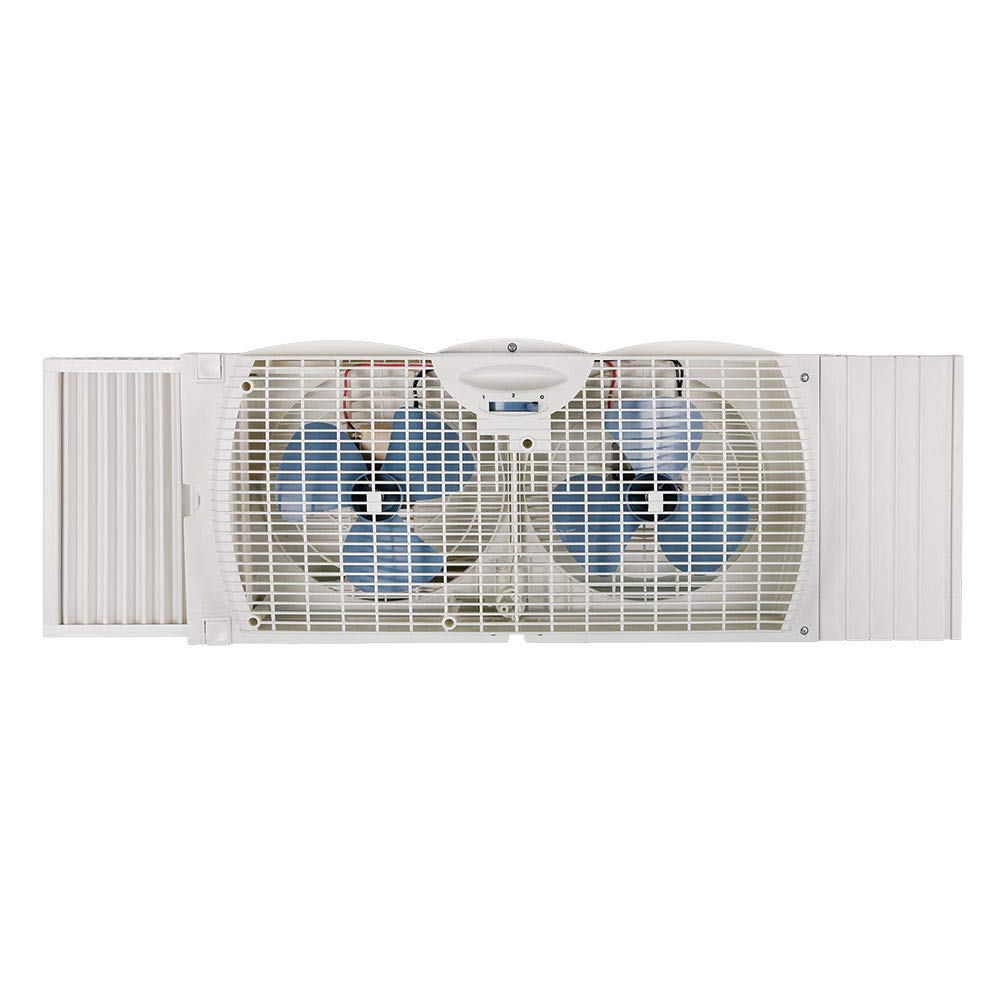
Image: The Westpointe WWF0710A-WM Twin Window Fan installed in a double-hung window, with extender panels fully extended to fit the window frame. The fan is positioned to draw air from outside.
Operating Instructions
The Westpointe WWF0710A-WM Twin Window Fan features a one-touch electric thermostat control with multiple settings.
- Power On/Off: Press the power button (usually indicated by an 'O' or 'I/O' symbol) to turn the fan on or off.
- Speed Settings: Cycle through the available speed settings (Low, High) by pressing the speed control button. The fan has 2 speed settings.
- Airflow Direction: The fan is designed to either bring air in or exhaust air out. To change the direction of airflow, the fan unit must be physically removed from the window and turned around. There is no electronic reverse function.
- Thermostat Control: The fan includes an electric thermostat. Use the thermostat control to set a desired temperature. The fan will operate to maintain this temperature, turning on and off as needed.
Maintenance
Regular maintenance ensures optimal performance and longevity of your fan.
- Cleaning: Always unplug the fan before cleaning. Use a soft, damp cloth to wipe the exterior surfaces. Do not use abrasive cleaners or allow water to drip into the motor housing.
- Fan Blades: Periodically clean dust from the fan blades using a soft brush or vacuum cleaner attachment. Do not attempt to disassemble the fan for cleaning.
- Storage: If storing the fan for an extended period, clean it thoroughly and store it in a cool, dry place, preferably in its original packaging.
Troubleshooting
| Problem | Possible Cause | Solution |
|---|---|---|
| Fan does not turn on. | No power to the unit. | Ensure the power cord is securely plugged into a working electrical outlet. Check the circuit breaker. |
| Fan operates but airflow is weak. | Fan blades or grilles are dirty. | Unplug the fan and clean the fan blades and grilles as described in the Maintenance section. |
| Fan is excessively noisy. | Fan is not securely installed in the window. | Ensure the extender panels are fully extended and the window sash is firmly against the fan unit. |
| Thermostat not functioning correctly. | Incorrect setting or sensor obstruction. | Verify thermostat settings. Ensure the fan's sensor area (if visible) is not blocked. |
Specifications
- Model: WWF0710A-WM
- Brand: Westpointe
- Type: Twin Window Fan
- Number of Speeds: 2
- Control Method: Touch / Button Control
- Features: Built-in extender panels, One-touch electric thermostat
- Item Weight: 5.2 Pounds
- UPC: 882395138670, 052088866610
Warranty and Support
For warranty information or technical support, please refer to the documentation included with your purchase or contact Westpointe customer service. Keep your purchase receipt as proof of purchase.