
Important Safety Information
WARNING: Cancer and Reproductive Harm – www.P65Warnings.ca.gov.
Always read and follow all safety instructions before operating this device. Keep the radio away from water and excessive moisture. Do not expose to extreme temperatures. Use only the specified power sources and batteries. Do not attempt to disassemble or repair the unit yourself; refer all servicing to qualified personnel.
Product Overview
The QFX R-24 is a high-quality, portable AM/FM/SW1-SW2 radio designed for reliable reception and ease of use. Its sleek design and durable construction make it suitable for various environments.
Key Features:
- High Power Dynamic Speaker for clear audio.
- AM/FM/SW1-SW2 Radio with LED Indicator for tuning and power status.
- Convenient Handle Bar for easy portability.
- Telescopic Antenna for enhanced signal reception.
- Multiple Power Options: AC 120V-240V, DC 4.5V Jack, and DC 3x D-Batteries.
- 3.5mm Headphone Jack for private listening.
Product Visuals:
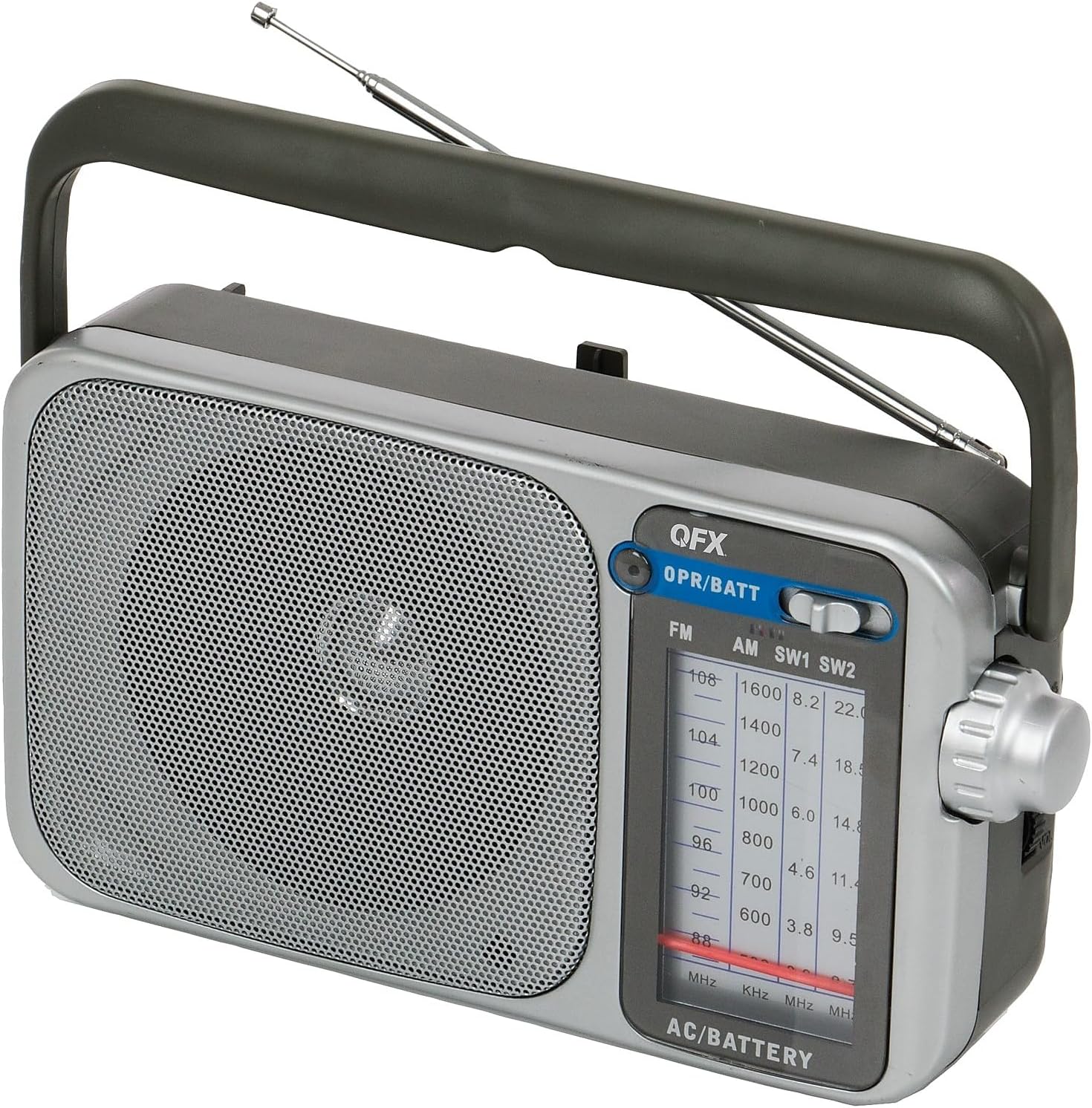
Figure 1: Front view of the QFX R-24 Portable AM/FM/SW1-SW2 Radio, showing the speaker grille, tuning dial, and controls.

Figure 2: The QFX R-24 radio with its telescopic antenna fully extended, ready for optimal reception.

Figure 3: Side view of the QFX R-24 radio illustrating its compact dimensions for portability.
Product Video:
Video 1: An overview of the QFX R-24 Portable AM/FM/SW1-SW2 Radio, highlighting its features and design.
Setup and Powering On
1. Battery Installation:
- Locate the battery compartment on the back of the radio.
- Open the battery compartment cover.
- Insert three (3) D-size batteries, ensuring correct polarity (+/-) as indicated inside the compartment.
- Close the battery compartment cover securely.
2. AC Power Connection:
- For AC power, connect the included AC power cord to the AC input jack on the radio.
- Plug the other end of the AC power cord into a standard 120V-240V wall outlet.
- The radio will automatically switch to AC power when connected.
3. Antenna Extension:
- For optimal reception, extend the telescopic antenna fully.
- Adjust the angle and direction of the antenna to achieve the clearest signal.
Operation
1. Power On/Off and Volume Control:
- Rotate the volume knob clockwise to turn the radio on and increase the volume.
- Rotate the volume knob counter-clockwise to decrease the volume and turn the radio off.
2. Band Selection:
- Use the band selector switch (FM, AM, SW1, SW2) to choose your desired frequency band.
3. Tuning to a Station:
- Rotate the tuning knob to scan through the frequencies within the selected band.
- The LED indicator will illuminate when a strong signal is received.
- Fine-tune the knob for the clearest audio.
4. Headphone Use:
- Plug 3.5mm headphones into the headphone jack located on the side/back of the radio for private listening.
- The internal speaker will automatically mute when headphones are connected.
Care and Maintenance
- Clean the radio with a soft, dry cloth. Do not use abrasive cleaners or solvents.
- If the radio will not be used for an extended period, remove the batteries to prevent leakage and corrosion.
- Store the radio in a cool, dry place away from direct sunlight and extreme temperatures.
- Avoid dropping the radio or subjecting it to strong impacts.
Troubleshooting
| Problem | Possible Cause | Solution |
|---|---|---|
| No power | Batteries are dead or incorrectly inserted; AC cord not properly connected. | Replace batteries, ensuring correct polarity. Check AC cord connection to radio and wall outlet. |
| Poor reception / Static | Antenna not extended; weak signal; interference from other electronics. | Fully extend and adjust the telescopic antenna. Try moving the radio to a different location. Turn off nearby electronic devices that may cause interference. |
| No sound from speaker | Volume too low; headphones plugged in; speaker malfunction. | Increase volume. Disconnect headphones. If problem persists, contact support. |
| Tuning dial inaccurate | Minor variations are normal for analog tuning. | Fine-tune slowly to locate the desired station. |
Specifications
| Feature | Detail |
|---|---|
| Model Number | R-24 |
| Product Dimensions | 9.25"L x 2.5"W x 4.5"H |
| Item Weight | 1.35 pounds |
| Radio Bands Supported | AM, FM, SW1, SW2 |
| Power Source | AC 120V-240V; DC 4.5V; 3x D-Batteries |
| Headphone Jack | 3.5mm |
| Included Components | Radio |
| Manufacturer | QFX |
| Country of Origin | China |
Warranty and Support
For warranty information, technical support, or service inquiries, please contact QFX customer service. Keep your purchase receipt as proof of purchase for any warranty claims.
Contact information can typically be found on the QFX official website or on the product packaging.