
1. Introduction
This manual provides essential information for the safe and effective use of your Makita GA9040R Angle Grinder. Please read these instructions carefully before operating the tool and keep them for future reference. The Makita GA9040R is a powerful 2600W, 220V angle grinder designed for heavy-duty grinding and cutting applications on various materials.
2. General Safety Instructions
Always follow basic safety precautions when using electrical tools to reduce the risk of fire, electric shock, and personal injury.
2.1 Work Area Safety
- Keep the work area clean and well-lit. Cluttered or dark areas invite accidents.
- Do not operate power tools in explosive atmospheres, such as in the presence of flammable liquids, gases, or dust. Power tools create sparks which may ignite the dust or fumes.
- Keep children and bystanders away while operating a power tool. Distractions can cause you to lose control.
2.2 Electrical Safety
- Power tool plugs must match the outlet. Never modify the plug in any way.
- Avoid body contact with earthed or grounded surfaces such as pipes, radiators, ranges, and refrigerators. There is an increased risk of electric shock if your body is earthed or grounded.
- Do not expose power tools to rain or wet conditions. Water entering a power tool will increase the risk of electric shock.
- Do not abuse the cord. Never use the cord for carrying, pulling, or unplugging the power tool. Keep cord away from heat, oil, sharp edges, or moving parts.
2.3 Personal Safety
- Always wear eye protection. Use safety glasses, goggles, or a face shield.
- Wear appropriate personal protective equipment (PPE) such as dust masks, non-skid safety shoes, hard hats, or hearing protection.
- Stay alert, watch what you are doing, and use common sense when operating a power tool.
- Do not overreach. Keep proper footing and balance at all times.
- Dress properly. Do not wear loose clothing or jewelry. Keep your hair, clothing, and gloves away from moving parts.
3. Product Overview
The Makita GA9040R is a robust angle grinder designed for demanding tasks. Familiarize yourself with its main components before use.

Figure 3.1: Main view of the Makita GA9040R Angle Grinder, showing the motor housing, gear housing, side handle, and a mounted grinding disc.
- Motor Housing: Contains the powerful 2600W motor.
- Gear Housing: Protects the internal gears and provides mounting for the spindle.
- Spindle Lock Button: Used to lock the spindle for easy disc changes.
- Side Handle: Provides additional grip and control during operation. Can be mounted on either side.
- Wheel Guard: Protects the user from sparks and debris. Adjustable for different working angles.
- Power Switch: For turning the tool on and off.
- Power Cord: Connects the tool to a 220V power supply.
4. Setup and Assembly
Before connecting the tool to the power supply, ensure all components are correctly assembled.
4.1 Attaching the Side Handle
- Unscrew the side handle from its packaging.
- Thread the side handle into one of the threaded holes on the gear housing.
- Tighten securely by hand. The handle can be positioned on either the left or right side for user comfort and control.
4.2 Installing/Removing Grinding/Cutting Discs
Warning: Always disconnect the tool from the power supply before installing or removing accessories.
- Press and hold the spindle lock button to prevent the spindle from rotating.
- Using the supplied wrench, loosen and remove the lock nut (if a disc is already installed).
- Place the inner flange onto the spindle.
- Position the desired grinding or cutting disc onto the inner flange, ensuring it sits flush.
- Screw the lock nut onto the spindle and tighten it firmly with the wrench while holding the spindle lock button.
- To remove, reverse the steps.
4.3 Adjusting the Wheel Guard
The wheel guard should always be positioned to provide maximum protection from sparks and debris, and to cover as much of the exposed disc as possible.
- Loosen the screw or lever on the wheel guard.
- Rotate the guard to the desired position.
- Tighten the screw or lever securely.
5. Operating Instructions
Always wear appropriate safety gear, including eye protection, hearing protection, and gloves, before operating the angle grinder.
5.1 Starting and Stopping
- To start the tool, push the power switch to the "ON" position.
- Allow the disc to reach full speed before making contact with the workpiece.
- To stop the tool, push the power switch to the "OFF" position.
- Wait for the disc to come to a complete stop before setting the tool down.
5.2 Grinding and Cutting Techniques
- Hold the tool firmly with both hands, using the main handle and the side handle.
- Apply light, even pressure. Do not force the tool.
- For grinding, hold the disc at a slight angle (15-30 degrees) to the workpiece.
- For cutting, hold the disc perpendicular to the workpiece and make straight, controlled cuts.
- Avoid sudden impacts or twisting the disc, as this can cause kickback or disc breakage.
- Do not use cutting discs for grinding, and vice-versa, unless specifically designed for both applications.
6. Maintenance
Regular maintenance ensures the longevity and safe operation of your tool. Always disconnect the tool from the power supply before performing any maintenance.
6.1 Cleaning
- Keep the ventilation openings clean to prevent overheating.
- Regularly clean dust and debris from the tool using a soft brush or compressed air.
- Do not use water or chemical cleaners.
6.2 Inspection
- Inspect the power cord for damage before each use. Replace if frayed or cut.
- Check the wheel guard for damage or cracks. Ensure it is securely fastened.
- Examine grinding/cutting discs for cracks, chips, or excessive wear before each use. Replace damaged discs immediately.
- Ensure all screws and fasteners are tight.
6.3 Storage
- Store the tool in a dry, secure place out of reach of children.
- Protect the tool from direct sunlight and extreme temperatures.
7. Troubleshooting
Refer to this section for common issues and their solutions.
| Problem | Possible Cause | Solution |
|---|---|---|
| Tool does not start. | No power supply. Damaged power cord. Faulty switch. | Check power outlet and circuit breaker. Inspect cord for damage; replace if necessary. Contact authorized service center. |
| Excessive vibration. | Disc improperly installed. Damaged or unbalanced disc. Loose components. | Re-install disc correctly. Replace disc. Check and tighten all fasteners. |
| Tool overheats. | Blocked ventilation openings. Overloading the tool. | Clean ventilation openings. Reduce pressure and allow the tool to cool. |
| Sparks are excessive or unusual. | Worn carbon brushes. Incorrect disc for material. | Contact authorized service center for brush replacement. Ensure correct disc type is used. |
8. Technical Specifications
The following are the technical specifications for the Makita GA9040R Angle Grinder:
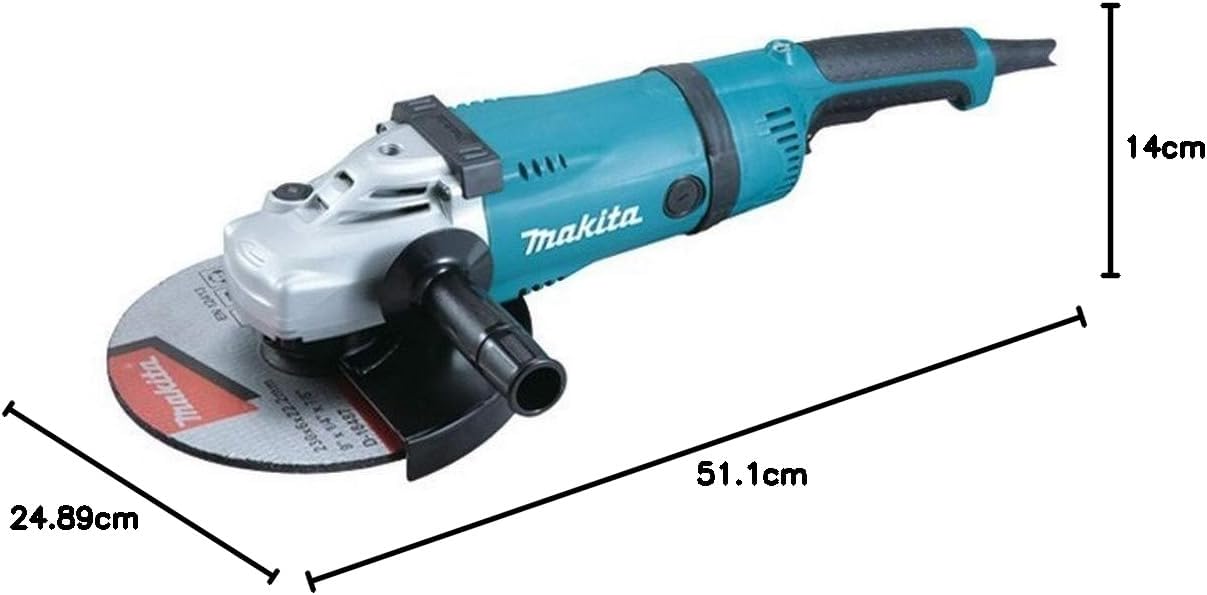
Figure 8.1: Dimensions of the Makita GA9040R Angle Grinder.
| Feature | Specification |
|---|---|
| Model Number | GA9040R |
| Manufacturer | Makita |
| Power Source | AC (Corded Electric) |
| Voltage | 220 Volts |
| Power | 2600 Watts |
| Horsepower | 3 HP |
| Maximum Rotational Speed | 6600 RPM |
| Material | Metal |
| Product Dimensions (L x W x H) | 51.1 x 24.89 x 14 cm |
| Item Weight | 6.7 kg (14.77 pounds) |
| Style | Angled |
| Included Components | x (Note: Original data states 'x', typically refers to accessories like side handle, wrench, etc.) |
| Battery/Batteries Required | No |
9. Warranty and Support
Makita products are manufactured to the highest quality standards. For information regarding warranty coverage, service, or technical support, please refer to the official Makita website or contact your local authorized Makita service center. Keep your purchase receipt as proof of purchase for warranty claims.
For further assistance, visit: www.makita.com


