Introduction
Thank you for choosing the Muvit MUHPH0025 Stereo Music & Call Headphones. This in-ear stereo headset is designed for use with various devices, including iPhone (1G, 3-3GS, 4-4S) and iPod touch, as well as any other device equipped with a standard 3.5mm audio jack. These headphones allow you to seamlessly switch between listening to music and taking calls with a single button click.
Please read this manual carefully before using the product to ensure proper operation and to maximize its lifespan.
Package Contents
- Muvit MUHPH0025 Stereo Music & Call Headphones
- User Manual (this document)

Image: Muvit MUHPH0025 Stereo Music & Call Headphones in their retail packaging. The packaging highlights universal compatibility and features like a built-in microphone, remote control, and 3.5mm jack.
Product Overview
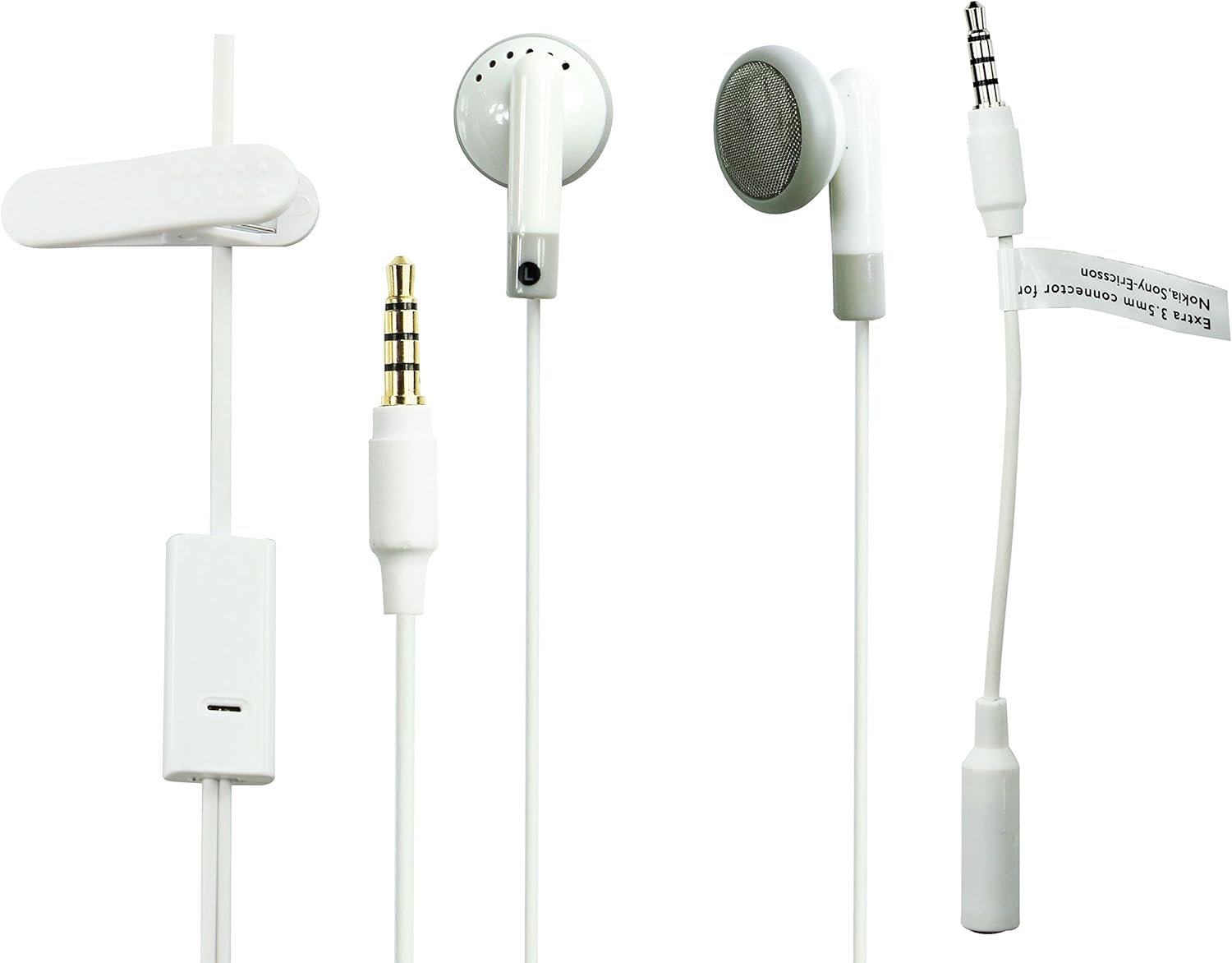
Image: A detailed view of the Muvit MUHPH0025 headphones, showing the 3.5mm jack, the in-line remote with microphone, the earbud design, and a cable clip.
The Muvit MUHPH0025 headphones feature a classic in-ear design for comfortable listening. They include an integrated microphone and a control button on the cable for easy management of calls and music playback.
- Earbuds: Designed for in-ear comfort and sound delivery.
- In-line Remote/Microphone: Allows for hands-free calling and music control.
- 3.5mm Audio Jack: Standard connector for universal compatibility.
- Cable Clip: For securing the cable to clothing.
Setup
- Unpack: Carefully remove the headphones from their packaging.
- Connect: Insert the 3.5mm audio jack firmly into the headphone port of your smartphone, tablet, MP3 player, or other compatible device.
- Position: Place the earbuds comfortably into your ears. Ensure a snug fit for optimal sound quality.
- Secure (Optional): Use the included cable clip to attach the headphone cable to your clothing, reducing cable sway and tangles during movement.
Operating Instructions
Music Playback Control:
- Play/Pause: Press the control button once.
- Next Track: Press the control button twice quickly.
- Previous Track: Press the control button three times quickly.
Call Management:
- Answer/End Call: Press the control button once during an incoming call or an active call.
- Reject Call: Press and hold the control button for approximately 2 seconds during an incoming call.
- Activate Voice Assistant (e.g., Siri): Press and hold the control button for approximately 2 seconds when not on a call.
Note: Functionality of the control button may vary slightly depending on your device's operating system and specific application.
Maintenance and Care
- Cleaning: Gently wipe the earbuds and cable with a soft, dry cloth. Do not use harsh chemicals or abrasive materials.
- Storage: When not in use, store the headphones in a clean, dry place, preferably in a protective pouch to prevent tangling and damage.
- Avoid Moisture: Although the product description mentions "Waterproof" (Poziom wodoodporności: Wodoodporny), it's generally best practice to avoid prolonged exposure to water or high humidity to prevent damage to electronic components. Do not submerge the headphones.
- Handle with Care: Do not pull on the cable to disconnect the headphones from your device. Always grasp the 3.5mm jack.
- Temperature: Avoid exposing the headphones to extreme temperatures (hot or cold).
Troubleshooting
| Problem | Possible Cause | Solution |
|---|---|---|
| No sound or low volume. | Headphone jack not fully inserted; device volume too low; incorrect audio output selected on device. | Ensure the 3.5mm jack is fully inserted. Increase the volume on your device. Check your device's audio settings to ensure output is directed to the headphones. Test with another device. |
| Microphone not working. | Microphone port blocked; device microphone settings; incompatible device. | Ensure the microphone on the in-line remote is not covered. Check your device's privacy or sound settings for microphone access. Some older devices may not fully support in-line microphone functionality. |
| Control button not responding. | Incompatible device; software glitch. | Ensure your device supports in-line remote controls. Restart your device. Test with another compatible device. |
| Sound distortion or crackling. | Loose connection; damaged cable; interference. | Re-insert the 3.5mm jack. Inspect the cable for any visible damage. Move away from potential sources of electromagnetic interference. |
Specifications
| Feature | Detail |
|---|---|
| Brand | Muvit |
| Model Name | MUHPH0025 |
| Manufacturer Model Number | 17060 |
| Part Number / EAN | 3700615049056 |
| Connectivity Technology | Wired |
| Headphone Jack | 3.5 mm Jack |
| Form Factor | In-Ear (Douszne) |
| Color | White |
| Compatible Devices | iPhone & iPod (and other 3.5mm jack devices) |
| Material Type | Polycarbonate (PC) |
| Water Resistance Level | Waterproof (as per product specifications, though general care is advised) |
| Product Dimensions | 17.7 x 8.99 x 2.01 cm; 60 g (approx. 6.97 x 3.54 x 0.79 inches; 2.12 oz) |
| Batteries Required | No |
Warranty and Support
Muvit products are manufactured to high quality standards. For information regarding warranty terms and conditions, please refer to the warranty card included with your purchase or contact your retailer.
For technical support or further assistance, please contact Muvit customer service or your local distributor. Contact details can typically be found on the Muvit official website or on your product packaging.
Manufacturer: Muvit
ASIN: B007ZXRXGE
Date First Available: September 5, 2012


