
Introduction
This manual provides detailed instructions for the assembly, operation, and maintenance of your BRIO 33165 Lift and Load Railway Set. Please read this manual carefully before use to ensure safe and correct operation. This interactive wooden toy set is designed for children aged 3 years and older.
Safety Information
- Choking Hazard: Small parts may be present. Not suitable for children under 3 years.
- Battery Safety: Ensure batteries are inserted with correct polarity. Do not mix old and new batteries. Remove batteries if the toy is not used for extended periods.
- Supervision: Adult supervision is recommended during play.
- Material: This product is primarily made of wood. Avoid exposure to excessive moisture or extreme temperatures.
Package Contents
Your BRIO 33165 Lift and Load Railway Set includes 75 pieces. Please verify that all components are present before assembly.

Image Description: An overhead view displaying all 75 individual components of the BRIO 33165 Lift and Load Railway Set. This includes various curved and straight wooden track pieces, two locomotives (one red, one orange), several cargo wagons, two cranes, a truck, trees, signs, and other railway accessories, each with a quantity label.
Key components include:
- Wooden track pieces (various shapes and lengths)
- 1 battery-powered freight train (orange locomotive)
- 1 push-along freight train (red locomotive)
- Cargo wagons and containers
- 2 loading cranes
- Road truck with trailer
- Railway accessories (e.g., signals, signs, trees, level crossing)
Setup and Assembly
1. Track Assembly
Arrange the wooden track pieces on a flat, stable surface to create your desired railway layout. The pieces connect easily with interlocking wooden pegs. A suggested layout is shown below.

Image Description: A complete overhead view of the assembled BRIO 33165 railway set. The wooden tracks form an oval layout with a central section featuring two cranes, a level crossing, and various accessories like trees and signs. Two trains are visible on the tracks.
Ensure all track pieces are securely connected to prevent derailments during play.
2. Battery Installation (Orange Locomotive)
The orange locomotive requires 1 x AA (LR06) 1.5V battery (not included).
- Locate the battery compartment on the underside of the orange locomotive.
- Using a small screwdriver, open the battery compartment cover.
- Insert one AA battery, ensuring the correct polarity (+/-) as indicated inside the compartment.
- Replace the cover and secure it with the screw.
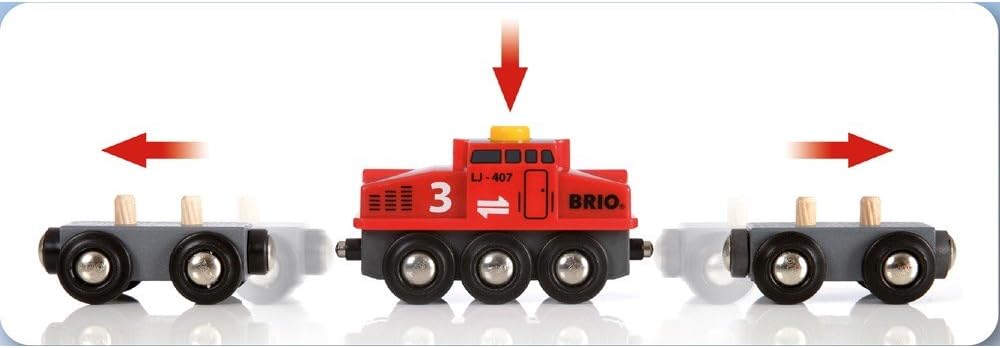
Image Description: A close-up view of the orange battery-powered locomotive. An arrow points to the top of the locomotive where a hand is pressing down, indicating the activation button. A battery icon with "1x AA NOT INCLUDED" is visible, suggesting battery installation or activation.
Note: The red locomotive is a push-along model and does not require batteries.
3. Accessory Placement
Place the cranes, signals, trees, and other accessories around the track as desired to enhance your railway environment.
Operating Instructions
1. Operating the Locomotives
- Orange Battery-Powered Locomotive: Press the button on top of the locomotive to start or stop its movement. It will move forward along the track.
- Red Push-Along Locomotive: This locomotive is manually operated. Push it along the track to move it.

Image Description: The red locomotive is positioned between two grey cargo wagons. Red arrows point left and right, illustrating that the train can be pushed in either direction along the track.
2. Using the Loading Cranes
The two loading cranes allow for interactive cargo handling.
- Rotation: Turn the red knob on the side of the crane to rotate the crane arm 360 degrees.
- Lifting/Lowering: The crane arm can be manually moved up and down to lift or lower cargo.
- Magnetic Attachment: The crane's hook is magnetic, allowing it to pick up and move magnetic cargo pieces (e.g., containers).

Image Description: A yellow loading crane is shown on a wooden base, positioned next to a track. Curved red arrows indicate the crane arm's ability to rotate, while vertical red arrows show its capacity to lift and lower a grey cargo piece.
3. Cargo Handling
Use the cranes to load and unload cargo from the wagons and the truck. The cargo pieces are designed to fit securely onto the wagons.

Image Description: A wooden truck with a red cab and a light brown bed is depicted. A curved red arrow indicates that the truck's bed can tilt upwards, simulating the action of unloading cargo.
4. Interactive Accessories
- Signals: Manually rotate the signal arm to indicate stop (red) or go (green) for trains.
- Level Crossing: Raise and lower the barriers at the level crossing to control road and rail traffic.

Image Description: A close-up of a grey railway signal. A red arm is shown rotating, with a curved red arrow indicating its movement between a vertical (green light visible) and horizontal (red light visible) position, signifying stop or go.
Maintenance
- Cleaning: Wipe all wooden and plastic parts with a damp cloth. Do not immerse in water. Avoid harsh cleaning agents.
- Storage: Store the set in a dry place away from direct sunlight and extreme temperatures to prevent warping or damage to the wooden components.
- Battery Replacement: Replace the AA battery in the orange locomotive when its movement becomes slow or stops.
Troubleshooting
| Problem | Possible Cause | Solution |
|---|---|---|
| Orange locomotive does not move. |
|
|
| Train derails frequently. |
|
|
| Crane magnet does not pick up cargo. |
|
|
Specifications
- Model Number: 33165
- Brand: BRIO
- Material: Wood
- Number of Pieces: 75
- Recommended Age: 3 years and up
- Product Dimensions (L x W x H): Approximately 45 x 10 x 39 cm (17.7 x 3.9 x 15.3 inches)
- Assembled Track Size: 87 x 72 cm (34.2 x 28.3 inches)
- Power Source: Battery-powered (orange locomotive)
- Battery Type: 1 x AA (LR06) 1.5V (not included)
- Scale: 1:87 (Standard Gauge)
Warranty and Support
For information regarding warranty, spare parts, or customer support, please refer to the official BRIO website or contact your local retailer.
Official BRIO Website: www.brio.net