
1. Product Overview
The Soundfreaq SFQ-04 Sound Kick is a portable Bluetooth stereo speaker designed for wireless audio streaming. It features UQ3 spatial enhancement technology for an immersive sound experience and includes a rechargeable battery for portability. The speaker can connect wirelessly via Bluetooth or through a wired 3.5mm auxiliary input. An integrated USB port allows for charging compatible devices.
Key Features:
- Wireless stereo Bluetooth connectivity
- 3.5mm wired auxiliary input
- Rechargeable internal battery providing up to 7 hours of play time
- UQ3 spatial technology mode for expanded immersive sound
- Compact size with full 2.1 stereo sound
- On-board USB port for charging external devices (500mA)
- Intuitive touch controls
Included Components:
- Soundfreaq SFQ-04 Sound Kick Speaker
- AC power cord
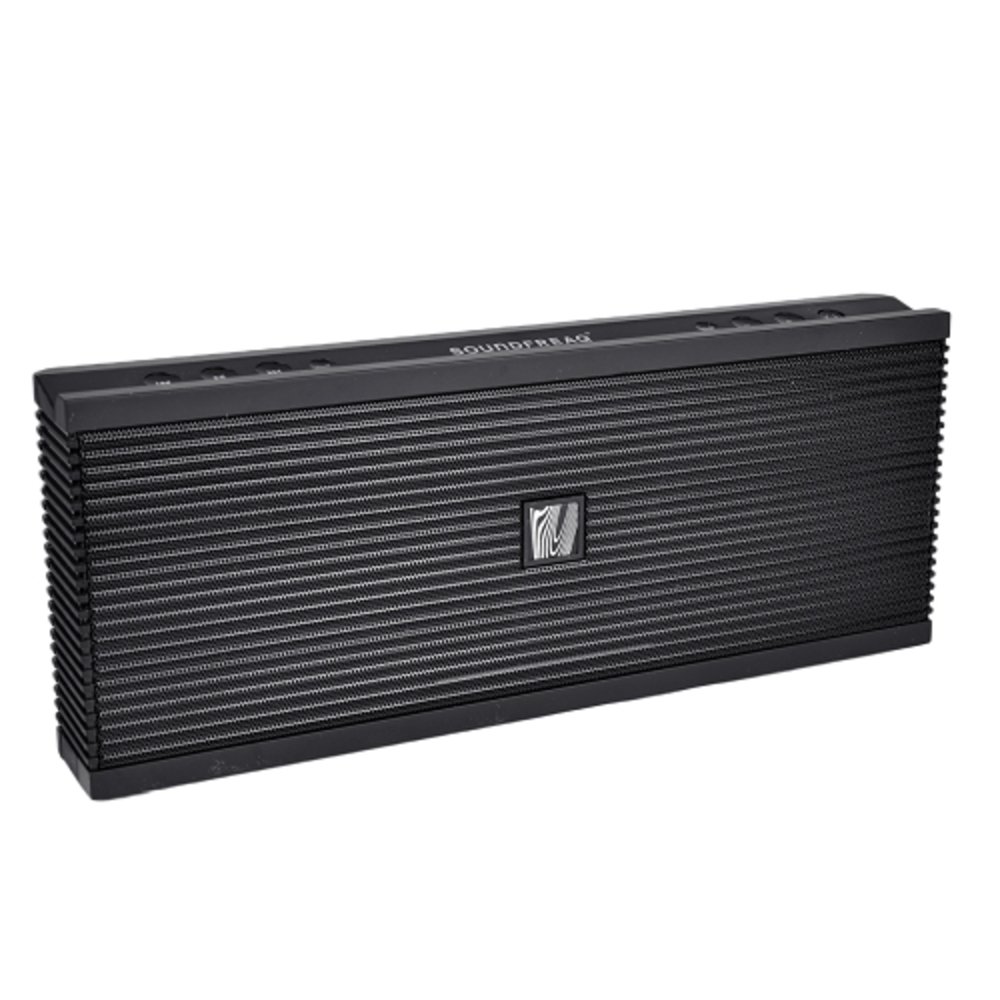
Image 1.1: Front view of the Soundfreaq SFQ-04 Sound Kick speaker with its unique kickstand extended, showcasing its compact design and speaker grille.
2. Setup
2.1 Charging the Speaker
- Connect the provided AC power cord to the speaker's power input port.
- Plug the AC power cord into a standard wall outlet.
- The speaker's indicator light will show charging status. For optimal battery life, it is recommended to fully charge the speaker before first use. A full charge can take approximately 12 hours.
- Once fully charged, the speaker provides up to 7 hours of playback time.
Note: The speaker can be used while charging.
2.2 Powering On/Off
- To power on, press and hold the Power button (usually indicated by a power symbol) on the speaker's control panel until the indicator light illuminates.
- To power off, press and hold the Power button again until the indicator light turns off.
- The speaker requires its rear kickstand to be fully extended for operation. Ensure it is extended until a silver mark is visible.
2.3 Bluetooth Pairing
- Ensure the speaker is powered on and within range of your Bluetooth-enabled device (e.g., smartphone, tablet, laptop).
- Activate Bluetooth on your device and search for available devices.
- Select "Sound Kick" or "SFQ-04" from the list of found devices.
- Once paired, the speaker will emit an audible confirmation, and its Bluetooth indicator light will typically turn solid.
- Your device should now be connected, and audio will play through the Sound Kick speaker.
Tip: Some devices may automatically connect after the initial pairing. If prompted for a passcode, enter "0000".
2.4 Wired Auxiliary Connection
- Connect one end of a 3.5mm audio cable (not included) to the AUX input port on the Sound Kick speaker.
- Connect the other end of the 3.5mm audio cable to the headphone jack or audio output of your external device.
- The speaker will automatically switch to AUX input mode when a cable is detected.
3. Operating Instructions
3.1 Adjusting Volume
- Use the touch-sensitive volume up (+) and volume down (-) buttons on the speaker's control panel to adjust the speaker's output volume.
- For precise control, you can also adjust the volume directly on your connected audio source device.
3.2 UQ3 Spatial Enhancement
- The Sound Kick features UQ3 spatial enhancement technology to broaden the soundstage and create a more immersive listening experience.
- Press the UQ3 button on the control panel to toggle this feature on or off.
- Experiment with the UQ3 setting to find your preferred sound, as its effect can vary depending on the audio content and your personal preference.
3.3 Charging External Devices
- The Sound Kick includes a USB port (500mA output) that can be used to charge compatible external devices, such as smartphones.
- Connect your device's USB charging cable to the USB port on the speaker.
- Charging an external device will consume the speaker's battery power and may reduce its audio playback time.
4. Maintenance
- Cleaning: Use a soft, dry cloth to clean the speaker's exterior. Avoid using abrasive cleaners, solvents, or sprays.
- Storage: When not in use for extended periods, store the speaker in a cool, dry place.
- Battery Care: To maintain battery health, avoid fully discharging the battery frequently. Recharge the speaker regularly, even if not in constant use.
- Water Resistance: This product is not waterproof and is not water-resistant. Avoid exposure to liquids, moisture, or extreme humidity.
5. Troubleshooting
5.1 No Power / Speaker Not Turning On
- Ensure the speaker is fully charged or connected to a power source using the AC adapter.
- Verify that the AC power cord is securely connected to both the speaker and the wall outlet.
- Confirm that the rear kickstand is fully extended. The speaker will not power on if it is not.
5.2 No Sound or Low Volume
- Increase the volume on both the Sound Kick speaker and your connected audio source device.
- If using Bluetooth, ensure the speaker is successfully paired and connected to your device.
- If using the AUX input, ensure the 3.5mm audio cable is securely connected to both the speaker and your device.
- Check if the audio source device is playing audio.
5.3 Bluetooth Connection Issues
- Ensure the speaker and your Bluetooth device are within the recommended operating range (typically up to 30 feet/10 meters) and there are no significant obstructions.
- Try unpairing the Sound Kick from your device's Bluetooth settings and then re-pairing it.
- Turn off and then turn on the Bluetooth function on your device.
- Restart both the Sound Kick speaker and your audio source device.
- If experiencing intermittent audio, try moving your device closer to the speaker or reducing interference from other wireless devices.
6. Specifications
| Feature | Specification |
|---|---|
| Model Name | SFQ-04 |
| Connectivity Technology | Bluetooth, Auxiliary, USB |
| Wireless Communication Technology | Bluetooth |
| Audio Output Mode | Stereo (2.1 Surround Sound Channel Configuration) |
| Speaker Maximum Output Power | 5 Watts |
| Signal-to-Noise Ratio | 80 dB |
| Power Source | Battery Powered (1 Lithium Ion battery required) |
| Battery Life | Up to 7 hours |
| Control Method | Touch |
| Product Dimensions | 10.6 x 1.6 x 4.2 inches |
| Item Weight | 1.6 pounds |
| Material | Plastic |
| Color | Black |
| Water Resistance Level | Not Water Resistant |
7. Warranty and Support
The Soundfreaq SFQ-04 Sound Kick speaker comes with a Limited Warranty. For specific warranty terms and conditions, please refer to the documentation included with your purchase or visit the official Soundfreaq website.
For technical support, troubleshooting assistance, or warranty claims, please contact Soundfreaq customer service. Contact information can typically be found on the manufacturer's website or in your product packaging.
Note: Keep your purchase receipt as proof of purchase for warranty purposes.


