
Makita DC18RC
Makita DC18RC Rapid Optimum Charger Instruction Manual
Model: DC18RC
Introduction
This manual provides essential information for the safe and effective use of your Makita DC18RC Rapid Optimum Charger. Please read these instructions thoroughly before operating the charger to ensure proper function and to prevent damage to the unit or batteries. This charger is designed for Makita 7.2V-18V Lithium-Ion and Ni-MH batteries.
Important Safety Instructions
When using electrical appliances, basic precautions should always be followed to reduce the risk of fire, electric shock, and personal injury. Read all instructions before using the charger.
- SAVE THESE INSTRUCTIONS. This manual contains important safety and operating instructions for battery charger DC18RC.
- Before using the battery charger, read all instructions and cautionary markings on (1) battery charger, (2) battery, and (3) product using the battery.
- CAUTION – To reduce risk of injury, charge only Makita rechargeable Li-ion or Ni-MH batteries. Other types of batteries may burst causing personal injury and damage.
- Do not charge non-rechargeable batteries.
- Do not expose charger to rain or wet conditions. Water entering the charger will increase the risk of electric shock.
- Do not carry the charger by cord or yank it to disconnect from an outlet.
- Do not use an extension cord unless it is absolutely necessary. Use of an improper extension cord could result in a risk of fire and electric shock.
- Do not operate charger if it has received a sharp blow, been dropped, or otherwise damaged. Take it to a qualified service person.
- Do not disassemble charger. Take it to a qualified service person when service or repair is required. Incorrect reassembly may result in a risk of electric shock or fire.
- To reduce risk of electric shock, unplug charger from outlet before attempting any maintenance or cleaning.
- This appliance is not intended for use by persons (including children) with reduced physical, sensory or mental capabilities, or lack of experience and knowledge, unless they have been given supervision or instruction concerning use of the appliance by a person responsible for their safety.
Product Overview
The Makita DC18RC Rapid Optimum Charger features advanced technology to optimize battery life and charging speed. It includes a built-in fan to cool the battery during charging and communicates with the battery's chip to manage current, voltage, and temperature.

Figure 1: Front view of the Makita DC18RC Rapid Optimum Charger, showing the battery slot and indicator panel.

Figure 2: Angled front view of the charger, highlighting its compact design.
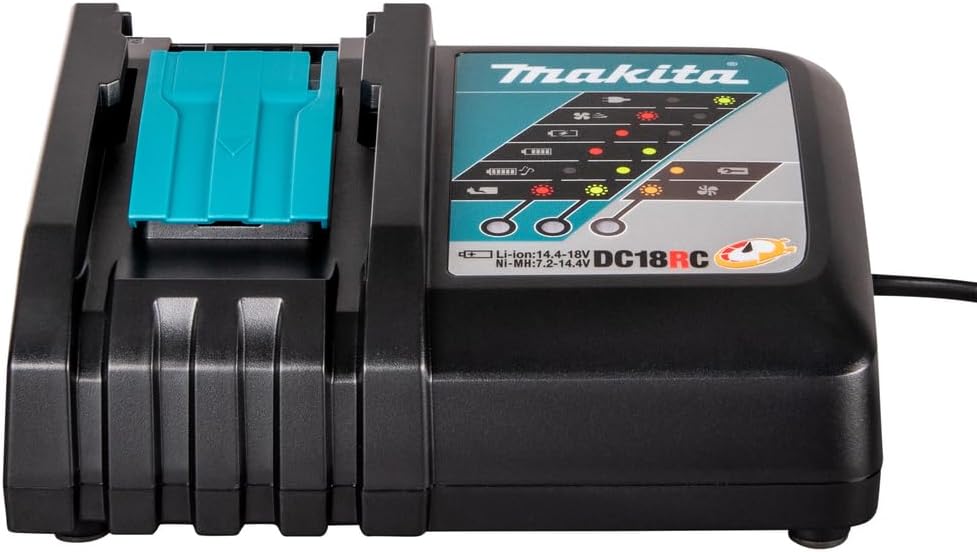
Figure 3: Side view of the charger, showing the ventilation fins.

Figure 4: Back view of the charger, showing the power cord connection point.
Setup
- Power Connection: Plug the charger's power cord into a standard 120V AC electrical outlet. Ensure the outlet is easily accessible and properly grounded.
- Placement: Place the charger on a stable, flat surface in a well-ventilated area. Avoid placing it on flammable surfaces or near heat sources.
- Initial Check: When plugged in, the charger's indicator lights may briefly illuminate to confirm power.

Figure 5: The Makita DC18RC charger with its attached power cord, ready for connection to an electrical outlet.
Operating Instructions
Charging a Battery
- Ensure the charger is plugged into a 120V AC power source.
- Slide a compatible Makita 7.2V-18V Lithium-Ion or Ni-MH battery into the charger's slot until it clicks securely into place.
- The charger will automatically begin the charging process. The indicator lights will show the charging status.

Figure 6: A Makita battery correctly inserted into the DC18RC charger, indicating it is ready to charge.
Indicator Lights
The charger features indicator lights to communicate the battery's status:
- Solid Green Light: Indicates the battery is fully charged.
- Flashing Green Light: Indicates the battery is charging.
- Solid Red Light: Indicates a battery error or that the battery is too hot/cold to charge.
- Flashing Red Light: Indicates a battery defect or a problem with the charger.
- Solid Yellow Light: Indicates the battery is in a cooling state before charging begins (if too hot).
Charging Times
The DC18RC is a rapid optimum charger, designed for quick charging:
- An 18V LXT Lithium-Ion 3.0Ah battery typically charges in approximately 30 minutes.
- An 18V LXT Lithium-Ion 4.0Ah battery typically charges in approximately 40 minutes.
- Charging times may vary based on battery condition, temperature, and usage.
Optimized Charging
The charger communicates with the battery's built-in chip to optimize battery life by actively controlling current, voltage, and temperature during the charging process. A built-in fan circulates air through the battery's air vents to cool it, enabling faster charging.
Maintenance
Cleaning
- Always unplug the charger from the power outlet before cleaning.
- Use a dry cloth to wipe dust and dirt from the charger's exterior.
- Do not use water or chemical cleaning agents.
- Keep the charger's ventilation openings clear of debris to ensure proper cooling.
Storage
- Store the charger in a dry, indoor location, away from direct sunlight and extreme temperatures.
- Do not store the charger with a battery inserted for extended periods.
Troubleshooting
| Problem | Possible Cause | Solution |
|---|---|---|
| Charger not working / No indicator lights | No power to the charger. | Check power outlet and cord connection. Try a different outlet. |
| Solid Red Light | Battery too hot or too cold. | Allow battery to reach room temperature before charging. |
| Flashing Red Light | Battery defect or charger malfunction. | Remove and reinsert the battery. If the issue persists, try a different battery. If still flashing, the charger or battery may be defective. Contact Makita service. |
| Battery not charging fully | Battery is old or damaged. | Replace the battery. Ensure proper contact between battery and charger terminals. |
Specifications
- Model: DC18RC
- Input Voltage: 120V AC
- Output Voltage: 7.2V - 18V DC
- Compatible Battery Types: Makita Lithium-Ion (LXT) and Ni-MH batteries
- Item Weight: Approximately 1.86 pounds (0.84 kg)
- Product Dimensions: Approximately 9.21 x 6.69 x 3.31 inches (23.4 x 17 x 8.4 cm)
- Material: Plastic
- Certification: UL
Warranty and Support
For warranty information, service, or technical support, please refer to the official Makita website or contact Makita customer service directly. Keep your purchase receipt as proof of purchase for warranty claims.
You can find more information and contact details on the Official Makita Website.
Related documentsDC18RC


Ask a question about this manual
Ask about setup, troubleshooting, compatibility, parts, safety, or missing instructions. Manuals+ will review the question and use this page’s manual context to help answer it.