
1. Product Overview
Bring a dramatic wide-angle perspective to your still and HD video shooting. The AF-S NIKKOR 28mm f/1.8G's fast maximum aperture lets you create in nearly any light—dusk to dawn, indoors or out—and offers outstanding depth-of-field control. Nikon's exclusive Nano Crystal Coat nearly eliminates the ghosting and flare seen with some wide-angle lenses for improved clarity and contrast. Impressive on both FX- and DX-format cameras, the AF-S NIKKOR 28mm f/1.8G excels with landscapes, architecture, group shots, travel and more.

Figure 1.1: The Nikon AF-S NIKKOR 28mm f/1.8G lens, a compact wide-angle prime lens designed for Nikon DSLR cameras.
2. Key Features
- Fast f/1.8 Prime NIKKOR Lens: Offers excellent low-light performance and shallow depth of field.
- Engineered for Nikon FX-format D-SLRs: Optimized for full-frame Nikon cameras.
- Nano Crystal Coat: An anti-reflective coating that virtually eliminates internal lens element reflections across a wide range of wavelengths, reducing ghosting and flare.
- Aspheric Lens Elements: Corrects spherical aberrations and distortions for superior image quality.
- 7 Diaphragm Blades: Contributes to a pleasing bokeh (background blur).
- Nikon Super Integrated Coating (SIC): Enhances light transmission efficiency and offers superior color consistency and reduced lens flare.
- Nikon Silent Wave Motor (SWM): Uses ultrasonic vibrations for incredibly smooth, silent, and precise autofocus operation.
- M/A Focus Mode Switch: Allows seamless manual override of the autofocus system with virtually no time lag.
- Rear Focusing (RF): Only the rear lens group moves during focusing, eliminating changes in the physical length of the lens and enabling faster focusing.
3. What's in the Box
Upon opening the product packaging, please verify that all the following items are included:
- AF FX NIKKOR 28mm f/1.8G Compact Wide-angle Prime Lens with Auto Focus for Nikon DSLR Cameras
- LC-67 Snap-on Front Lens Cap
- HB-64 Bayonet Lens Hood
- CL-0915 Soft Case
- LF-4 Rear Lens Cap

Figure 3.1: LC-67 Snap-on Front Lens Cap, used to protect the front element of the lens.

Figure 3.2: LF-4 Rear Lens Cap, used to protect the rear element and lens mount when the lens is not attached to a camera body.

Figure 3.3: HB-64 Bayonet Lens Hood, designed to block stray light from entering the lens and causing flare, and to provide some physical protection.

Figure 3.4: CL-0915 Soft Case, for protecting the lens during storage and transport.
4. Setup and Installation
4.1 Attaching the Lens
- Ensure your camera is turned off before attaching or detaching any lens.
- Remove the rear lens cap (LF-4) from the lens and the body cap from your camera.
- Align the mounting mark on the lens with the mounting mark on the camera body.
- Rotate the lens counter-clockwise until it clicks into place. Do not force the lens.
4.2 Attaching the Lens Hood
- Align the mounting mark on the lens hood (HB-64) with the alignment mark on the front of the lens.
- Rotate the lens hood clockwise until it clicks into place.
- Ensure the lens hood is securely attached and properly oriented to prevent vignetting.
5. Operating Instructions
5.1 Focus Mode Switch (M/A and M)
The lens features a focus mode switch with two settings:
- M/A (Autofocus with Manual Override): In this mode, the lens will autofocus, but you can instantly switch to manual focus by rotating the focus ring. This is ideal for making fine adjustments after autofocus has been achieved.
- M (Manual Focus): In this mode, the lens will only focus manually. Rotate the focus ring to adjust focus. This is useful for precise focusing in specific situations or when autofocus struggles.
5.2 Aperture Control
The aperture (f-number) is controlled via your camera body. This lens has a fast maximum aperture of f/1.8, allowing for excellent performance in low light and the creation of shallow depth of field effects (bokeh).

Figure 5.1: Example of a portrait shot demonstrating the lens's ability to produce beautiful background blur (bokeh) at wide apertures.
5.3 Understanding MTF Curves
Modulation Transfer Function (MTF) charts illustrate a lens's optical performance. They show how well a lens reproduces contrast and resolution from the center to the edges of the image. Higher values indicate better performance.
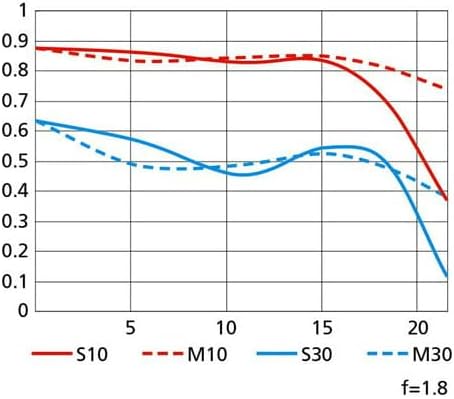
Figure 5.2: MTF curve chart for the AF-S NIKKOR 28mm f/1.8G lens. The red lines represent contrast (S10 and M10), and the blue lines represent resolution (S30 and M30). Solid lines are sagittal (radial) and dashed lines are meridional (tangential).
6. Maintenance and Care
- Cleaning the Lens: Use a soft, lint-free cloth specifically designed for optical surfaces. For stubborn smudges, use a small amount of lens cleaning fluid applied to the cloth, not directly to the lens.
- Protecting the Lens: Always use the front and rear lens caps when the lens is not in use. The lens hood provides additional protection against accidental bumps and stray light.
- Storage: Store the lens in a cool, dry place, away from direct sunlight and extreme temperatures. If storing for extended periods, consider using a dehumidifier or desiccant to prevent mold growth.
- Avoid Impact: Protect the lens from drops and impacts, which can damage internal elements or the focusing mechanism.
7. Troubleshooting
7.1 Autofocus Issues
- Lens not focusing: Ensure the focus mode switch on the lens is set to M/A. Check your camera's focus mode settings.
- Slow or inaccurate autofocus: Ensure there is sufficient light on your subject. Clean the lens contacts on both the lens and camera body.
7.2 Image Quality Concerns
- Images appear soft or blurry: Check if the lens is properly attached. Ensure the focus mode is appropriate for your shooting conditions. Verify that the lens elements are clean.
- Ghosting or flare: While the Nano Crystal Coat minimizes these, strong direct light sources can still cause them. Use the lens hood (HB-64) to mitigate this.
If you experience persistent issues not covered here, please refer to the official Nikon support resources or contact customer service.
8. Specifications
| Attribute | Detail |
|---|---|
| Brand | Nikon |
| Model Number | 2203 |
| Product Dimensions | 3.17 x 2.87 x 2.87 inches |
| Item Weight | 11.6 ounces |
| Focal Length Description | Wide angle 28mm |
| Lens Type | Wide Angle Prime |
| Compatible Mountings | Nikon F (FX) |
| Diaphragm Blades | 7 |
| First Available Date | April 18, 2012 |
9. Warranty and Support
9.1 Legal Disclaimer
This product is subject to a 14-day return policy. The lens serial number is US602746. Note: Warranty has expired for certain used conditions.
9.2 Additional Resources
For a comprehensive user manual in PDF format, please refer to the official document:
For further support or inquiries, please visit the official Nikon Store:


