
BAOFENG UV-5R
Contents
BAOFENG UV-5R VHF/UHF Dual Band Radio User Manual
Model: UV-5R
Introduction
This manual provides comprehensive instructions for the operation, maintenance, and troubleshooting of your BAOFENG UV-5R VHF/UHF Dual Band Radio. Please read this manual thoroughly before using the device to ensure proper functionality and safety.
What's in the Box
Upon unboxing, verify that all the following components are present:
- BAOFENG UV-5R VHF/UHF Dual Band Radio
- Lithium-Ion Battery (1 included)
- Antenna
- Desktop Charger
- Belt Clip
- Hand Strap
- User Manual (this document)
Product Overview
Familiarize yourself with the various parts and controls of your UV-5R radio.
Front View

This image shows the front of the BAOFENG UV-5R radio, highlighting its dual-band display, alphanumeric keypad, and function buttons. The display shows frequency information, and the speaker grille is visible below the display.
Side View with Controls

This image illustrates the side of the UV-5R radio, pointing out key controls such as the PTT (Push-to-Talk) button, SK-side key1 (CALL/radio/alarm), and SK-side key2 (MONI/flashlight/monitor). The speaker and microphone ports are also indicated.
Rear View

The rear view of the UV-5R radio, showing the battery compartment and the metal contacts for battery connection. A "PUSH" indicator for battery release is also visible.
Battery and Radio Separated

This image displays the BAOFENG UV-5R radio body alongside its detachable Lithium-Ion battery pack, illustrating how the battery connects to the radio.
Dimensions

A diagram showing the approximate dimensions of the BAOFENG UV-5R radio, including its height with the antenna (260mm/10.2"), body height (94mm/3.7"), width (54mm/2.1"), and depth (30mm/1.2").
Charging Cradle
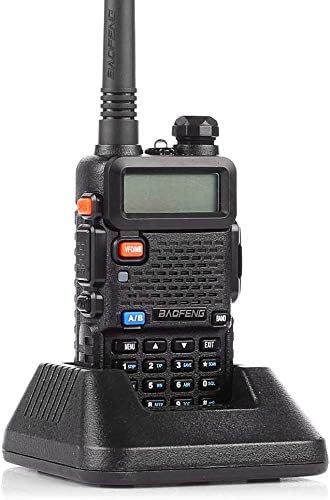
The BAOFENG UV-5R radio placed in its dedicated desktop charging cradle, demonstrating how the unit is charged.
Setup
1. Battery Installation and Charging
- Align the battery pack with the grooves on the back of the radio.
- Slide the battery upwards until it clicks into place.
- To remove, press the battery release button (usually on the bottom of the battery) and slide it downwards.
- Place the radio with the installed battery into the desktop charger. Ensure the charging contacts align.
- Connect the charger's power adapter to an electrical outlet. The charger indicator light will show charging status (typically red for charging, green for fully charged).
- Charge the battery fully before first use (approximately 4-5 hours).
2. Antenna Installation
- Screw the antenna clockwise onto the connector at the top of the radio until it is finger-tight. Do not overtighten.
3. Belt Clip Attachment
- Align the belt clip with the two screw holes on the back of the radio (above the battery).
- Secure the belt clip using the provided screws.
Operating Instructions
Power On/Off and Volume
- To power on, rotate the volume knob (top-left) clockwise.
- To power off, rotate the volume knob counter-clockwise until it clicks.
- Adjust volume by rotating the same knob.
Frequency and Channel Mode
- Press the VFO/MR button to switch between Frequency (VFO) mode and Channel (MR) mode.
- In VFO mode, you can manually input frequencies using the keypad.
- In MR mode, you can select pre-programmed channels using the UP/DOWN arrow keys or by entering the channel number.
Selecting A/B Band
- The UV-5R has two display lines (A and B). Press the A/B button to select the active band for transmission and menu operations.
Push-to-Talk (PTT) Button
- Press and hold the large PTT button on the left side of the radio to transmit.
- Release the PTT button to receive.
- Ensure you are on an authorized frequency before transmitting.
Menu Operations
- Press the MENU button to enter the menu.
- Use the UP/DOWN arrow keys to navigate through menu options.
- Press MENU again to select an option.
- Use UP/DOWN or the keypad to change settings.
- Press MENU to confirm the setting, or EXIT to cancel.
Keypad Functions
- 0-9: Numeric input for frequencies or channel numbers.
- #SCAN: Initiates scanning.
- *SCAN: Activates reverse frequency or FM radio.
- BAND: Switches between VHF and UHF bands.
Maintenance
Cleaning
- Wipe the radio's surface with a soft, damp cloth. Do not use harsh chemicals or abrasive cleaners.
- Ensure the radio is powered off and the battery is removed before cleaning.
Battery Care
- Avoid overcharging or completely draining the battery.
- Store the battery in a cool, dry place when not in use.
- If storing for extended periods, charge the battery to about 50% capacity.
Storage
- Store the radio in a dry, dust-free environment away from direct sunlight and extreme temperatures.
- Remove the battery if the radio will not be used for an extended period.
Troubleshooting
| Problem | Possible Cause | Solution |
|---|---|---|
| Radio does not power on. | Battery is dead or not properly installed. | Charge the battery fully. Ensure the battery is securely attached. |
| Cannot transmit or receive. | Incorrect frequency/channel, antenna not connected, low battery, squelch too high. | Verify frequency/channel. Ensure antenna is securely attached. Charge battery. Adjust squelch level (Menu option). |
| Poor audio quality. | Low signal strength, incorrect squelch, external interference. | Move to an area with better signal. Adjust squelch. Check for nearby electronic devices causing interference. |
| Keypad unresponsive. | Keypad lock is active. | Press and hold the '#' key to unlock the keypad. |
Specifications
| Feature | Detail |
|---|---|
| Frequency Range | VHF: 144-148MHz, UHF: 420-450MHz |
| Channels | 128 |
| CTCSS/DCS | 50 CTCSS and 104 CDCSS |
| Channel Step | 2.5/5/6.25/10/25KHz |
| Switchable Bandwidth | 25KHz/12.5KHz |
| Battery | 7.4V Lithium Ion (1800mAh) |
| Dimensions (H x W x D) | 3.7 x 6.5 x 8.3 inches (Product) |
| Item Weight | 15.2 ounces |
| Special Features | Dual-Band Display, Dual Freq. Display, Dual-Standby, UHF, FM Radio, Flashlight |
| Water Resistance Level | Water Resistant |
Warranty and Support
For warranty information and technical support, please refer to the official BAOFENG website or contact your authorized dealer. Keep your purchase receipt as proof of purchase for warranty claims.
Official BAOFENG Website: www.baofengradio.com
Documents and downloads
Ask a question about this manual
Ask about setup, troubleshooting, compatibility, parts, safety, or missing instructions. Manuals+ will review the question and use this page’s manual context to help answer it.