
Introduction
The iLuv Mo'Beats is a slim, compact portable stereo speaker stand designed to enhance your audio experience with tablets and smartphones. It features a cradle that supports your device for hands-free viewing in both landscape and portrait orientations, accommodating most cases. Equipped with opposing high-fidelity speakers, it delivers a wide sound stage. The built-in rechargeable lithium-ion battery provides portability, and Bluetooth connectivity allows for wireless audio streaming. An auxiliary input is also included for devices without Bluetooth or to conserve battery life.
What's in the Box
- iLuv Mo'Beats Portable Stereo Bluetooth Speaker Stand (iSP245)
- Mini-USB Charging Cable
- Carrying Pouch
Please inspect the contents of the package to ensure all items are present and undamaged.
Setup Instructions
1. Charging the Device
Before initial use, fully charge your Mo'Beats speaker stand. Connect the included Mini-USB charging cable to the charging port on the speaker and the other end to a USB power source (e.g., computer USB port, USB wall adapter). The charging indicator light will show the charging status. A full charge provides up to 8 hours of playtime.
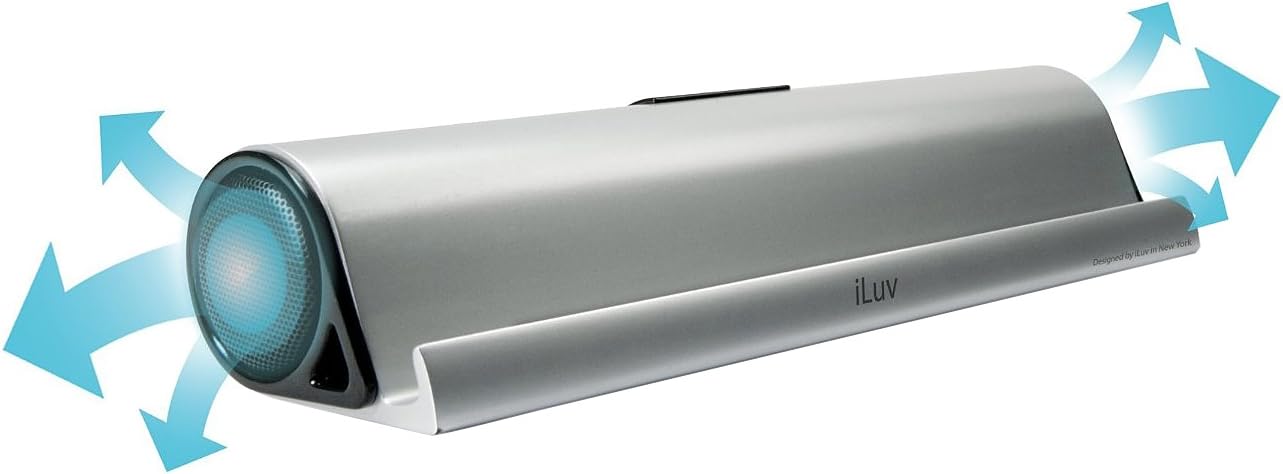
Image Description: This image displays the rear of the iLuv Mo'Beats speaker stand. It highlights the central control panel which includes an ON/OFF switch, a 'PAIR' button, a 'LINE IN' auxiliary port, and a Mini-USB charging port. A blue LED light is visible above the 'PAIR' button, indicating Bluetooth pairing status.
2. Powering On/Off
Locate the ON/OFF switch on the rear of the speaker. Slide the switch to the ON position to power on the device. Slide it to the OFF position to power it off.
3. Bluetooth Pairing
- Ensure the Mo'Beats speaker is powered on.
- Activate Bluetooth on your mobile device (smartphone or tablet).
- On your mobile device, search for available Bluetooth devices.
- Select "iLuv Mo'Beats" or a similar name from the list of devices.
- Once paired, the Bluetooth indicator light on the speaker will typically turn solid blue.
- Your device is now connected and ready to stream audio wirelessly.

Image Description: This image shows the iLuv Mo'Beats speaker stand in silver, holding an iPad in landscape orientation. The iPad's screen displays its home interface with various app icons. The speaker stand itself is sleek and minimalist, providing a stable base for the tablet.
4. Using Auxiliary Input (Line-In)
If your device does not support Bluetooth or if you prefer a wired connection, use the auxiliary input. Connect a 3.5mm audio cable (not included) from your audio device's headphone jack to the "LINE IN" port on the Mo'Beats speaker. The speaker will automatically switch to auxiliary mode when a cable is detected.
Operating Instructions
1. Placing Your Device
The Mo'Beats speaker stand features a cradle designed to securely hold your tablet or smartphone. Place your device into the cradle in either landscape or portrait mode. The design accommodates most cases, allowing for unobstructed viewing and optimal sound projection from the opposing speakers.

Image Description: This image shows the iLuv Mo'Beats speaker stand from the rear, with an iPad resting in its cradle in landscape orientation. The back of the iPad is visible, along with the central control panel of the speaker stand, which includes the power switch, pairing button, line-in port, and USB charging port.
2. Adjusting Volume
Volume control is managed directly through your connected mobile device. Adjust the volume on your smartphone or tablet to your desired listening level.
3. Optimizing Sound Experience
The opposing high-fidelity speakers create a wide sound stage. For the best audio experience, ensure the speaker is placed on a stable, flat surface and that the speaker grilles are not obstructed.

Image Description: This image features the iLuv Mo'Beats speaker stand positioned next to a silver laptop. The speaker is connected to the laptop, likely for charging or audio input via USB. The laptop screen displays a music library interface, suggesting the speaker is being used for audio playback.
Maintenance
- Cleaning: Use a soft, dry cloth to clean the exterior of the speaker. Do not use liquid cleaners or aerosols.
- Storage: When not in use for extended periods, store the speaker in a cool, dry place.
- Battery Care: To prolong battery life, avoid fully discharging the battery frequently. Charge the device regularly, even if not in constant use.
- Avoid Moisture: Keep the speaker away from water and excessive moisture. It is not waterproof.
Troubleshooting
- No Power:
- Ensure the ON/OFF switch is in the ON position.
- Charge the device using the provided USB cable. The battery may be depleted.
- Cannot Pair via Bluetooth:
- Make sure Bluetooth is enabled on your mobile device.
- Ensure the speaker is in pairing mode (blue LED blinking). If not, power cycle the speaker.
- Move your mobile device closer to the speaker.
- Forget the device from your mobile device's Bluetooth settings and try pairing again.
- Ensure no other devices are currently connected to the Mo'Beats speaker.
- No Sound:
- Check the volume level on both the Mo'Beats speaker and your connected mobile device.
- Ensure the device is properly paired via Bluetooth or connected via the auxiliary cable.
- If using auxiliary input, ensure the cable is fully inserted and functional.
- Poor Sound Quality:
- Ensure the speaker grilles are not obstructed.
- Move the speaker closer to the audio source if using Bluetooth, or reduce interference from other wireless devices.
- Check the audio source quality.
Specifications
| Model Name | Mo'Beats (iSP245) |
| Brand | iLuv |
| Connectivity Technology | Auxiliary, Bluetooth, USB |
| Audio Output Mode | Stereo |
| Mounting Type | Tabletop Mount |
| Speaker Type | Portable |
| Controller Type | Battery Powered |
| Color | Silver |
| Battery Average Life | Up to 8 Hours |
| Is Waterproof | No |
| Control Method | Touch (via connected device) |
| Item Weight | 1.2 Pounds |
| Compatible Devices | Laptop, MP3 Player, Smartphone, Tablet (Apple, Android) |
| Power Source | Battery Powered |
| Manufacturer | jWIN |
Warranty and Support
The iLuv Mo'Beats Portable Stereo Bluetooth Speaker Stand comes with a 1 Year iLuv Warranty. For warranty claims, technical support, or further assistance, please contact iLuv customer service. Refer to the official iLuv website for the most up-to-date contact information and support resources.
Manufacturer: jWIN
Product Overview Video
Video Description: This video provides a visual overview of the iLuv Mo'Beats Portable Stereo Bluetooth Speaker Stand. It demonstrates the product's features, including its use as a tablet stand, Bluetooth connectivity, and auxiliary input. The video highlights the speaker's design and functionality for an enhanced media experience.


