
1. Introduction
This manual provides detailed instructions for the proper use and care of your Tamron SP 24-70mm Di VC USD lens for Nikon F-mount cameras. This high-performance standard zoom lens is designed to deliver exceptional image quality across its versatile 24-70mm focal range, featuring Tamron's Vibration Compensation (VC) and Ultrasonic Silent Drive (USD) technologies for stable and quiet operation.
2. Key Features
- Versatile Focal Length: Covers a 24-70mm range, ideal for various photography styles.
- Constant Maximum Aperture: F/2.8 throughout the zoom range for excellent low-light performance and shallow depth of field.
- Vibration Compensation (VC): Tamron's proprietary image stabilization system to reduce camera shake.
- Ultrasonic Silent Drive (USD): Ensures speedy, silent, and precise autofocusing.
- Specialized Glass Elements: Incorporates three LD (Low Dispersion) elements and two XR (Extra Refractive Index) glasses to minimize chromatic aberration.
- Moisture-Resistant Construction: Designed for enhanced durability in various shooting conditions.
- Rounded Diaphragm: Features 9 diaphragm blades for smooth and attractive bokeh.
3. Setup
3.1 Attaching the Lens
- Ensure your camera is turned off.
- Remove the rear lens cap from the lens and the body cap from the camera.
- Align the mounting index (white dot) on the lens barrel with the mounting index on the camera body.
- Insert the lens into the camera's lens mount and rotate it clockwise until it clicks into place.
3.2 Detaching the Lens
- Ensure your camera is turned off.
- While pressing the lens release button on the camera body, rotate the lens counter-clockwise until it stops.
- Remove the lens from the camera. Attach the rear lens cap to the lens and the body cap to the camera.
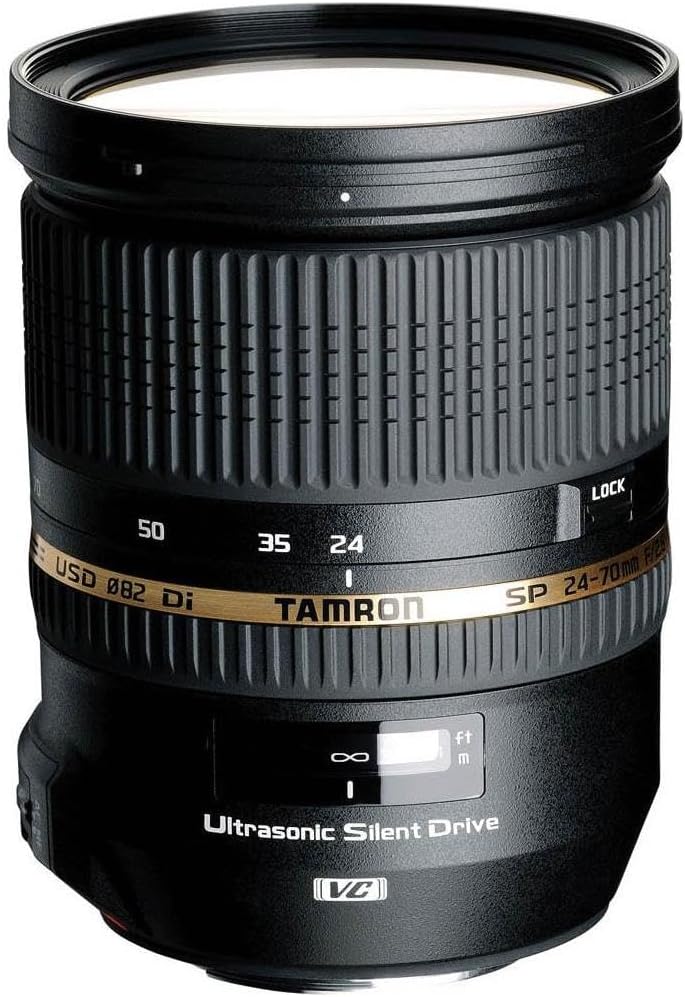
Figure 1: The Tamron SP 24-70mm Di VC USD lens. This image displays the overall structure of the lens, including the zoom ring, focus ring, and control switches.
4. Operating the Lens
4.1 Autofocus (AF) / Manual Focus (MF) Switch
This switch allows you to select between autofocus and manual focus modes. Set the switch to AF for automatic focusing or to MF for manual focusing. When in AF mode, you can typically override the autofocus manually by turning the focus ring (Full-time Manual Focus).
4.2 Vibration Compensation (VC) Switch
The Vibration Compensation (VC) mechanism reduces camera shake, allowing for sharper images in low light or at slower shutter speeds. Set the switch to ON to activate VC, or OFF when using a tripod or when VC is not desired.
4.3 Zoom Ring
Rotate the zoom ring to adjust the focal length between 24mm and 70mm. The current focal length is indicated by the numbers (24, 35, 50, 70) on the lens barrel. The lens also features a zoom lock switch to prevent accidental extension during transport.
4.4 Focus Ring and Distance Scale
In manual focus mode, rotate the focus ring to achieve sharp focus. The distance scale, located near the focus ring, indicates the current focusing distance in both meters (m) and feet (ft).
5. Maintenance
5.1 Cleaning the Lens
- Use a lens blower to remove dust and loose particles from the lens surface.
- For smudges or fingerprints, use a clean, soft lens cloth and a small amount of lens cleaning solution. Apply the solution to the cloth, not directly to the lens.
- Clean the lens body with a soft, dry cloth. Avoid using organic solvents like thinner or benzene.
5.2 Storage
- Store the lens in a cool, dry place away from direct sunlight and high humidity.
- Attach both front and rear lens caps when not in use to protect the glass elements.
- If storing for an extended period, consider using a desiccant to prevent mold and mildew.
6. Troubleshooting
- Autofocus is slow or inaccurate:
- Ensure the AF/MF switch on the lens is set to AF.
- Check if there is sufficient light for the autofocus system to operate effectively.
- Clean the lens contacts on both the lens and camera body.
- Images are blurry:
- Ensure the VC switch is ON if shooting handheld in low light.
- Check your camera's shutter speed; a faster shutter speed may be needed to prevent motion blur.
- Verify that the lens is properly focused on your subject.
- Lens not recognized by camera:
- Ensure the lens is securely mounted to the camera body.
- Clean the electronic contacts on both the lens and camera body.
- Restart the camera.
7. Specifications
| Model Name | A007 |
| Focal Length | 24-70mm |
| Maximum Aperture | F/2.8 |
| Lens Construction | 17 elements in 12 groups |
| Minimum Focus Distance | 15 inches (0.38m) |
| Max. Magnification Ratio | 1:5 (at f=70mm: MFD 15") |
| Filter Diameter | 82mm |
| Overall Length | 4.3 inches |
| Maximum Diameter | 3.5 inches |
| Weight | 29.1 oz (1.82 pounds) |
| Diaphragm Blades | 9 (rounded diaphragm) |
| Compatible Mountings | Nikon F (FX) |
8. Warranty and Support
Tamron provides a manufacturer's warranty for its products. Please refer to the warranty card included with your lens for specific terms and conditions. For technical support, service, or further inquiries, please visit the official Tamron website or contact their customer service department.
Note: One customer review mentioned a 6-year warranty. Please verify current warranty terms with Tamron directly.


