
1. Introduction
This manual provides comprehensive instructions for the installation, operation, and maintenance of your Emerson 1F89EZ-0251 Thermostat. This advanced thermostat is designed for heat pump systems and features Home-Sleep-Away modes for efficient temperature control. Please read this manual thoroughly before operating your thermostat to ensure proper function and to maximize energy efficiency.
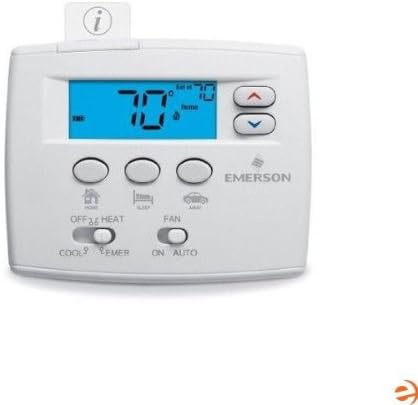
Figure 1: Front view of the Emerson 1F89EZ-0251 Thermostat, showing the digital display, control buttons, and mode switches. The display shows a temperature of 70 degrees Fahrenheit.
2. Setup
2.1 Installation
For optimal performance and safety, professional installation of the Emerson 1F89EZ-0251 Thermostat is recommended. Incorrect wiring can damage the thermostat or your HVAC system.
- Power Off: Before beginning any installation, ensure the power to your heating and cooling system is turned off at the circuit breaker.
- Wiring: Carefully follow the wiring diagrams provided with your thermostat's installation guide. Ensure all connections are secure and match the labels on your existing thermostat's wiring.
- Mounting: Mount the thermostat base plate to the wall using the provided hardware. Attach the thermostat body to the base plate.
2.2 Initial Power-Up
Once installed and power is restored, the thermostat display will illuminate. You may need to configure initial settings such as date, time, and system type (if not automatically detected). Refer to the detailed installation guide for specific configuration steps.
3. Operating the Thermostat
3.1 Display Overview
The 2-inch backlit display shows the current room temperature, set temperature, system mode, fan mode, and active programming mode (Home, Sleep, Away).
3.2 Temperature Adjustment
Use the Up (▲) and Down (▼) arrow buttons located on the right side of the thermostat to adjust the desired temperature. Each press will change the setpoint by one degree.
3.3 System Mode Selection
The system mode switch is located at the bottom left of the thermostat. Slide the switch to select one of the following modes:
- COOL: Activates the cooling system.
- OFF: Turns off both heating and cooling systems.
- HEAT: Activates the primary heating system.
- EMER (Emergency Heat): Activates the auxiliary or emergency heating system, typically used when the heat pump cannot provide sufficient heat.
3.4 Fan Mode Selection
The fan mode switch is located at the bottom right of the thermostat. Slide the switch to select:
- ON: The fan runs continuously, regardless of whether the heating or cooling system is active.
- AUTO: The fan runs only when the heating or cooling system is actively operating.
3.5 Programming Modes (Home, Sleep, Away)
The Emerson 1F89EZ-0251 features programmable Home, Sleep, and Away modes to optimize energy usage. Press the corresponding button (Home, Sleep, or Away icon) below the display to activate a pre-set schedule.
- Home Mode: Typically set for periods when the home is occupied.
- Sleep Mode: Designed for nighttime comfort and energy savings.
- Away Mode: Optimizes energy savings when the home is unoccupied.
To customize the temperature settings for each mode, refer to the detailed programming instructions in your full installation and operating guide.
4. Maintenance
4.1 Battery Replacement
The thermostat uses batteries (typically AA or AAA, refer to your installation guide for exact type) to maintain settings and power the display. When the battery icon appears on the display, replace the batteries promptly.
- Gently pull the thermostat body away from its wall plate.
- Locate the battery compartment.
- Remove old batteries and insert new ones, ensuring correct polarity.
- Snap the thermostat body back onto the wall plate.
4.2 Cleaning
To clean the thermostat, gently wipe the exterior with a soft, damp cloth. Do not use abrasive cleaners or solvents, as these can damage the finish or internal components.
5. Troubleshooting
If you encounter issues with your Emerson 1F89EZ-0251 Thermostat, consult the following common troubleshooting steps:
| Problem | Possible Cause | Solution |
|---|---|---|
| No display or power | Dead batteries, tripped circuit breaker, loose wiring. | Replace batteries. Check circuit breaker for your HVAC system. Verify wiring connections. |
| Incorrect temperature reading | Thermostat exposed to direct sunlight, drafts, or heat sources. | Ensure thermostat is not in direct sunlight or near heat/cold sources. |
| System not responding (no heating/cooling) | Incorrect system mode, fan mode, or programming. HVAC system issue. | Check system mode (COOL/HEAT/EMER) and fan mode (AUTO/ON). Review programmed schedules. If issues persist, contact a qualified HVAC technician. |
6. Specifications
| Feature | Detail |
|---|---|
| Brand | Emerson |
| Model | 1F89EZ-0251 |
| Color | Blue, White |
| Screen Size | 2 Inches |
| Control Type | Button Control |
| Connectivity Protocol | Z-Wave |
| Backlight | Yes |
| Date First Available | March 29, 2012 |
7. Warranty and Support
The Emerson 1F89EZ-0251 Thermostat is covered by a manufacturer's warranty. For specific warranty terms and conditions, please refer to the documentation included with your product or visit the official Emerson website.
For technical support, troubleshooting assistance beyond this manual, or to inquire about replacement parts, please contact Emerson customer service. Contact information can typically be found on the Emerson website or in your product packaging.


