
DEWALT DCS391B
DEWALT 20V MAX Circular Saw (DCS391B) User Manual
Model: DCS391B
1. Introduction
The DEWALT 20V MAX* 6-1/2-inch circular saw, model DCS391B, is designed for efficient and precise cutting tasks. It features a 6-1/2-inch carbide-tipped blade, powered by a robust 5150 rpm motor, and offers a 0 to 50-degree bevel capacity. The tool is constructed with a lightweight and durable magnesium shoe, ensuring jobsite durability and long-term cutting accuracy. This manual provides detailed instructions for the safe and effective operation, setup, maintenance, and troubleshooting of your DEWALT circular saw.
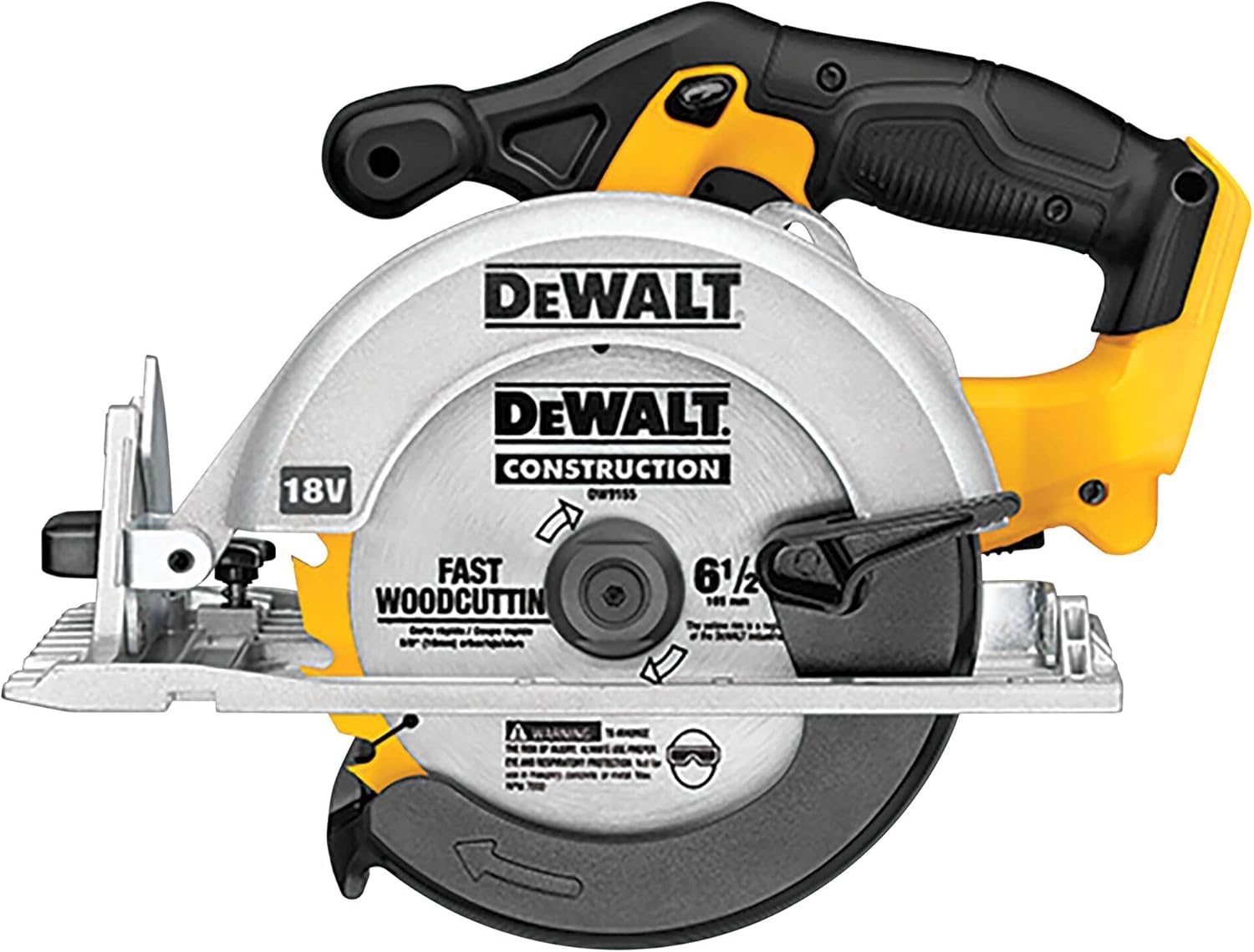
Figure 1.1: Overall view of the DEWALT 20V MAX Circular Saw (DCS391B).
2. Safety Information
Always adhere to the following safety guidelines to prevent personal injury and damage to the tool.
- Read All Instructions: Familiarize yourself with all safety warnings, instructions, illustrations, and specifications provided with this power tool. Failure to follow all instructions may result in electric shock, fire, and/or serious injury.
- Work Area Safety: Keep your work area clean and well-lit. Cluttered or dark areas invite accidents. Do not operate power tools in explosive atmospheres, such as in the presence of flammable liquids, gases, or dust.
- Electrical Safety: Avoid body contact with grounded surfaces such as pipes, radiators, ranges, and refrigerators. There is an increased risk of electric shock if your body is grounded.
- Personal Safety: Always wear eye protection. Use appropriate personal protective equipment such as dust masks, non-skid safety shoes, hard hats, or hearing protection when necessary.
- Tool Use and Care: Do not force the power tool. Use the correct power tool for your application. The correct power tool will do the job better and safer at the rate for which it was designed.
- Blade Safety: Ensure the blade is sharp and clean. Dull blades can cause kickback. Always use the correct type and size of blade for the material being cut.
- Battery Tool Use and Care: Recharge only with the charger specified by the manufacturer. Use power tools only with specifically designated battery packs.
3. Setup
3.1 Battery Installation
The DEWALT DCS391B circular saw is designed for use with DEWALT 20V MAX Lithium-Ion batteries. To install the battery, align the battery pack with the receptacle on the tool's handle and slide it in until it clicks securely into place. To remove, press the release button on the battery pack and slide it out.

Figure 3.1: DEWALT 20V MAX Circular Saw with a 20V MAX battery installed.
3.2 Blade Installation and Replacement
The DCS391B uses a 6-1/2-inch carbide-tipped blade. For blade replacement:
- Ensure the battery is removed from the tool.
- Locate the spindle lock button (often near the blade guard). Press and hold it to lock the blade in place.
- Use the onboard Allen key (conveniently stored in the handle) to loosen the arbor bolt by turning it in the direction indicated on the blade washer (usually counter-clockwise for loosening).
- Lift the lower blade guard and remove the old blade.
- Install the new blade, ensuring the teeth are pointing in the correct direction (usually indicated by an arrow on the blade and the saw).
- Tighten the arbor bolt securely with the Allen key, turning in the direction indicated for tightening. Release the spindle lock.

Figure 3.2: Close-up view of the 6-1/2-inch carbide-tipped blade.
3.3 Adjusting Blade Depth
To adjust the cutting depth, locate the depth adjustment lever on the side of the saw. Loosen the lever, move the shoe up or down to achieve the desired cutting depth, and then securely tighten the lever. For optimal cutting, the blade should extend approximately 1/8 inch to 1/4 inch below the material being cut.
3.4 Adjusting Bevel Angle
The saw allows for bevel cuts from 0 to 50 degrees. To adjust the bevel angle, loosen the bevel adjustment knob (located at the front of the saw's base). Tilt the saw base to the desired angle, using the angle scale for reference, and then securely tighten the knob. This feature allows for angled cuts in various materials.

Figure 3.3: Bevel adjustment mechanism, allowing cuts up to 50 degrees.
4. Operating Instructions
4.1 General Operation
To operate the saw, ensure the battery is installed. Depress the safety lock-off button (ergonomically designed for both right and left-handed users) and then squeeze the trigger switch to start the motor. The 5150 RPM motor provides ample power for demanding cuts. The electric brake feature ensures the blade stops almost instantly upon releasing the trigger, enhancing safety.
4.2 Cutting Wood
When cutting wood, ensure the workpiece is securely clamped. Align the saw's base plate with your cut line. Start the saw before it contacts the material, allowing the blade to reach full speed. Maintain a steady, consistent feed rate through the material. The saw is capable of cutting 2x material at 90 and 45 degrees.

Figure 4.1: The saw in action, demonstrating its powerful cutting capability.
4.3 Cutting Aluminum Soffit
When cutting aluminum soffit or similar thin metal materials, it is crucial to use a blade designed for metal cutting or a fine-tooth carbide blade. For best results and to prevent burring, it is often recommended to install the blade in the reverse direction (teeth pointing backward) when cutting aluminum soffit. This technique helps to shear the material cleanly rather than tearing it. Always wear appropriate personal protective equipment, including eye protection and gloves, when cutting metal.
5. Maintenance
Regular maintenance ensures the longevity and optimal performance of your circular saw.
- Cleaning: Regularly clean the tool, especially the blade guard and shoe, to remove sawdust and debris. Use a soft brush or compressed air. Do not use solvents that could damage plastic parts.
- Blade Inspection: Inspect the blade regularly for sharpness, cracks, or missing teeth. Replace dull or damaged blades immediately.
- Battery Care: Store batteries in a cool, dry place away from direct sunlight. Do not store batteries in a discharged state.
- Cordless Tool Maintenance: Check all screws and fasteners for tightness. Periodically lubricate moving parts as recommended by the manufacturer (refer to the full user manual for specific lubrication points).
6. Troubleshooting
This section addresses common issues you might encounter with your circular saw.
| Problem | Possible Cause | Solution |
|---|---|---|
| Saw does not start | Battery not charged or improperly installed; Safety lock-off not engaged; Faulty switch | Charge battery and ensure proper installation; Fully depress safety lock-off; Contact service center if switch is faulty |
| Blade binds or stalls during cut | Dull blade; Incorrect cutting depth; Material pinching blade; Overloading tool | Replace or sharpen blade; Adjust cutting depth; Support workpiece properly; Reduce feed rate |
| Excessive vibration or noise | Loose blade; Damaged blade; Worn bearings | Tighten arbor bolt; Replace blade; Contact service center for bearing replacement |
| Inaccurate cuts | Incorrect bevel setting; Loose shoe; Blade wobble | Verify and adjust bevel setting; Tighten shoe fasteners; Check blade for damage or proper installation |
7. Specifications
| Feature | Specification |
|---|---|
| Model Number | DCS391B |
| Power Source | Battery Powered (20V MAX) |
| Blade Diameter | 6-1/2 inches |
| No-Load Speed | 5150 RPM |
| Bevel Capacity | 0-50 degrees |
| Shoe Material | Magnesium |
| Item Weight | 6.95 pounds |
| Product Dimensions | 15.5"L x 8.5"W x 10.5"H |
8. Warranty and Support
Your DEWALT 20V MAX Circular Saw (DCS391B) comes with a 3 Year Limited Warranty. For detailed warranty terms and conditions, please refer to the official documentation included with your product or visit the DEWALT website.
For further assistance, technical support, or to order replacement parts, please refer to the official user guides:
You can also visit the official DEWALT website or contact their customer service for additional support.
Related documentsDCS391B


Ask a question about this manual
Ask about setup, troubleshooting, compatibility, parts, safety, or missing instructions. Manuals+ will review the question and use this page’s manual context to help answer it.