
1. Introduction
The Tecsun H501 is a versatile digital portable receiver designed for comprehensive radio frequency coverage. It supports AM, FM, longwave, shortwave, and single side band (SSB) reception. Additionally, it features an integrated MP3 player with micro-SD card input, compatible with various audio formats including FLAC, WAV, APE, WMA, and MP3. This manual provides detailed instructions for setting up, operating, and maintaining your Tecsun H501 radio to ensure optimal performance and enjoyment.
2. Safety Information
Please read and understand all safety instructions before using the device. Keep this manual for future reference.
General Safety Precautions:
- Do not expose the unit to rain, moisture, or extreme temperatures.
- Avoid dropping the unit or subjecting it to strong impacts.
- Do not attempt to disassemble or modify the unit. This will void the warranty.
- Keep the unit away from strong magnetic fields.
- Clean the unit with a soft, dry cloth. Do not use liquid cleaners.
Battery Safety:
- The Tecsun H501 uses 18650 Lithium Ion batteries. Ensure correct polarity when inserting batteries.
- Use only the specified type of rechargeable batteries.
- Do not mix old and new batteries, or different types of batteries.
- Remove batteries if the unit will not be used for an extended period.
- Dispose of used batteries according to local regulations.
3. Package Contents
Upon unpacking your Tecsun H501, please ensure all items listed below are present:
- Tecsun H501 Digital Worldband Radio
- Power Adapter
- Owner's Manual
- Quick Start Guide
- Stereo Earphones
- USB Charging Cable
- External Antenna Wire
- 16GB Micro-SD Card (pre-installed or included separately)
- 2 x 18650 Lithium Ion Batteries
- Carrying Case

Image: Tecsun H501 radio with its complete set of accessories, including the power adapter, owner's manual, quick start guide, stereo earphones, USB charging cable, external antenna wire, 16GB Micro-SD card, two 18650 Lithium Ion batteries, and a carrying case.
4. Product Overview
Familiarize yourself with the layout and functions of your Tecsun H501 radio.
Front View:

Image: Front view of the Tecsun H501 radio, showing the dual speakers, LCD display, and control buttons.
Side View (Left):

Image: Left side of the Tecsun H501 radio, featuring rotary controls for Volume, Treble, and Bass, along with ports for earphones, line-in, line-out, MicroSD card slot, and a reset button.
Back View:

Image: Rear view of the Tecsun H501 radio, showing the battery compartment, product information label, and a foldable kickstand.
Key Features and Controls:
- Dual Speakers: For rich, dynamic sound.
- Treble/Bass Controls: Adjust audio output to your preference.
- LCD Display: Shows frequency, time, battery status, and other information.
- Tuning Knobs: For precise frequency adjustment.
- Band Selection Buttons: Easily switch between AM, FM, LW, SW, and SSB.
- MP3 Player: Integrated with Micro-SD card slot for audio playback.
- External Antenna Input: For enhanced reception on various bands.
- Audio Ports: 3.5mm Earphone Jack, Line-In, and Line-Out.
- Alarm Clock & Sleep Timer: Convenient time-based functions.
- Keylock Function: Prevents accidental changes to settings.
5. Setup
Battery Installation:
- Locate the battery compartment on the back of the radio.
- Open the battery compartment cover.
- Insert the two 18650 Lithium Ion batteries, ensuring correct polarity (+/-) as indicated inside the compartment.
- Close the battery compartment cover securely.
Initial Power-On and Charging:
- Connect the power adapter to the DC-IN port on the radio and plug it into a wall outlet to charge the batteries before first use.
- The battery indicator on the LCD display will show charging status.
- Press the POWER button to turn on the radio.
- Adjust the VOLUME knob to a comfortable listening level.
6. Operating Instructions
Band Selection:
Press the dedicated buttons (e.g., FM, AM, SW, LW, SSB) to switch between different frequency bands.
Tuning:
- Manual Tuning: Use the main tuning knob on the right side of the radio to adjust the frequency.
- Fine Tuning: For SSB reception, use the dedicated fine-tuning control for precise adjustment.
- Direct Frequency Entry: Use the numeric keypad to enter a specific frequency directly. Press FREQ or ENTER to confirm.
- Auto Scan: Press the ATS button to automatically scan and store available stations.
SSB (Single Side Band) Reception:
When in SW mode, press the SSB button to activate SSB reception. Use the fine-tuning control to clarify the signal for optimal listening.
MP3 Player Operation:
- Insert a Micro-SD card (with audio files) into the Micro-SD card slot on the left side of the radio.
- Press the MODE button to switch to MP3 player mode.
- Use the playback control buttons (Play/Pause, Next/Previous Track) to manage your audio.
Alarm Clock and Sleep Timer:
- Alarm: Press the ALARM button to set and activate the alarm function.
- Sleep Timer: Press the SLEEP button to set a sleep timer (up to 120 minutes), allowing the radio to turn off automatically.
Keylock Function:
Long press the LOCK button to activate or deactivate the keylock, preventing accidental button presses.
7. Maintenance
Cleaning:
- Wipe the radio's exterior with a soft, dry cloth.
- Do not use abrasive cleaners, solvents, or strong chemicals.
Storage:
- Store the radio in a cool, dry place away from direct sunlight and extreme temperatures.
- If storing for an extended period, remove the batteries to prevent leakage.
8. Troubleshooting
If you encounter any issues with your Tecsun H501, refer to the following common solutions:
- No Power: Check if batteries are correctly inserted and charged. Ensure the power adapter is properly connected if using external power.
- Poor Reception: Extend the telescopic antenna fully. If using an external antenna, ensure it is properly connected. Try adjusting the radio's position or orientation.
- No Sound: Check the volume level. Ensure earphones are not plugged in if you intend to use the speakers.
- MP3 Playback Issues: Ensure the Micro-SD card is inserted correctly and contains compatible audio files.
- Unit Unresponsive: Try performing a soft reset by pressing the RESET button (usually a small pinhole on the side/back of the unit).
9. Specifications
| Product Dimensions | 10.91 x 6.57 x 1.73 inches |
| Item Weight | 2.5 pounds |
| Item Model Number | H501 |
| Batteries | 2 Lithium Ion batteries required (included) |
| Radio Bands Supported | AM (520-1710 kHz), FM (64-108 MHz), LW (100-519 kHz), SW (1711-29999 kHz) |
| Special Feature | Portable |
| Connectivity Technology | Auxiliary |
| Power Source | Battery Powered |
| Manufacturer | Tecsun |
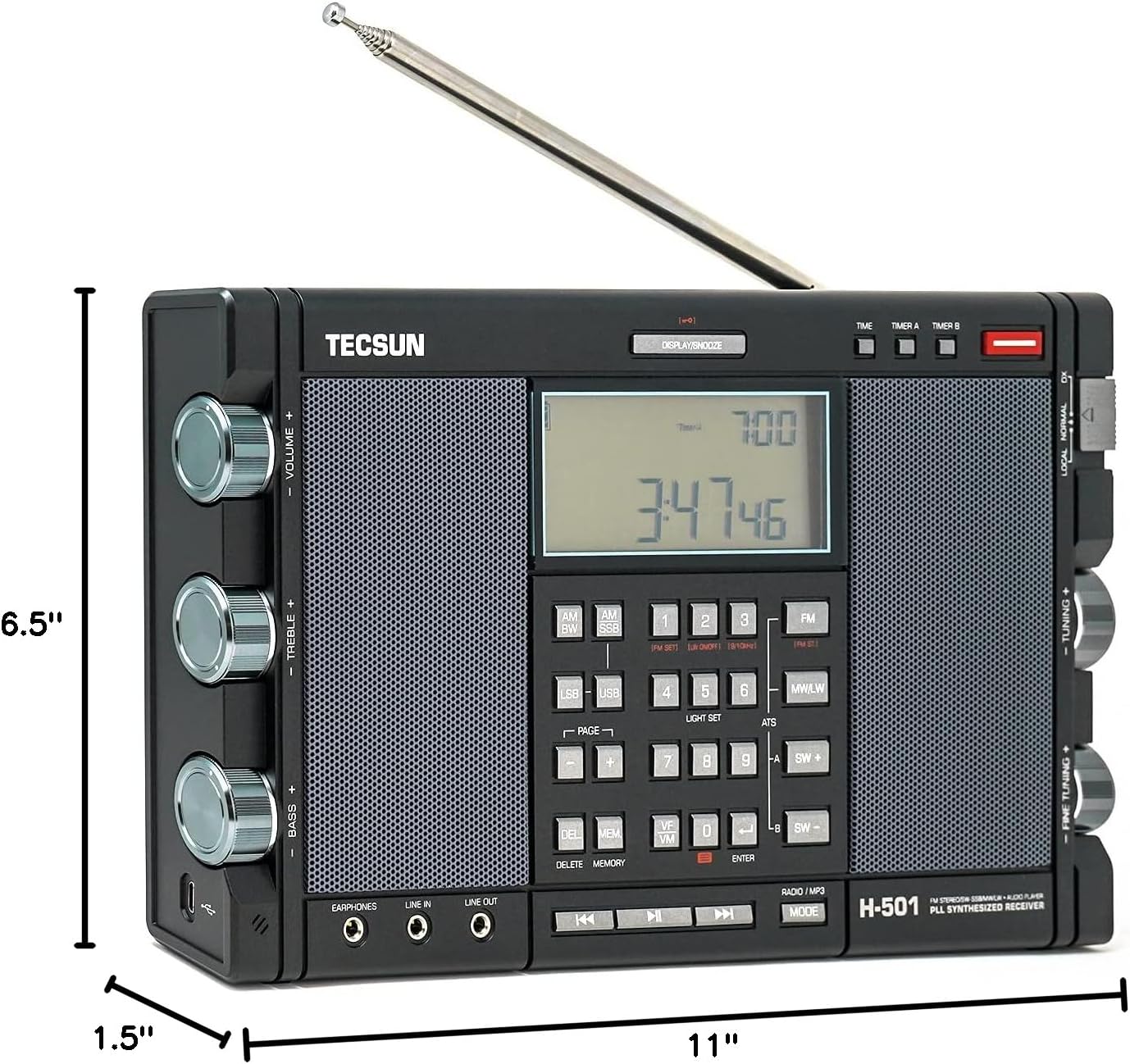
Image: Visual representation of the Tecsun H501 radio's dimensions: 11 inches (length), 1.5 inches (width), and 6.5 inches (height).
10. Warranty and Support
For detailed warranty information and customer support, please refer to the included Owner's Manual and Quick Start Guide. These documents contain comprehensive details regarding product warranty, service contacts, and additional operational tips.
You may also visit the official TECSUN website or contact their customer service for further assistance.

