
1. Introduction and Overview
This manual provides essential instructions for the safe installation, operation, and maintenance of the Leviton MT820-R Lev-Lok Duplex Receptacle Outlet. The MT820-R is a heavy-duty, hospital-grade, tamper-resistant duplex receptacle designed for modular wiring systems. It features a smooth face, 15 Amp, 125 Volt capacity, NEMA 5-15R configuration, 2-pole, 3-wire, and self-grounding capabilities. This device is intended for use with a compatible Lev-Lok wiring module, which is sold separately.
2. Safety Information
WARNING: To avoid fire, shock, or death, always turn off power at the circuit breaker or fuse box before wiring. This device must be installed in accordance with all national and local electrical codes. If you are unsure about any part of these instructions, consult a qualified electrician. Do not use this device if it appears damaged.
- Always disconnect power before installation or servicing.
- Ensure all wire connections are secure and properly insulated.
- Do not exceed the specified electrical ratings (15 Amp, 125 Volt).
- This device is for indoor use only.
- The tamper-resistant feature is designed to prevent insertion of foreign objects into the receptacle openings.
3. Product Features
- Type: Duplex Receptacle Outlet
- Grade: Heavy-Duty Hospital Grade
- Current/Voltage: 15 Amp, 125 Volt
- Design: Tamper-Resistant, Smooth Face
- System: Modular, for use with Lev-Lok wiring module (sold separately)
- Configuration: NEMA 5-15R, 2-Pole, 3-Wire
- Grounding: Self-Grounding
- Color: Red
4. Setup and Installation
The Leviton MT820-R receptacle is designed for quick and secure installation when paired with a Lev-Lok wiring module. Ensure you have the correct Lev-Lok module for your application before proceeding.
- Turn Off Power: Locate the circuit breaker or fuse controlling the outlet you are replacing or installing. Turn off the power completely. Verify power is off using a voltage tester.
- Prepare Wiring: If replacing an existing outlet, carefully disconnect the old device. For new installations, ensure the electrical box is properly installed and wires are stripped to the appropriate length as specified by the Lev-Lok module instructions.
- Connect to Lev-Lok Module: The MT820-R receptacle connects directly to a Lev-Lok wiring module. Follow the specific instructions provided with your Lev-Lok module for proper wire termination (hot, neutral, ground). The self-grounding feature ensures a ground path through the mounting strap to a properly grounded metal electrical box.
- Attach Receptacle: Once the Lev-Lok module is wired, align the MT820-R receptacle with the module and push firmly until it clicks into place. Ensure a secure connection.
- Mount in Box: Carefully fold the wires into the electrical box. Secure the receptacle to the electrical box using the provided mounting screws.
- Install Wallplate: Attach the decorative wallplate (sold separately) over the installed receptacle.
- Restore Power: Turn the power back on at the circuit breaker or fuse box. Test the receptacle with a known working appliance or outlet tester.
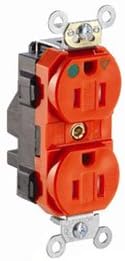
Image 1: The Leviton MT820-R Lev-Lok Duplex Receptacle Outlet. This image displays the front and side profile of the red, tamper-resistant duplex outlet, highlighting its modular design and mounting tabs.
5. Operating Instructions
Once properly installed and power is restored, the Leviton MT820-R receptacle operates like any standard duplex outlet. Insert the plug of an electrical appliance or device into one of the two available receptacles. The tamper-resistant shutters will open only when a two-pronged or three-pronged plug is inserted simultaneously, providing an added layer of safety, especially in environments where children may be present.
- Ensure the plug is fully inserted into the receptacle for a secure connection.
- Do not force plugs into the tamper-resistant openings; apply even pressure to both prongs simultaneously.
- Avoid overloading the circuit by connecting too many high-power devices.
6. Maintenance
The Leviton MT820-R receptacle requires minimal maintenance to ensure continued safe operation.
- Cleaning: Periodically wipe the surface of the receptacle with a soft, damp cloth. Do not use abrasive cleaners, solvents, or harsh chemicals, as these can damage the finish or internal components. Ensure power is off before cleaning if possible.
- Inspection: Regularly inspect the receptacle for any signs of damage, such as cracks, discoloration, or loose connections. If any damage is observed, disconnect power and replace the device immediately.
- Loose Plugs: If plugs feel loose when inserted, it may indicate wear. Consider replacing the receptacle if this becomes a persistent issue.
7. Troubleshooting
If the receptacle is not functioning correctly, consider the following troubleshooting steps:
- No Power: Check the circuit breaker or fuse box. A tripped breaker or blown fuse will cut power to the circuit. Reset the breaker or replace the fuse.
- Loose Connection: If the receptacle was recently installed, ensure all wire connections within the Lev-Lok module are secure and that the receptacle is firmly seated in the module. (Always turn off power before checking connections).
- Appliance Issue: Test the appliance in another known working outlet to rule out an issue with the appliance itself.
- Tamper-Resistant Shutters: If a plug is difficult to insert, ensure you are applying even pressure to both prongs simultaneously. Do not force the plug.
- Persistent Issues: If troubleshooting steps do not resolve the problem, or if you suspect internal damage, disconnect power and consult a qualified electrician.
8. Specifications
| Specification | Detail |
|---|---|
| Manufacturer | Leviton |
| Part Number | MT820-R |
| Item Model Number | MT820-R |
| Item Weight | 3.99 ounces |
| Product Dimensions | 1.53 x 1.61 x 4.06 inches |
| Color | Red |
| Material | Viton |
| Voltage | 125 Volts |
| Amperage | 15 Amps |
| Certification | NEMA |
| Included Components | Device |
9. Warranty and Support
Warranty: The Leviton MT820-R Lev-Lok Duplex Receptacle Outlet comes with a 1-Year Limited Warranty from the date of purchase. This warranty covers defects in materials and workmanship under normal use. For specific terms and conditions, please refer to the official Leviton warranty documentation or contact customer support.
Customer Support: For technical assistance, warranty claims, or further information regarding your Leviton product, please visit the official Leviton website or contact their customer service department. Contact details can typically be found on the product packaging or the Leviton website: www.leviton.com.


