
Introduction
Thank you for choosing the Beurer PM16 Female Heart Rate Monitor. This device is designed for ECG-accurate heart rate monitoring directly on the finger, making it ideal for activities such as walking or hiking where continuous pulse measurement is not always required. Please read this manual carefully to ensure safe and correct operation of your device.
Setup
1. Battery Installation
The Beurer PM16 typically uses a standard button cell battery. To install or replace the battery:
- Locate the battery compartment cover on the back of the device.
- Use a small coin or screwdriver to carefully open the battery compartment.
- Insert the new battery with the positive (+) side facing upwards.
- Close the battery compartment cover securely.
2. Initial Settings
Upon first use or after battery replacement, you may need to set the time and date. Refer to the on-screen prompts or the device's buttons to navigate through the settings menu. Typically, buttons are used to adjust values and confirm selections.
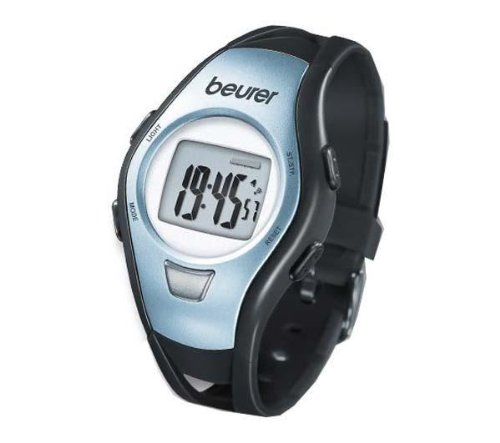
Image: The Beurer PM16 Heart Rate Monitor. This image displays the compact design of the monitor, featuring a digital display and the integrated finger sensor for heart rate measurement. The device is shown from a slight angle, highlighting its ergonomic shape.
Operating the Device
1. Heart Rate Measurement
The Beurer PM16 uses an ECG-accurate finger sensor for heart rate measurement.
- Ensure your finger is clean and dry.
- Place your index finger firmly on the designated sensor area.
- Remain still and avoid talking during the measurement.
- Your heart rate will be displayed on the screen after a few seconds.
Note: For best results, ensure good contact between your finger and the sensor. Cold fingers or excessive movement can affect accuracy.
2. Stopwatch Function
The device includes a stopwatch function for timing your activities.
- Navigate to the stopwatch mode using the device's buttons.
- Press the start button to begin timing.
- Press the stop button to pause or end the timing.
- Press the reset button to clear the stopwatch.
3. Time of Day Display
The Beurer PM16 also functions as a watch, displaying the current time of day. This is typically the default display mode when not actively measuring heart rate or using other functions.
Maintenance
1. Cleaning
To ensure the longevity and hygiene of your device:
- Wipe the device regularly with a soft, slightly damp cloth.
- Do not use abrasive cleaning agents or solvents.
- Ensure the finger sensor area is kept clean for accurate readings.
2. Storage
When not in use, store the device in a cool, dry place, away from direct sunlight and extreme temperatures. If the device will not be used for an extended period, it is recommended to remove the battery to prevent leakage.
Troubleshooting
- No display / Device not turning on: Check if the battery is correctly inserted and has sufficient charge. Replace the battery if necessary.
- Inaccurate heart rate readings: Ensure your finger is clean, dry, and making firm contact with the sensor. Avoid movement during measurement. Cold fingers can affect readings; warm your hands before use.
- Display shows error message: Refer to the specific error code in the full product manual (if available) or try resetting the device by removing and reinserting the battery.
Specifications
| Model: | PM16 |
| Measurement Method: | ECG-accurate heart rate monitoring on the finger |
| Water Resistance: | Waterproof (50 m) |
| Functions: | Time of day, Stopwatch, Heart Rate Display |
| Manufacturer: | Beurer |
Warranty
Beurer products are manufactured to the highest quality standards. For detailed information regarding the warranty period and conditions for your Beurer PM16 Heart Rate Monitor, please refer to the warranty card included with your purchase or visit the official Beurer website. Keep your proof of purchase for any warranty claims.
Customer Support
Should you have any questions, encounter issues not covered in this manual, or require technical assistance, please contact Beurer customer support. Contact details can typically be found on the official Beurer website or on the product packaging.
Official Product Videos
No official product videos from the seller were available for embedding in this manual.