
1. Introduction
This manual provides essential information for the safe and efficient installation, operation, and maintenance of the Eltako S91-100-230V UP-mechanical Control Switch. This device is designed for controlling electrical circuits with a push-button mechanism and a rotary selector for different operating modes. It is a surface-mount component with an IP00 rating, indicating it is not protected against ingress of dust or water and should be installed in an appropriate enclosure.
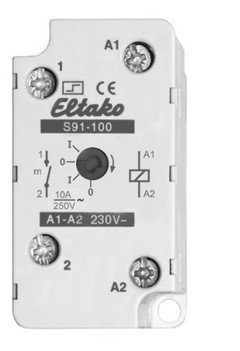
Figure 1: Front view of the Eltako S91-100-230V UP-mechanical Control Switch. The image displays the device with screw terminals labeled A1, A2, 1, and 2. A rotary switch is visible with positions 'I', '0', and 'm', alongside a push button. Electrical ratings '10A 250V~' and 'A1-A2 230V~' are also indicated.
2. Safety Instructions
WARNING: Electrical shock hazard. Installation and maintenance must be performed by qualified personnel only. Failure to follow these instructions may result in serious injury or death.
- Always disconnect power to the circuit before installing, servicing, or removing the device.
- Ensure all wiring complies with local and national electrical codes.
- The device has an IP00 rating. It must be installed within an enclosure that provides adequate protection against dust, moisture, and accidental contact with live parts.
- Do not operate the device if it appears damaged.
- Verify correct voltage and current ratings before connecting to a load.
3. Product Overview
The Eltako S91-100-230V is a compact UP-mechanical control switch designed for reliable operation in various industrial and domestic applications. It features a robust metal contact material and screw terminals for secure connections.
Key Components:
- Control Voltage Terminals (A1, A2): For connecting the 230V AC supply that powers the internal control mechanism.
- Load Terminals (1, 2): For connecting the electrical load to be switched. Rated for 10A at 250V AC.
- Rotary Selector Switch: Allows selection of operating modes:
- 'I' (Continuous ON): The switch remains closed, providing continuous power to the load.
- '0' (OFF): The switch remains open, disconnecting power to the load.
- 'm' (Momentary ON): The switch operates as a push button. Power is supplied to the load only while the button is pressed.
- Push Button: Activates the momentary ON function when the rotary selector is set to 'm'.
4. Setup and Installation
The Eltako S91-100-230V is designed for surface mounting. Ensure the mounting location is clean, dry, and within an appropriate enclosure to maintain the required IP protection for the overall system.
4.1. Mounting
- Select a suitable surface within an electrical enclosure for mounting.
- Secure the device using appropriate screws through the mounting holes provided on the unit.
- Ensure the device is firmly attached and does not wobble.
4.2. Wiring
Refer to the wiring diagram and terminal labels on the device for correct connections. All connections must be tight and secure to prevent arcing and ensure reliable operation.
- Disconnect all power to the circuit before beginning any wiring.
- Connect the 230V AC control voltage supply to terminals A1 and A2. Ensure correct phase and neutral connections if applicable.
- Connect the input power for the load to terminal 1.
- Connect the load (e.g., light, motor) to terminal 2. The other side of the load should be connected to the neutral or return path of the power supply.
- Double-check all connections for correctness and tightness.
- Once wiring is complete and verified, restore power to the circuit.
5. Operating Instructions
The Eltako S91-100-230V offers three distinct operating modes, selected via the rotary switch:
- 'I' Position (Continuous ON): When the rotary switch is set to 'I', the internal contacts are continuously closed, providing uninterrupted power to the connected load. This mode is suitable for applications requiring a constant ON state.
- '0' Position (OFF): When the rotary switch is set to '0', the internal contacts are continuously open, disconnecting power from the connected load. This mode is used to keep the load in an OFF state.
- 'm' Position (Momentary ON): When the rotary switch is set to 'm', the device functions as a momentary push button. The contacts will close and supply power to the load only for as long as the push button is physically pressed. Releasing the button will open the contacts and disconnect power.
6. Maintenance
The Eltako S91-100-230V is designed for long-term, reliable operation with minimal maintenance. However, periodic checks can help ensure optimal performance and safety.
- Power Disconnection: Always disconnect power before performing any maintenance.
- Cleaning: Keep the device clean and free from dust and debris. Use a dry, soft cloth for cleaning. Do not use liquid cleaners.
- Connection Checks: Periodically inspect screw terminals for tightness. Loose connections can lead to overheating or intermittent operation.
- Visual Inspection: Check for any signs of physical damage, discoloration, or burning. Replace the device immediately if any damage is observed.
7. Troubleshooting
If you encounter issues with your Eltako S91-100-230V control switch, refer to the table below for common problems and their potential solutions.
| Problem | Possible Cause | Solution |
|---|---|---|
| Device not responding / No power to load | No control voltage (230V AC) to A1-A2. Loose wiring connections. Rotary switch in '0' position. Blown fuse or tripped circuit breaker. | Verify 230V AC supply to A1-A2. Check and tighten all screw terminals. Set rotary switch to 'I' or 'm' and press button. Check and reset circuit protection. |
| Load remains ON in 'm' position without pressing button | Rotary switch incorrectly set to 'I'. Internal fault. | Ensure rotary switch is firmly in 'm' position. If issue persists, replace the device. |
| Intermittent operation | Loose wiring connections. Overheating due to excessive load. | Check and tighten all screw terminals. Ensure load current does not exceed 10A. |
8. Specifications
Detailed technical specifications for the Eltako S91-100-230V UP-mechanical Control Switch:
| Feature | Specification |
|---|---|
| Model Number | S91-100-230V |
| Brand | Eltako |
| Operation Mode | ON-OFF-ON (I-0-m) |
| Control Voltage | 230V AC |
| Max. Load Current | 10A |
| Max. Load Voltage | 250V AC |
| Connector Type | Screw Terminal |
| Circuit Type | 1-way |
| Mounting Type | Surface Mount |
| Actuator Type | Push Button |
| Contact Material | Metal |
| International Protection Rating | IP00 |
| Number of Positions | 1 (for the push button, with 3 rotary modes) |
| Wattage | 5 Watts |
| Item Weight | 82 g |
| Package Dimensions | 6.2 x 3.99 x 3.1 cm |
9. Warranty Information
Specific warranty details for the Eltako S91-100-230V are not provided in the available product data. Please refer to the purchase documentation or contact your retailer or Eltako directly for warranty terms and conditions.
10. Customer Support
Specific customer support contact information is not provided in the available product data. For technical assistance or inquiries, please contact your product supplier or visit the official Eltako website for their support resources.

