
1. Introduction
This manual provides comprehensive instructions for the safe and efficient use of your SCS Sentinel ControlPower Wireless Remote Control Outlet Kit. This kit allows you to remotely control electrical appliances up to 2300W or 10A, offering convenience and ease of use for various indoor applications.
Please read this manual thoroughly before operating the device and retain it for future reference.
2. Product Overview and Components
The SCS Sentinel ControlPower kit includes the following components:
- Two (2) Wireless Remote Control Outlets
- One (1) Simplified Remote Control
- One (1) LR23-A-12V Battery for the Remote Control (pre-installed or included)
- User Manual (this document)

Figure 2.1: Overview of the SCS Sentinel ControlPower Kit components, showing two remote-controlled outlets and their corresponding remote control.
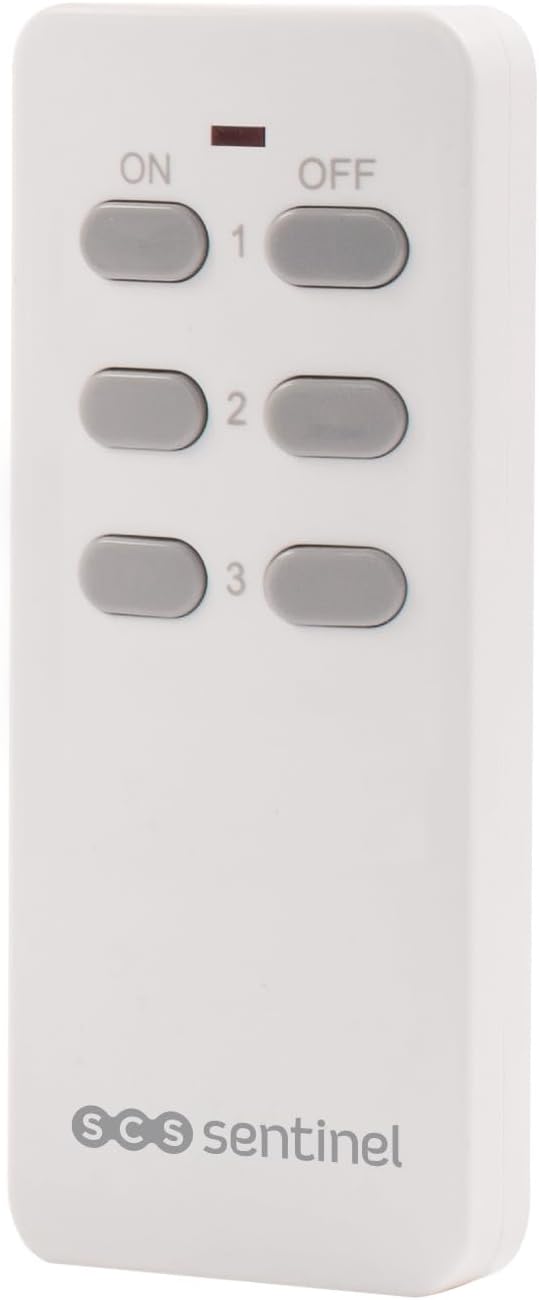
Figure 2.2: Detailed view of the remote control, highlighting the ON/OFF buttons for controlling up to three separate outlets.
3. Setup and Installation
The SCS Sentinel ControlPower kit is designed for simple, plug-and-play installation. No complex configuration or pairing is required.
- Unpack Components: Carefully remove all components from the packaging.
- Insert Remote Battery: Ensure the LR23-A-12V battery is correctly installed in the remote control. The battery compartment is typically located on the back of the remote.
- Plug in Outlets: Insert the remote control outlets into standard wall sockets.
- Connect Appliances: Plug the electrical appliance(s) you wish to control into the remote control outlets. Ensure the appliance's power consumption does not exceed 2300W or 10A.
- Ready for Use: The system is now ready for immediate operation.
Important Note: This product is designed for indoor use only. For optimal performance, maintain a maximum distance of 30 meters (approximately 98 feet) between the remote control and the outlets in an open field environment. Obstacles such as walls or furniture may reduce the effective range.
4. Operating Instructions
Using the remote control to operate your connected appliances is straightforward:
- Each remote control outlet corresponds to a numbered button pair (1, 2, or 3) on the remote control. The kit includes two outlets, so you will use button pairs 1 and 2.
- To turn an appliance ON, press the corresponding "ON" button (e.g., "ON 1" for the first outlet).
- To turn an appliance OFF, press the corresponding "OFF" button (e.g., "OFF 1" for the first outlet).
This allows for convenient control of hard-to-reach appliances, such as string lights or floor lamps.
5. Maintenance
The SCS Sentinel ControlPower kit requires minimal maintenance.
- Cleaning: Wipe the surfaces of the outlets and remote control with a soft, dry cloth. Do not use abrasive cleaners or solvents.
- Battery Replacement: If the remote control's range decreases significantly or it stops responding, the LR23-A-12V battery may need replacement. Refer to the remote control's battery compartment for instructions on how to open and replace the battery. Ensure correct polarity when inserting the new battery.
- Storage: When not in use for extended periods, store the kit in a cool, dry place away from direct sunlight and extreme temperatures.
6. Troubleshooting
If you encounter issues with your SCS Sentinel ControlPower kit, refer to the following troubleshooting guide:
| Problem | Possible Cause | Solution |
|---|---|---|
| Appliance does not turn ON/OFF via remote. |
|
|
| Reduced remote control range. |
|
|
7. Specifications
| Feature | Detail |
|---|---|
| Model Number | S316-2 3600W (HCN0014) |
| Manufacturer | SCS Sentinel |
| Product Dimensions (L x W x H) | 32.5 x 15.5 x 7.5 cm (12.8 x 6.1 x 3 inches) |
| Product Weight | 300 grams (0.66 lbs) |
| Color | White |
| Material | Plastic |
| Max Power Rating | 2300W / 10A |
| Wireless Range | Up to 30 meters (98 feet) in open field |
| Remote Control Battery | 1 x LR23-A-12V (included) |
| Components Included | 2 Remote Control Outlets, 1 Remote Control |
| Intended Use | Indoor use only |
8. Warranty and Support
SCS Sentinel is committed to providing reliable and innovative technical products. Your satisfaction is our priority.
- Warranty: The product comes with a 2-year availability of spare parts. For specific warranty terms and conditions, please refer to the product packaging or contact SCS Sentinel customer service.
- Technical Assistance: For any questions regarding the installation or use of your product, technical assistance is available. Our technicians are based in France and are ready to provide personalized advice and support.
For further assistance, please visit the official SCS Sentinel website or contact their customer support directly.