Introduction
This manual provides essential information for the safe and effective use of the Sick i16 Actuator, Semi-Flexible Straight, model iE16-F1. Please read this manual thoroughly before installation, operation, or maintenance to ensure proper functionality and to prevent potential hazards.
Product Overview
The i16 Actuator is a component designed for specific industrial applications, typically used in conjunction with safety switches or similar devices. It features a semi-flexible straight design, allowing for precise engagement.
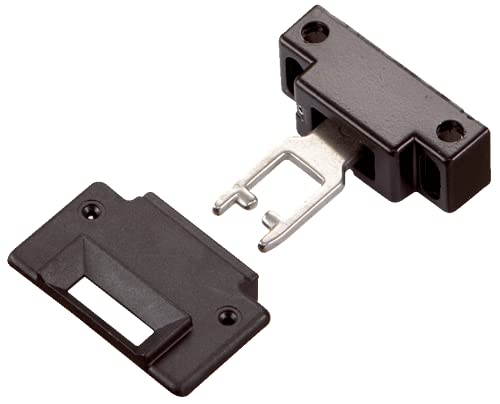
Figure 1: The Sick i16 Actuator components. This image displays the main actuator body, which is a black rectangular housing with a metal key mechanism partially extended. Adjacent to it is a separate black mounting plate with a rectangular opening, designed to receive the actuator's key. Both components have screw holes for secure fastening.
Key Features:
- Semi-flexible straight design for versatile application.
- Durable construction for industrial environments.
- Designed for reliable engagement with compatible safety devices.
Setup and Installation
Proper installation is crucial for the actuator's performance and safety. Ensure all power is disconnected from the system before beginning installation.
Installation Steps:
- Identify Mounting Location: Select a stable and appropriate surface for mounting the actuator and its corresponding safety switch. Ensure proper alignment.
- Secure Mounting Plate: If applicable, fasten the mounting plate securely using appropriate screws (not included) to the designated surface.
- Mount Actuator Body: Position the actuator body so that its key mechanism aligns correctly with the opening in the mounting plate or the receiving slot of the safety switch. Secure the actuator body using screws through its designated mounting holes.
- Verify Alignment: Manually operate the system (e.g., door, gate) to ensure the actuator key smoothly enters and exits the safety switch or mounting plate without binding or excessive force.
- Test Functionality: After installation, perform a functional test of the entire safety system to confirm correct operation of the actuator and associated devices.
Note: Refer to the specific safety switch manual for detailed wiring and system integration instructions.
Operating Instructions
The i16 Actuator operates passively by engaging with a compatible safety switch. Its function is to provide the physical means for the safety switch to detect the position or presence of a guard or door.
Normal Operation:
- When the guard or door is closed, the actuator's key fully inserts into the safety switch, allowing the machine to operate.
- When the guard or door is opened, the actuator's key withdraws from the safety switch, triggering the safety function (e.g., machine shutdown).
Ensure that the actuator is not obstructed and can move freely within its intended path during operation.
Maintenance
The i16 Actuator is designed for low maintenance. Regular inspection is recommended to ensure continued reliable operation.
Maintenance Schedule:
- Monthly Inspection:
- Check for any visible damage to the actuator body or key.
- Ensure mounting screws are tight and secure.
- Verify smooth movement of the actuator key without excessive play or binding.
- Cleaning: If necessary, clean the actuator and surrounding area with a soft, damp cloth. Avoid using abrasive cleaners or solvents.
Caution: Do not attempt to lubricate the actuator key or internal mechanisms unless specifically instructed by the manufacturer. This could attract debris and impair function.
Troubleshooting
This section addresses common issues that may arise with the i16 Actuator. For complex problems, contact technical support.
| Problem | Possible Cause | Solution |
|---|---|---|
| Actuator key does not fully engage/disengage. | Misalignment with safety switch or mounting plate; obstruction; worn components. | Check and adjust alignment. Remove any obstructions. Inspect for wear and replace if necessary. |
| Excessive play or looseness in actuator. | Loose mounting screws; damaged housing. | Tighten all mounting screws. If housing is damaged, replace the actuator. |
| Safety system not activating/deactivating correctly. | Actuator not fully engaging the safety switch; issue with the safety switch itself. | Verify actuator engagement. Test the safety switch independently. Consult the safety switch manual. |
Specifications
- Model: iE16-F1
- Type: Semi-Flexible Straight Actuator
- Brand: Sick
- Package Dimensions: 72 x 72 x 48 inches; 1.6 Pounds
- Manufacturer: SICK
- ASIN: B007JYCKCG
- Date First Available: May 4, 2021
Warranty Information
This product is covered by the standard manufacturer's warranty. For specific warranty terms and conditions, please refer to the documentation provided with your purchase or contact Sick customer support directly. Keep your proof of purchase for warranty claims.
Support and Contact
For technical assistance, spare parts, or further information regarding the i16 Actuator, please contact Sick customer support.
- Manufacturer: SICK
- Website: www.sick.com (Please visit the official Sick website for regional contact information and support resources.)


