
Introduction
The Oster FPSTBW8225 Electric Wine Opener is designed for effortless cork removal from traditional wine bottles. Its cordless operation and recharging base provide convenience and mobility, making it an ideal tool for any occasion. The sleek metallic black and brushed gunmetal finish offers a sophisticated aesthetic that complements modern kitchen environments.
Key Features
- Cordless Operation: Provides freedom of movement without being tethered to an outlet.
- Recharging Base: Ensures the opener is always ready for use.
- Universal Fit: Designed to fit all traditional wine bottles.
- Effortless Cork Removal: Opens a bottle in seconds with a simple touch of a button.
- Integrated Foil Cutter: Conveniently removes seals from wine bottles.
- Stylish Design: Features a metallic tuxedo black and brushed gunmetal finish.
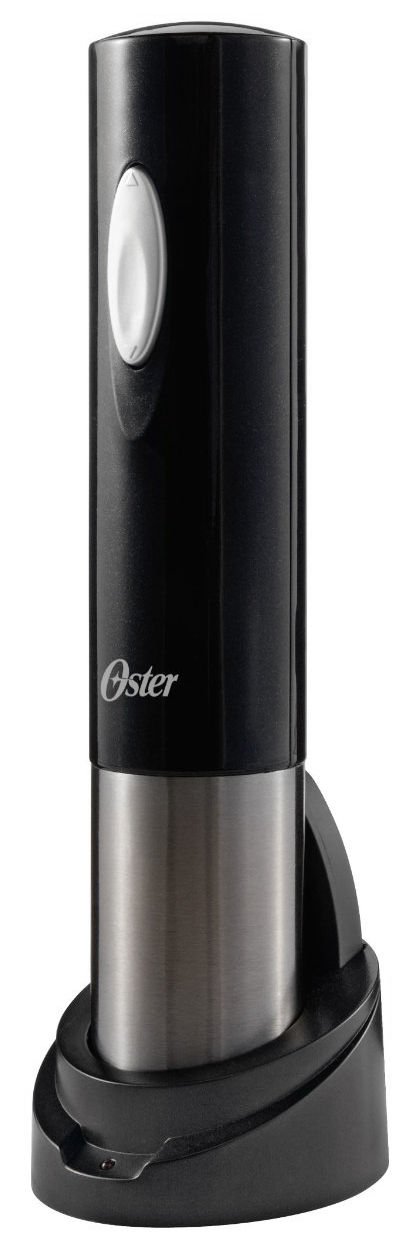
Image: The Oster FPSTBW8225 Electric Wine Opener in metallic black, shown with its recharging base.
Setup
- Unpack: Carefully remove all components from the packaging. Ensure the electric wine opener, recharging base, and foil cutter are present.
- Charge the Opener: Place the electric wine opener onto its recharging base. Plug the recharging base into a standard electrical outlet. The indicator light on the base will illuminate (typically red) to show that the unit is charging. Allow the unit to charge fully before first use (refer to the indicator light for full charge status, which may turn green or off).
- Foil Cutter Placement: The foil cutter is designed to be stored conveniently on the recharging base or separately.
Operating Instructions
- Remove Foil Seal: Use the included foil cutter to remove the foil seal from the wine bottle. Place the foil cutter over the top of the wine bottle and twist it around the bottle neck until the foil is cut and can be easily removed.
- Position the Opener: Place the electric wine opener vertically on top of the wine bottle, ensuring the corkscrew is centered over the cork. Hold the bottle firmly with one hand.
- Extract the Cork: Press and hold the lower button (down arrow) on the wine opener. The corkscrew will automatically rotate to penetrate the cork and then pull it out of the bottle. The opener will stop automatically once the cork is fully extracted.
- Release the Cork: Once the cork is removed from the bottle, lift the opener away. To release the cork from the opener, press and hold the upper button (up arrow). The corkscrew will rotate in reverse, ejecting the cork.
- Serve: Your wine bottle is now open and ready to be served.
Maintenance
- Cleaning: Wipe the exterior of the electric wine opener and recharging base with a soft, damp cloth. Do not immerse the unit or base in water or any other liquid.
- Storage: Store the wine opener on its recharging base when not in use to ensure it is always charged. Keep the unit in a dry place.
- Corkscrew Care: Periodically check the corkscrew for any debris or damage. Clean as needed with a small brush if cork particles accumulate.
Troubleshooting
| Problem | Possible Cause | Solution |
|---|---|---|
| Opener does not turn on. | Battery is not charged. | Place the opener on the recharging base and ensure the base is plugged into a working outlet. Allow sufficient time for charging. |
| Cork does not come out. | Opener not centered or held firmly. Cork is synthetic or unusually tight. | Ensure the opener is perfectly vertical and centered over the cork. Hold the bottle firmly. If the cork is synthetic, the opener may require more pressure or a different approach. |
| Corkscrew is stuck. | Cork material or debris. | Press the upper button to reverse the corkscrew. If it doesn't retract, gently try to manually turn the corkscrew to free it. Clean any debris. |
| Charging indicator light not on. | Base not plugged in or power outlet issue. Opener not correctly seated on base. | Check power connection to the base and wall outlet. Ensure the opener is securely placed on the recharging base. |
Specifications
- Model Number: FPSTBW8225
- Brand: Oster
- Material: Aluminum
- Color: Metallic Black
- Finish Type: Brushed
- Item Weight: 1 Pound
- Product Dimensions: 3.5"L x 3.1"W
- Number of Items: 1
- UPC: 034264454637, 716080053866
- Manufacturer: Oster
Warranty and Support
For warranty information or technical support, please refer to the product packaging or contact Oster customer service directly. Keep your purchase receipt as proof of purchase for any warranty claims.


