
TASCO 30060800
Contents
Tasco Novice 60x800mm Refractor Telescope
Model: 30060800
User Instruction Manual
Introduction
Thank you for purchasing the Tasco Novice 60x800mm Refractor Telescope. This manual provides detailed instructions for the assembly, operation, and maintenance of your new telescope. Please read this manual thoroughly before using your telescope to ensure proper setup and optimal viewing experience. This telescope is designed for beginners and offers a clear view of celestial objects like the Moon, planets, and brighter deep-sky objects, as well as terrestrial viewing.

Figure 1: Tasco Novice 60x800mm Refractor Telescope with included accessories.
Safety Information
- NEVER look directly at the Sun through your telescope or its finderscope, even for an instant, without a professionally made solar filter that covers the entire front of the telescope. Permanent and irreversible eye damage may result.
- Do not leave the telescope unsupervised, especially when children or inexperienced adults are present.
- Handle optical components with care to avoid scratches or damage.
- Ensure the tripod is stable on a level surface to prevent tipping.
Package Contents
Verify that all components listed below are present in your package:
- Telescope Optical Tube (60x800mm Refractor)
- Adjustable Aluminum Tripod with Accessory Tray
- Finderscope (6x24mm) with Bracket
- Eyepieces (e.g., H20mm, H12.5mm, SR4mm) - Specific eyepieces may vary.
- Barlow Lens (e.g., 3x)
- Diagonal Mirror (Star Diagonal)
- Accessory Tray
- Instruction Manual
Component Identification
Familiarize yourself with the main parts of your telescope:

Figure 2: Main optical tube and mount assembly.
- Objective Lens: The large lens at the front of the telescope that gathers light.
- Optical Tube: The main body of the telescope.
- Focuser: The mechanism used to move the eyepiece in and out to achieve a sharp image.
- Eyepiece: The small lens you look into to magnify the image.
- Diagonal Mirror: An angled mirror that redirects light at a 90-degree angle for comfortable viewing.
- Finderscope: A small, low-power telescope mounted parallel to the main telescope, used for locating objects.
- Mount: The assembly that holds the optical tube and allows it to move.
- Tripod: The three-legged stand that supports the telescope.
Setup
Follow these steps to assemble your telescope:
- Set up the Tripod:
Spread the tripod legs fully apart on a stable, level surface. Extend the legs to your desired height and secure them with the locking clamps. Attach the accessory tray to the tripod brace if not already installed.
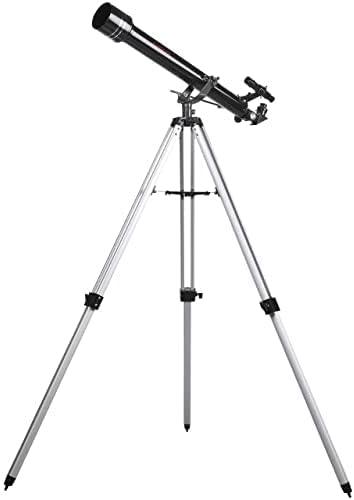
Figure 3: Tripod fully extended and stable.
- Attach the Optical Tube to the Mount:
Carefully place the telescope optical tube onto the mount head. Align the mounting screws or bolts with the holes on the optical tube and tighten them securely. Ensure the tube is balanced.
- Install the Finderscope:
Slide the finderscope into its bracket on the optical tube. Tighten the small set screws on the bracket to hold the finderscope firmly in place. Do not overtighten.

Figure 4: Finderscope and focuser assembly.
- Insert the Diagonal Mirror:
Unscrew the small thumbscrews on the focuser drawtube. Insert the chrome barrel of the diagonal mirror into the focuser. Tighten the thumbscrews to secure it.
- Insert an Eyepiece:
Choose an eyepiece (start with the lowest power, e.g., H20mm). Insert the chrome barrel of the eyepiece into the diagonal mirror. Tighten the thumbscrews on the diagonal mirror to secure the eyepiece.
Operating Your Telescope
1. Aligning the Finderscope
The finderscope is crucial for locating objects. It must be aligned with the main telescope. This is best done during the day:
- Point the main telescope at a distant, stationary object (e.g., a telephone pole or a distant tree) at least a quarter-mile away.
- Center the object in the main telescope's eyepiece (using the lowest power eyepiece).
- Look through the finderscope. Use the adjustment screws on the finderscope bracket to move the finderscope until the same object is centered in its crosshairs.
- Once aligned, the finderscope will help you quickly point the main telescope to desired objects.
2. Focusing
Once an object is in view, turn the focuser knob slowly until the image is sharp. You may need to make slight adjustments as objects move across the sky or as your eyes adjust.
3. Changing Magnification
To change magnification, simply swap eyepieces. Higher magnification eyepieces have smaller focal lengths (e.g., 4mm). The Barlow lens increases the magnification of any eyepiece it's used with (e.g., a 3x Barlow with a 20mm eyepiece gives the magnification of a 6.67mm eyepiece).
Magnification = Telescope Focal Length (800mm) / Eyepiece Focal Length
4. Observing Celestial Objects
- The Moon: An excellent first target. Use a low-power eyepiece to see the full disk, then switch to higher power to observe craters and mountains.
- Planets: Planets like Jupiter and Saturn can be observed, showing their major features (e.g., Jupiter's moons, Saturn's rings). Higher magnification is often needed.
- Stars: Individual stars will appear as pinpoints of light. You can observe double stars or star clusters.

Figure 5: The objective lens, responsible for gathering light.
Maintenance
- Cleaning Lenses: Use a soft, clean brush to remove dust. For smudges, use a specialized optical lens cleaning fluid and a microfiber cloth. Apply fluid to the cloth, not directly to the lens. Avoid touching optical surfaces with your fingers.
- Storage: Store your telescope in a dry, dust-free environment. Keep dust caps on the objective lens and focuser when not in use.
- General Care: Avoid exposing the telescope to extreme temperatures or sudden temperature changes. Do not disassemble the optical components.
Troubleshooting
| Problem | Possible Cause | Solution |
|---|---|---|
| Image is blurry or out of focus. | Incorrect focus; atmospheric conditions; eyepiece not fully inserted. | Adjust focuser slowly. Wait for stable atmospheric conditions. Ensure eyepiece is fully seated and secured. |
| Cannot find objects. | Finderscope not aligned; looking for objects too high in magnification. | Align the finderscope (see "Operating Your Telescope"). Start with the lowest power eyepiece. |
| Image is upside down or reversed. | Normal for astronomical telescopes (refractors with diagonal). | This is expected for astronomical viewing. For terrestrial viewing, a correct-image prism may be needed (not typically included). |
| No image visible. | Dust caps still on; wrong eyepiece; object not in field of view. | Remove all dust caps. Ensure an eyepiece is inserted. Use the finderscope to locate the object. |
Specifications
- Model: Tasco Novice 60x800mm Refractor
- Model Number: 30060800
- Optical Design: Refractor
- Aperture: 60mm (2.4 inches)
- Focal Length: 800mm
- Focal Ratio: f/13.3
- Finderscope: 6x24mm
- Mount Type: Altazimuth Mount
- Tripod: Adjustable Aluminum
- Included Components: Optical tube, tripod, finderscope, eyepieces, Barlow lens, diagonal mirror.
- Item Weight: 1.8 Kilograms (approx. 4 lbs)
- Dimensions (LxWxH): 30.75 x 11.25 x 8 inches (assembled, approximate)
Warranty and Support
Tasco products are manufactured to meet the highest quality standards. For warranty information and technical support, please refer to the official Tasco website or contact their customer service department. Keep your purchase receipt as proof of purchase.
Online Support: Visit www.tasco.com (Note: This is a placeholder URL, please refer to your product packaging for the correct support website).
Customer Service: Refer to the contact information provided with your product or on the official Tasco website for phone or email support.
Documents and downloads
Ask a question about this manual
Ask about setup, troubleshooting, compatibility, parts, safety, or missing instructions. Manuals+ will review the question and use this page’s manual context to help answer it.